
Participating Frequently
September 5, 2018
Answered

There is no pixel motion blur effect

  • September 5, 2018
  • 5 replies
  • 13801 views

Dear all

I just downloaded latest premiere pro trial version

I want to use "pixel motion blur" effect for my timelapse sequences.

But why i can not found it in effect>time>xxxx

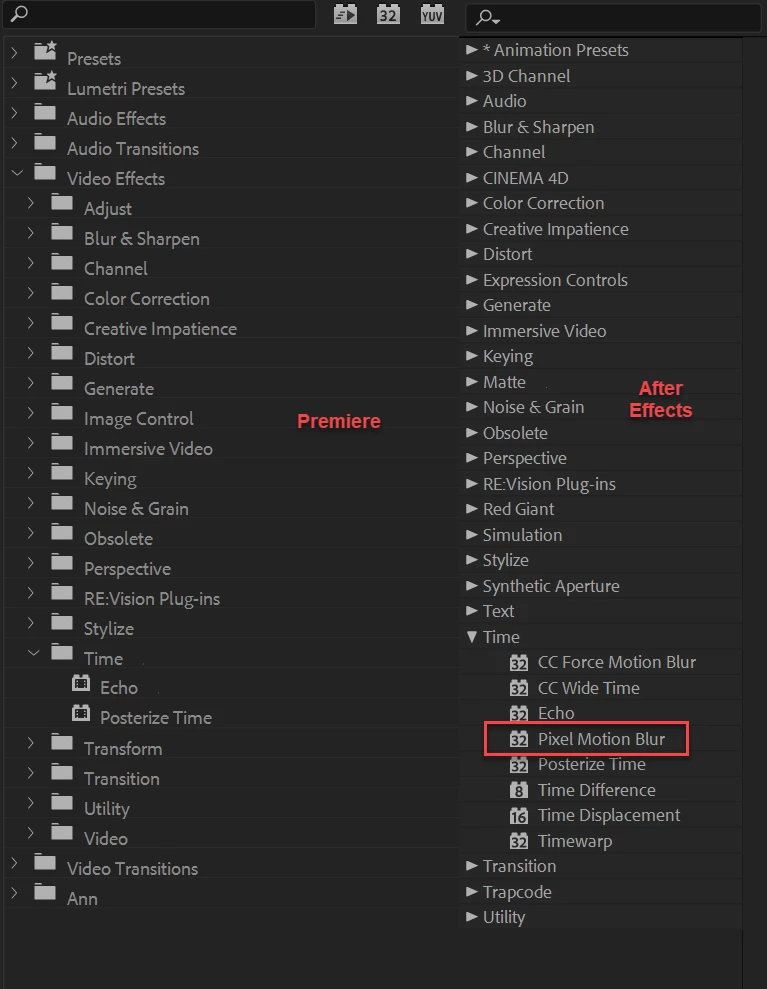
There are only 2 effect inside time effect, meanwhile i saw in youtube that "time" effect has many sub-effect.

Why is this happen? Please advise

Thank you
    This topic has been closed for replies.
    Correct answer Ann Bens

    That is a screenshot from Ae.


    Your tutorial clearly shows Pixel Motion Blur in an After Effects project and not Premiere.

    5 replies

    ColbyFulton
    Known Participant
    September 26, 2020

    Why doesn't premiere have pixel motion blur? That would be helpful.

    Participant
    October 19, 2018

    Although I get an error message on MAC with Premiere Pro CC 2019, I do have Pixel Motion Blur in the Time dropdown.

    josefh66697858
    Participant
    May 26, 2019

    I am late maybe, but you can achieve similiar effect with echo if you set echo time to 1 divided by amount of your keyframes(you can customise it to wathever works best for you) , and dont forget to set echo operator to screen.

    Hope I helped.

    yenaphe
    Inspiring
    September 7, 2018

    Glad we could help.

    Happy After effecting

    Richard van den Boogaard
    Community Expert
    Community Expert
    September 5, 2018

    Use the context menu on the clip (right-click on Windows) > Time Interpolation > Frame Blending or Optical flow

    If this is not what you're looking for, your best bet in in After Effects. Timelapses are far easier to create/adjust in AE anyway.

    Hope this helps.

    Participating Frequently
    September 6, 2018

    thanks  but im not looking for optical flow or frame blending. im absolutely sure about premiere pro , because im looking at someone premiere pro tutorial about it. i just wondering why my premiere dont have it

    here is capture screen from the tutotial i saw

    meanwhile mine only have "echo" and "posterize time" inside time effect

    yenaphe
    Inspiring
    September 6, 2018

    Could you point to the tutorizl video itself? The CC Force Motion blur and CC Wide looks like they are AE plugins.

    Wanna make sure that in the video, the user is using the vanilla version of Premiere.

    Cheers,

    Seb

    Community Expert
    September 5, 2018

    I think this may be an After Effects effect and not a Premiere one.

    Participating Frequently
    September 6, 2018

    sorry but im sure its premiere pro

    im AE user too