
Inspiring
November 5, 2024
Answered

Triangle corners/length limited marks doesn't show on clip
  • November 5, 2024
  • 1 reply
  • 250 views

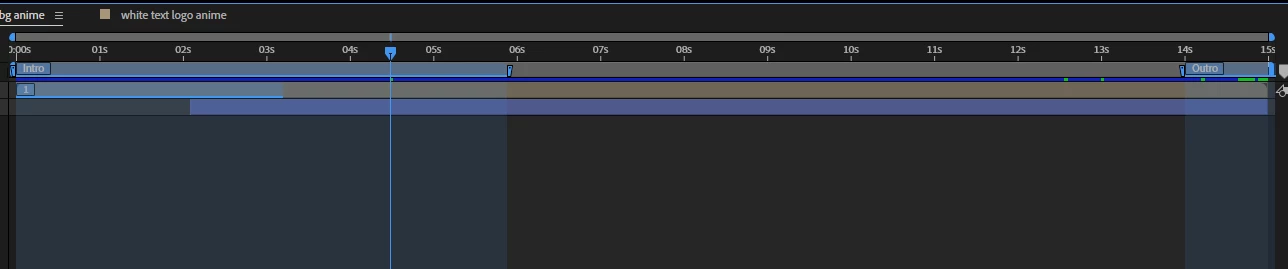
Hi all, i set the lengh to 15sec for this Mogrt file, but when i drag the file to premiere pro, it doents show the white triangle/corners, (i don't want people to strench the lengh of the clip any longer, that's why i set the time limits, also i checked all all sub compositions are all 15sec... ). do you know why that corners doen't show?

please help. thank you.


This topic has been closed for replies.
Correct answer PaulMurphy

The Work Area does not control the duration; that is set with Composition > Composition Settings > Duration.

1 reply

Community Expert
November 5, 2024

It looks like your comp has protected regions for the intro and outro (the blue work areas). These allow the MOGRT to be stretched to any length, but will keep the intro/outro animation the same duration.


Here’s more info on protected regions:
https://helpx.adobe.com/au/after-effects/using/responsive-design.html

Inspiring
November 5, 2024

thank you. and one more question:


i set the time to 3:20 sec. but when drag the file to PR, is will be default 4:23 sec, do you know why?


PaulMurphyCommunity ExpertCorrect answer
Community Expert
November 6, 2024

The Work Area does not control the duration; that is set with Composition > Composition Settings > Duration.