


Inspiring
April 3, 2023
Answered

Adobe RoboHelp 2019 - Search suggestions in HTML5 output include file names

  • April 3, 2023
  • 6 replies
  • 421 views

Hi,

we've discovered that file names (e.g. file names of images used in the RH project) are included as suggestions in the Responsive HTML5 output of our project: 
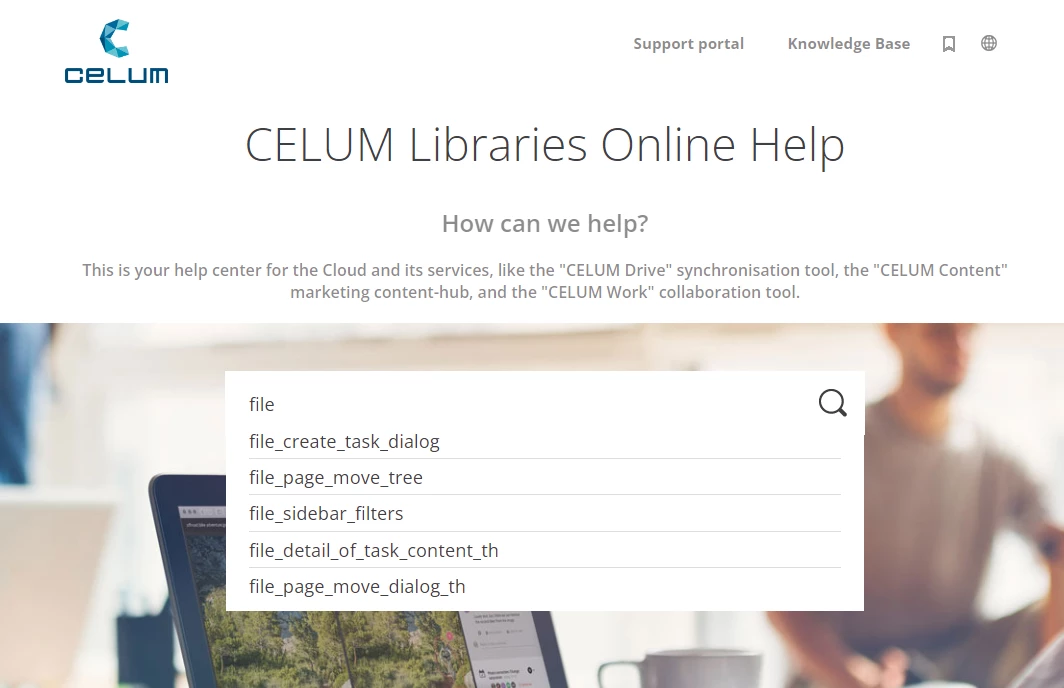
Is there a way to turn this off? Having file names as the first suggestions makes the search all but unusable. Especially since the suggestions also include thumbnail images that are generated by RoboHelp if a thumbnail class is applied to an image.


Thank you for your help.

Cheers, Birgit

This topic has been closed for replies.
Correct answer Peter Grainge

Gotya. With an image the underscores do appear and there is no solution I can see other than renaming the images so that they are user friendly. 

________________________________________________________

My site www.grainge.org includes many free Authoring and RoboHelp resources that may be of help.


6 replies

Peter Grainge
Peter GraingeCorrect answer
Community Expert
April 4, 2023

Gotya. With an image the underscores do appear and there is no solution I can see other than renaming the images so that they are user friendly. 

________________________________________________________

My site www.grainge.org includes many free Authoring and RoboHelp resources that may be of help.


Help others by clicking Correct Answer if the question is answered. Found the answer elsewhere? Share it here. "Upvote" is for useful posts.
Peter Grainge
Community Expert
April 4, 2023

In Help > About what version of 2019 are you on? In the test I ran the titles came up without an underscore.

________________________________________________________

My site www.grainge.org includes many free Authoring and RoboHelp resources that may be of help.


Help others by clicking Correct Answer if the question is answered. Found the answer elsewhere? Share it here. "Upvote" is for useful posts.
FaenethAuthor
Inspiring
April 4, 2023

Hi Peter,

We're using the latest RH 2019 classic build, version 14.0.14.

Have you tried adding images with underscores in their file names to a topic and then searching for a part of the file name (but without underscore)? Again, topic titles are not affected - only image file names are shown in the suggestion box.

I am beginning to suspect (also with the other post that Amebr linked to above) that this is not fixable, if it's been around since RH 2017. Just don't know why it never came up until now. We've been using images with underscores in their file names since the beginning.

FaenethAuthor
Inspiring
April 4, 2023

Thanks for your answers. The problem is not related to topic titles (all topic titles are correct) and also not related to the actual search results once the search is executed. 
It is purely the search suggestions (the suggestion drop-down that opens as a user types in the search field) that is affected - but that is very ugly and can turn users off using the search. If they don't get usable suggestions, why would they even want to see what the actual results are?


This is why I would like to turn this off somehow, but there doesn't seem to be a setting. I've excluded unreferenced baggage files from the search, but the images whose names show up as suggestions are not unreferenced. I also excluded all types of baggage files from the search in the SSL settings, but that list doesn't contain any image file types. 


What I noticed is that I didn't have the issue at first (a colleage reported it), but after I cleared my cache for the help output window, the file names showed up in the search suggestions. So maybe this is some kind of caching issue?


Could there be a way to prevent file names from showing up via JavaScript somehow? Or do we just have to live with it? Currently, switching to the new UI is not an option for us.


Thanks, Birgit

Community Expert
April 4, 2023

Regarding the image file names showing up in search, I found this report about it but the OP didn't come back with any advice from support.

https://community.adobe.com/t5/robohelp-discussions/responsive-html5-output-rh-2019-classic-search-includes-my-image-file-names/td-p/11141439


FaenethAuthor
Inspiring
April 4, 2023

Thanks, I've left a comment on that other topic to see if the OP has found a solution and would be willing to share.

Community Expert
April 3, 2023

I wonder if the topic title property has been set to the file name somehow. Go into one of the topics and check the Title property. What does that show?

Peter Grainge
Community Expert
April 3, 2023

As you have tagged your post Classic, this is what I see from that version. It is feint so I'm not clear how that makes the results all but unusable. 


In the new UI that has been dropped but I don't know if that was in the 2019 New UI version or later in 2020 or 2022. This is what you get now.


If you are on the subscription model rather than a perpetual licence, you can upgrade at no cost. Otherwise you will need a subscription as that is now the only option. Look at 2019 New UI first as it's a very different UI. You can upgrade the Classic version and it will create a new project leaving the Classic one untouched so you can still work on it.

________________________________________________________

My site www.grainge.org includes many free Authoring and RoboHelp resources that may be of help.


Help others by clicking Correct Answer if the question is answered. Found the answer elsewhere? Share it here. "Upvote" is for useful posts.