


Known Participant
October 23, 2023
Answered

CSS shows not available styles in the CSS style sheet.

  • October 23, 2023
  • 7 replies
  • 928 views

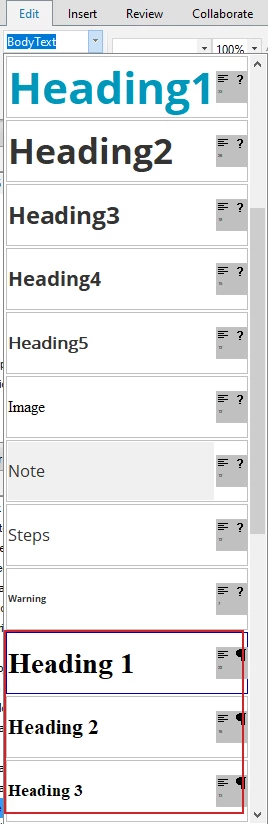
In my RoboHelp 2017,  I see the styles that are not available in my stylesheet are displayed.


For example, Heading 1, Heading 2, and Heading 3.

If I go to my stylesheet, it is Heading1, Heading2, and Heading3.


I think these are the default RoboHelp styles.

How can I get rid of these styles?
 

Please help.

    This topic has been closed for replies.
    Correct answer Peter Grainge

    Thanks for the project. What you are seeing is the styles in your CSS defined as Heading 1 etc plus the browser defaults, As @Amebr has picked up, Heading1 is not a heading in CSS terms.


    In the code view of your CSS delete just the characters

    .Heading1 (note the full stop)

    and replace with

    h1

    Then in the style pod you will only see one set of headings with your definitions.

    ________________________________________________________

    My site www.grainge.org includes many free Authoring and RoboHelp resources that may be of help.


    7 replies

    Community Expert
    October 24, 2023

    The short answer is, no, if they are not in your stylesheet but still appear, then they are required behind the scenes for something.


    More detail:

    (none) - removes the class from the selected paragraph level element (heading, p).

    Normal - this is your html p tag (body text). you should give this the style that you want most of your paragraph text to have. This way you don't need to apply a class to every paragraph, which is messy and not best practice.

    breadcrumbs - this is a special RH style for the breadcrumbs which are added by the breadcrumbs placeholder, if you use it.

    Glossary Text - this is the style used for the text displayed when you click a glossary hyperlink, if using

    Default paragraph font - this one is a bit weird. It's a character class rather than a paragraph style so I think it applies to the span tag. So perhaps it's poorly named, perhaps as a legacy from when Robohelp was based on Word (about a million years ago).

    Peter Grainge
    Peter GraingeCorrect answer
    Community Expert
    October 24, 2023

    Thanks for the project. What you are seeing is the styles in your CSS defined as Heading 1 etc plus the browser defaults, As @Amebr has picked up, Heading1 is not a heading in CSS terms.


    In the code view of your CSS delete just the characters

    .Heading1 (note the full stop)

    and replace with

    h1

    Then in the style pod you will only see one set of headings with your definitions.

    ________________________________________________________

    My site www.grainge.org includes many free Authoring and RoboHelp resources that may be of help.


    Help others by clicking Correct Answer if the question is answered. Found the answer elsewhere? Share it here. "Upvote" is for useful posts.
    Known Participant
    October 24, 2023

    Great. Thanks @Peter Grainge  and @Amebr.

    It worked.

    Is it possible to get rid of these styles too somehow?

    (none), Normal, breadcrumbs, Glossary Text, Default paragraph font


    Community Expert
    October 23, 2023

    The .Heading1 style in your stylesheet is not a heading style. It's a generic class selector that can be applied to any html tag you want. I doubt you'll be able to get rid of the proper h1-h3 styles as they are needed for properly structuring web content.


    I personally would recommend changing the heading classes to proper tags so you can structure your content properly.


    Instead of this:

    .Heading1{
        font-family: "Open Sans";
        font-size: 280%;
        font-weight: bold;
    	color: #0097BA;
    }


    Use this (don't worry, this will show up as "Heading 1" when selecting from your style list):

    h1 {
        font-family: "Open Sans";
        font-size: 280%;
        font-weight: bold;
    	color: #0097BA;
    }


    If you have already started using your styles you may need to go through and change your headings to the proper html tag. You can do this easily using shortcut keys. 

    Ctrl+Alt+1 for Heading 1/h1

    Ctrl+Alt+2 for Heading 2/h2

    Ctrl+Alt+3 for Heading 3/h3.


    (And Ctrl+Shift+n for normal/p)


    *Edit to change "will" to "may", as what needs to happen depends on which html element the heading classes have been applied to

    Peter Grainge
    Community Expert
    October 24, 2023

    Doh, yes of course Heading1 is not a heading style. Thanks @Amebr for the catch.

    ________________________________________________________

    My site www.grainge.org includes many free Authoring and RoboHelp resources that may be of help.


    Help others by clicking Correct Answer if the question is answered. Found the answer elsewhere? Share it here. "Upvote" is for useful posts.
    Known Participant
    October 24, 2023

    Great. Thanks @Peter Grainge  and @Amebr.

    It worked.

    Is it possible to get rid of these styles too somehow?

    (none), Normal, breadcrumbs, Glossary Text, Default paragraph font


    Peter Grainge
    Community Expert
    October 23, 2023

    I don't think it should show there but is there a master page linked to the topics.

    ________________________________________________________

    My site www.grainge.org includes many free Authoring and RoboHelp resources that may be of help.


    Help others by clicking Correct Answer if the question is answered. Found the answer elsewhere? Share it here. "Upvote" is for useful posts.
    Peter Grainge
    Community Expert
    October 23, 2023

    Can you share the project? If you can, then see the Contact page on my site and send the project as instructed there. Do make sure you include a link to this thread and please do not email the project direct.

    ________________________________________________________

    My site www.grainge.org includes many free Authoring and RoboHelp resources that may be of help.


    Help others by clicking Correct Answer if the question is answered. Found the answer elsewhere? Share it here. "Upvote" is for useful posts.
    Peter Grainge
    Community Expert
    October 23, 2023

    Look in the code of a topic. Do you see a second CSS specified or an inline CSS?

    ________________________________________________________

    My site www.grainge.org includes many free Authoring and RoboHelp resources that may be of help.


    Help others by clicking Correct Answer if the question is answered. Found the answer elsewhere? Share it here. "Upvote" is for useful posts.
    Known Participant
    October 23, 2023

    No, I don't see anything.


    Peter Grainge
    Community Expert
    October 23, 2023

    There can only be one version of any style so if you are seeing multiple versions of heading styles, what you are really seeing is one H1 style and then a paragraph style named Heading 1.


    Look in the code view to see which is the real H1, it will show as

    h1 {
    your definitions
    }


    The other one will start something like p.Heading1.


    You need the H1 etc as your CSS must have the heading styles. Copy the definitions across if need be.

    (Corrected)

    ________________________________________________________

    My site www.grainge.org includes many free Authoring and RoboHelp resources that may be of help.


    Help others by clicking Correct Answer if the question is answered. Found the answer elsewhere? Share it here. "Upvote" is for useful posts.
    Known Participant
    October 23, 2023

    Thanks Peter.


    I don't see any other Heading styles. I only have .Heading1 in my stylesheet.


    I just attached the stylesheet.