


Participating Frequently
December 9, 2021
Question

List topics in search tab causes the program to hang/crash (chm help file)

  • December 9, 2021
  • 10 replies
  • 1212 views

Hello, everybody.

We are using RoboHelp 2020 and generate Microsoft HTML help.

The user start the chm help from a dialogue in our software.

If he enter some search word and click List Topics the help hangs.
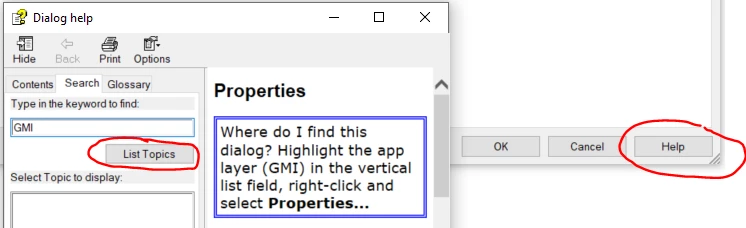
 

If he kill the process (clicking the x in the window) the program crashes to.

Any idea what might be wrong?


Regards

Tord


    This topic has been closed for replies.

    10 replies

    Community Expert
    October 13, 2022

    If you navigate to the folder where your application installs the chm and manually run the chm from there, does it work correctly?

    abel001
    Known Participant
    October 13, 2022

    Yes it works correctly if the chm is opened directly. It only hangs if we open the chm from our application and perform a search in the Search tab.

    Jeff_Coatsworth
    Community Expert
    Community Expert
    October 13, 2022

    Bizarre - I think you need to touch base with the RH folks - see https://helpx.adobe.com/contact/enterprise-support.other.html#robohelp for your Adobe Support options. I'd recommend using the tcssup@adobe.com e-mail address as it reaches a team dedicated to Technical Communication Suite products including RoboHelp.
    The problem is that CHM is such an ancient antique format now, that I suspect it's getting harder & harder for RH to support it's creation and operation as O/S versions change and browsers come & go.

    Community Expert
    December 9, 2021

    It might be that some dlls aren't registered properly.

    https://community.adobe.com/t5/robohelp-discussions/full-text-search-not-working-in-chm-file/m-p/485290


    This provides more info and a diagnostic tool (I haven't tried downloading it for a while, but if it doesn't work, try using the WayBack Machine to get a copy).

    http://kb.helpwaregroup.com/ms-html-help/mj-s-diagnostics


    If that's the problem and the users are not part of your company, I recommend working with your developers to make sure the dlls are correctly registered as part of the application installation process.


    Participating Frequently
    December 10, 2021

    Thanks for your tips, but registering this dll's did not solve the problems we have. 

    abel001
    Known Participant
    October 7, 2022

    If you launch it directly (i.e. not through the application) does it behave the same way?


    No, if launched directly, there is no problem.

    Peter Grainge
    Community Expert
    Community Expert
    December 9, 2021

    Based on my earlier reply and information from Adobe, RoboHelp installs just the components it needs and that has not changed since Update 1 of RoboHelp 2019. I have not changed anything on my system so it follows that somehow the other person and likely yourselves have got a later version installed. I have no idea how other than a deliberate update or some other program.


    The solution the other person tried has worked for them but I can't say that is what you should do. Let us know what you decide to do and how you get on as that will help anyone else who hits this issue.

    ________________________________________________________
    See www.grainge.org for free Authoring and RoboHelp Information

    Help others by clicking Correct Answer if the question is answered. Found the answer elsewhere? Share it here. "Upvote" is for useful posts.
    Participating Frequently
    December 9, 2021

    Thanks for your quick and good help Peter and for taking the time 👍. I'll update you if or when we solve the problem 😊.

    Peter Grainge
    Community Expert
    Community Expert
    December 9, 2021

    I have been dealing with someone else who has this issue and just got this from them.


    Thanks so much for your help Peter – it helped me figure it out. It seems to be the hhw (Microsoft HTML Help Workshop) on my machine and by installing an older version from here:


    http://www.helpgenerator.com/html_help_workshop.htm#.YbHtV71ByUk


    The problem was resolved.


    I have queried this with Adobe. It's up to you if you want to try this or wait to see what they come back with.

    ________________________________________________________
    See www.grainge.org for free Authoring and RoboHelp Information

    Help others by clicking Correct Answer if the question is answered. Found the answer elsewhere? Share it here. "Upvote" is for useful posts.
    Peter Grainge
    Community Expert
    Community Expert
    December 9, 2021

    Compass Travel should work with that language. You may need to take this up with Support but let me make some enquiries first.

    If you want to go ahead, see https://helpx.adobe.com/contact/enterprise-support.other.html#robohelp for your Adobe Support options. The email link tcssup@adobe.com is recommended as it reaches a team dedicated to Technical Communication Suite products including RoboHelp. 

    ________________________________________________________
    See www.grainge.org for free Authoring and RoboHelp Information

    Help others by clicking Correct Answer if the question is answered. Found the answer elsewhere? Share it here. "Upvote" is for useful posts.
    Peter Grainge
    Community Expert
    Community Expert
    December 9, 2021

    What is your OS language?

    ________________________________________________________
    See www.grainge.org for free Authoring and RoboHelp Information

    Help others by clicking Correct Answer if the question is answered. Found the answer elsewhere? Share it here. "Upvote" is for useful posts.
    Peter Grainge
    Community Expert
    Community Expert
    December 9, 2021

    I am advised the CHM is operating system language dependent. Test a project created for whatever OS you have and see if that one works. Assuming it does the projects created for other languages must be tested on machines with that language as the OS.

    ________________________________________________________
    See www.grainge.org for free Authoring and RoboHelp Information

    Help others by clicking Correct Answer if the question is answered. Found the answer elsewhere? Share it here. "Upvote" is for useful posts.
    Participating Frequently
    December 9, 2021

    OS language:


    Peter Grainge
    Community Expert
    Community Expert
    December 9, 2021

    Try the About RoboHelp sample project that you can find in Documents > My RoboHelp projects. Does that work?

    ________________________________________________________
    See www.grainge.org for free Authoring and RoboHelp Information

    Help others by clicking Correct Answer if the question is answered. Found the answer elsewhere? Share it here. "Upvote" is for useful posts.
    Participating Frequently
    December 9, 2021

    It does not work either:


    Peter Grainge
    Community Expert
    Community Expert
    December 9, 2021

    I am dealing with someone else having the same issue with the search. They sent me their project and the output I generated worked fine including the search. I sent them the file back and the search does not work for them. 


    When you say the search is failing, that is when you search from the file opened directly on your machine, correct?


    Let me know that and I will see what I can find.

    ________________________________________________________
    See www.grainge.org for free Authoring and RoboHelp Information

    Help others by clicking Correct Answer if the question is answered. Found the answer elsewhere? Share it here. "Upvote" is for useful posts.
    Participating Frequently
    December 9, 2021

    We have two issue:

    1. When chm is opened from our application, then the search (List topics) hangs

    2. When chm is opened direct on PC, then full text search does not work. Could the Languange be a problem. We have both english, swedish an orwegian help files.

    Peter Grainge
    Community Expert
    Community Expert
    December 9, 2021

    Where is the CHM installed?


    Does it work OK if you open the CHM direct on your computer?

    ________________________________________________________
    See www.grainge.org for free Authoring and RoboHelp Information

    Help others by clicking Correct Answer if the question is answered. Found the answer elsewhere? Share it here. "Upvote" is for useful posts.
    Participating Frequently
    December 9, 2021

    It's installed together with our software under Program Files:

    C:\Program Files\Gemini\Ter17\Sys\Language\Eng

    It does not hang if I open it direct on my computer.

    We have one more issue. Full text search does not work for this dialogue help.