Participating Frequently
December 4, 2023
Answered

Adobe Stock Rejection - QUALITY ISSUES

  • December 4, 2023
  • 5 replies
  • 1389 views

Greetings,


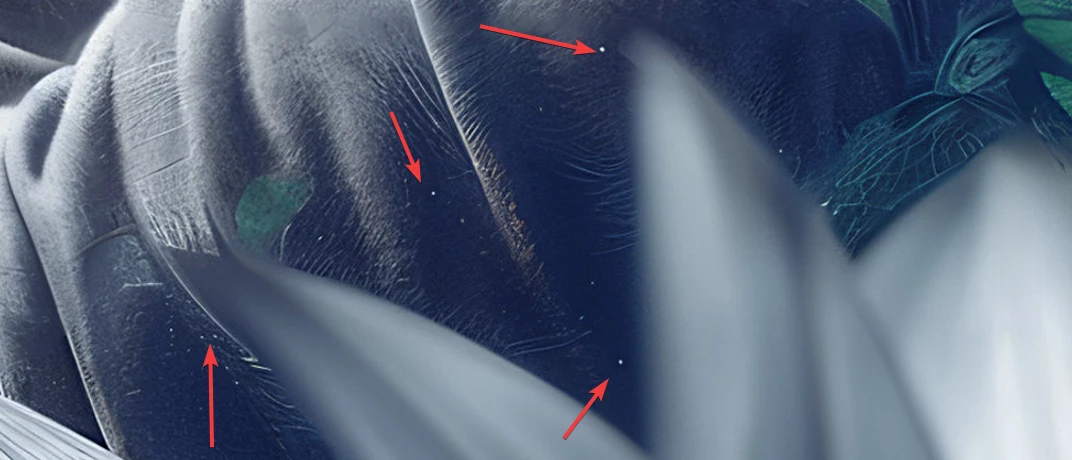
I recently embarked on my journey with Adobe Stock by uploading four of my images, and I'm pleased to share that three were accepted. However, I'm seeking guidance and insights regarding the rejection of one image to enhance my future submissions. My initial thought is that it could be due to minor white artifacts noticeable in certain areas of the first image, though I'm uncertain if this is a significant factor for rejection. Additionally, there's a finger in the image that appears somewhat unusual, but considering the illustrative nature of the work, I didn't anticipate it being an issue. Maybe the top-right part is too noisy.


Any advice or feedback would be greatly appreciated.


Thank you in advance!

This topic has been closed for replies.
Correct answer Abambo

Moderators refuse at the first flaw they see. So yes, the finger is a good candidate. But there is nothing done with correcting only the hand. Correct everything you see and try with a resubmit. 


The illustrative nature of your asset should not be a reason to accept flaws.


On a personal note (but really personal), I think that this asset is too crowded. 


I've found, that if you view your asset at 200%, you will detect most flaws, that are disturbing. You can go into higher magnification to see the defect but what is not detectable at 200% won't be troubling at 100%. 

5 replies

Nancy OShea
Community Expert
Community Expert
December 5, 2023
quote

I recently embarked on my journey with Adobe Stock by uploading four of my images, and I'm pleased to share that three were accepted.

By @Keven5E0A

===========

Congratulations!  3 out of 4 is a very good acceptance rate, especially for a new contributor.


I think what you're doing is interesting.  It's more complex than what we normally see here.  Good work.


Nancy O'Shea— Product User & Community Expert
Keven5E0AAuthor
Participating Frequently
December 8, 2023

Appreciate it! I'm familiar with the 'rule of thirds', but wasn't aware of these specific type of guides.


Striving for uniqueness was my goal, and it appears I've succeeded. In a world where many images draw inspiration from models such as Midjourney, I find it crucial to preserve originality. At the same time, it's vital to ensure the style resonates with a specific niche, so let the time pass :-).

Nancy OShea
Community Expert
Community Expert
December 8, 2023

The Fibonacci Sprial or Golden Ratio has been in use for thousands of years.

Easy Fibonacci Sequence Hack (NO MATH)

https://community.adobe.com/t5/stock-contributors-discussions/ot-easy-fibonacci-sequence-hack-no-math/m-p/14218706#M72228


Nancy O'Shea— Product User & Community Expert
Ricky336
Community Expert
Community Expert
December 4, 2023

@Abambo mentioned a good point. I can agree that you have too much visual information in the image. It is a bit cluttered. 

Keven5E0AAuthor
Participating Frequently
December 4, 2023

Got it, that makes sense. I'll work on sharpening my eye for the upcoming images, haha.


Thank you for the comment sir!

Abambo
Community Expert
AbamboCommunity ExpertCorrect answer
Community Expert
December 4, 2023

Moderators refuse at the first flaw they see. So yes, the finger is a good candidate. But there is nothing done with correcting only the hand. Correct everything you see and try with a resubmit. 


The illustrative nature of your asset should not be a reason to accept flaws.


On a personal note (but really personal), I think that this asset is too crowded. 


I've found, that if you view your asset at 200%, you will detect most flaws, that are disturbing. You can go into higher magnification to see the defect but what is not detectable at 200% won't be troubling at 100%. 

ABAMBO | Hard- and Software Engineer | Photographer
daniellei4510
Community Expert
Community Expert
December 4, 2023

Makes sense. If they find one flaw, why spend time further to find more.

Adobe Community Expert | If you can't fix it, hide it; if you can't hide it, delete it.
Abambo
Community Expert
Community Expert
December 4, 2023

Optimized for speed. You never know which of the many quality issues triggered the refusal. And it may be that by correcting all issues, you will get an IP strike. Refusals are done faster then accepting an asset.

ABAMBO | Hard- and Software Engineer | Photographer
Jill_C
Community Expert
Community Expert
December 4, 2023

It's a lovely image, and it appears that you've already identified the flaws for which it was rejected. The good news is that you should be able to re-edit and re-submit.

Jill C., Forum Volunteer
Keven5E0AAuthor
Participating Frequently
December 4, 2023

Thanks a lot! 😊 I did put in the effort to identify the issues, but it's always reassuring to have confirmation from experienced people like you. Your feedback is valuable and much appreciated.

Jill_C
Community Expert
Community Expert
December 4, 2023

You're welcome. Learning to "see" an image like a Moderator takes time and practice, but you'll get there !

Jill C., Forum Volunteer
daniellei4510
Community Expert
Community Expert
December 4, 2023

You're right about the misshapen finger. I believe Adobe moderators have been told to immediately look at the hands and reject any that even slightly misshappen, illustrative nature or not. I also found that dot on her cheek a little weird. And yes...those things that look like dust spots need to be eliminated. If you haven't been, view your assets at 100% minimum before submission. 200% is better. I even occasionally do 300%.

Adobe Community Expert | If you can't fix it, hide it; if you can't hide it, delete it.
Keven5E0AAuthor
Participating Frequently
December 4, 2023

Yeah, you're right about the misshapen finger. I wasn't sure if the illustration would slide by, so thanks for pointing it out. Getting human features right, especially faces and hands, seems to be the toughest part. About those black dots, I thought they were part of the AI's style, but guess I was wrong. I'll watch out for that next time. And thank you for the tip about checking at 200% and 300%. It's very appreciated 🙂