

Participant
March 22, 2025
解決済み

fireflyのお気に入りが見れません

  • March 22, 2025
  • 返信数 2.
  • 371 ビュー

Adobe fireflyで生成した画像は、☆マークを押したものはお気に入りとして後から見返せると思うのですが、☆を押したときに出てくる「お気に入りを表示」を推して確認しようとすると「ページが見つかりません」と書かれたページに飛んでしまいます。(その時のリンク:https://firefly.adobe.com/faborites)

知らないうちにお気に入り機能はなくなってしまったのですか??

    解決に役立った回答 droopydog500

    oooooh my gosh, I didn't realize that!
    This is me trying to restore the situation from my pc history to take a screenshot. So this is just my mistake 😂😂 very embarrassing ......😂


    However, I properly followed the steps as this:
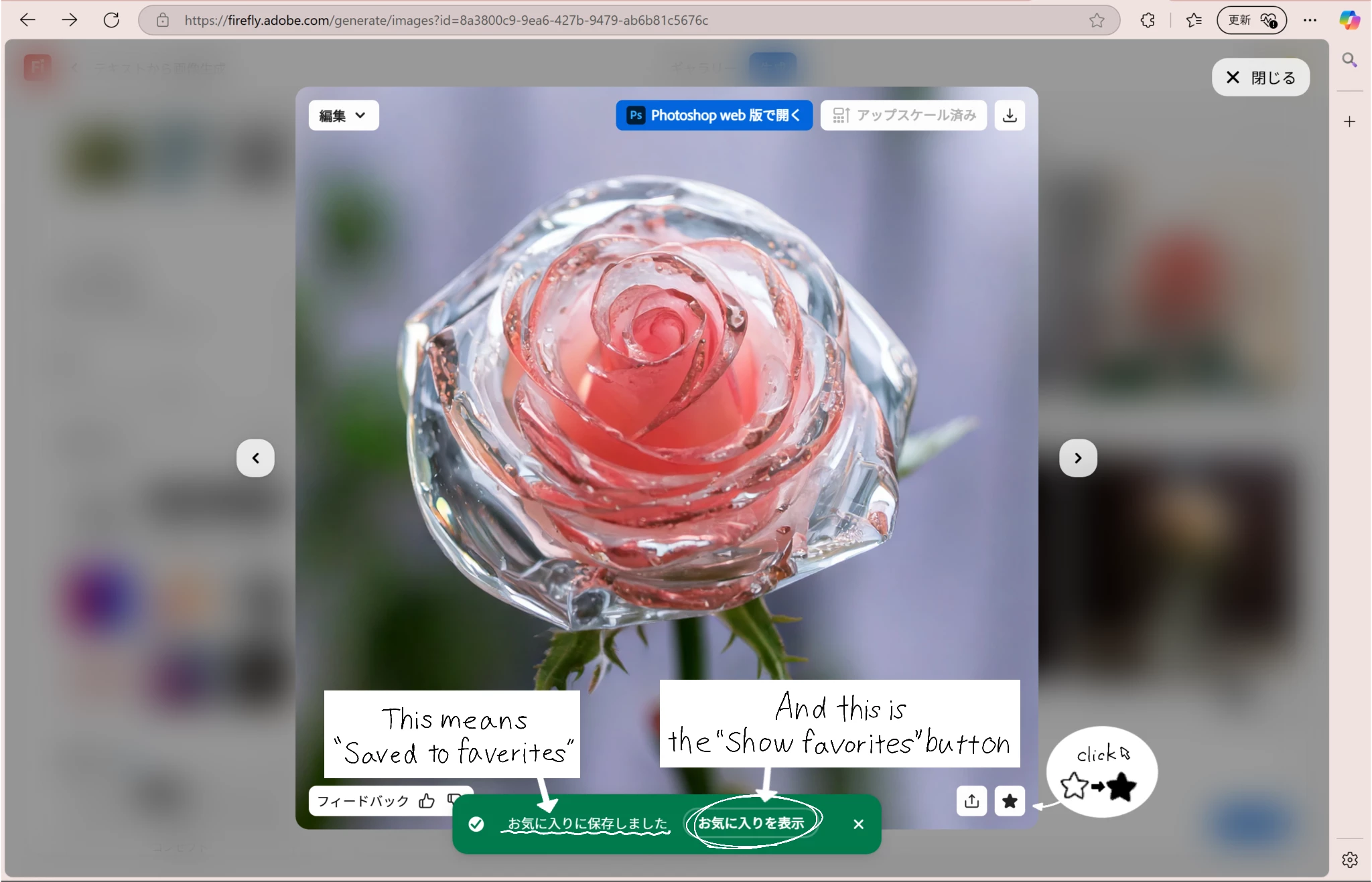
     

    But I clicked on “Show Favorites” and it still shows up like this:
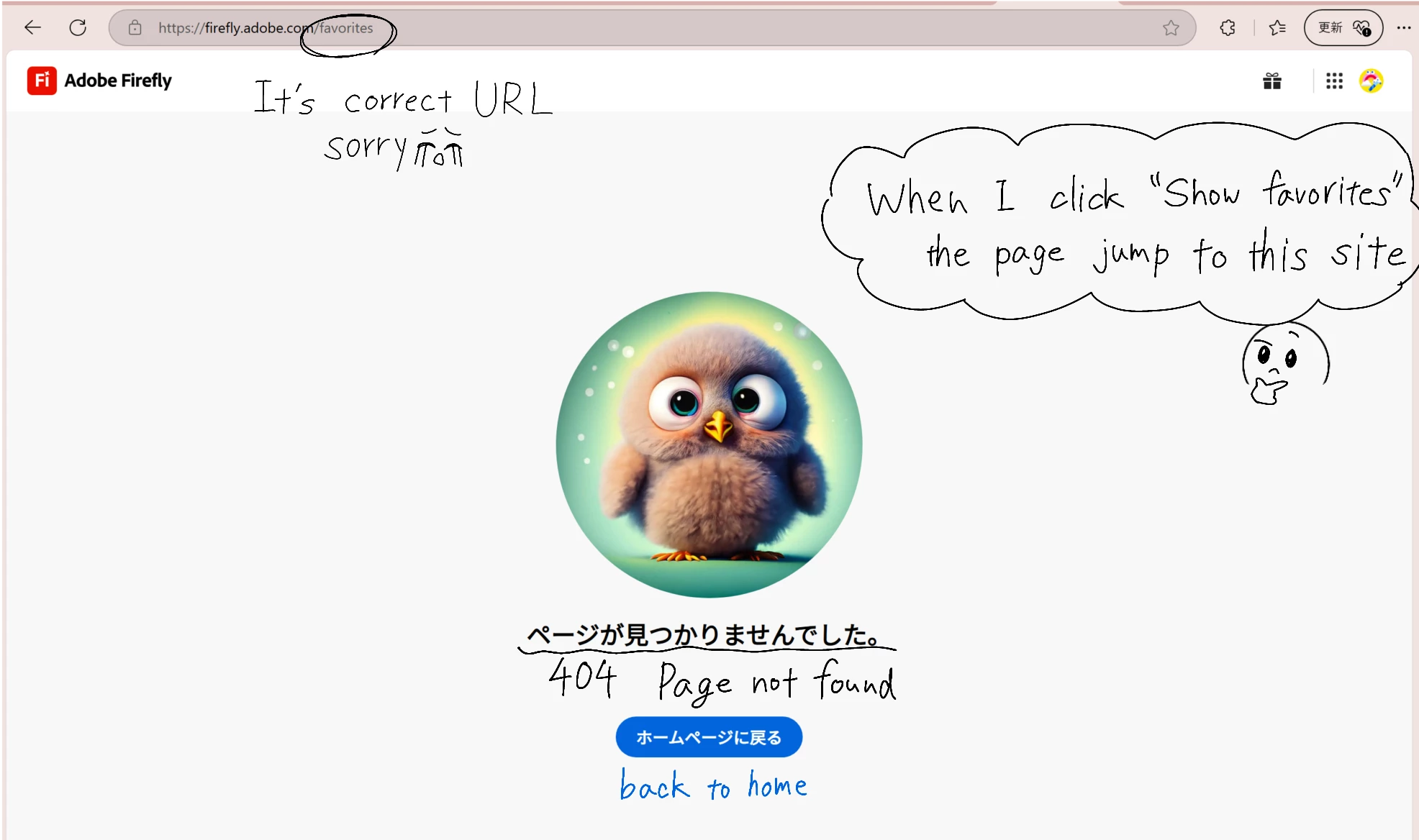
     These are the images that the issues at hand. I would be glad if you could take a look at this and give me some solutions.


    I did a final check using a translation site, but my sentences might be strange. I am still learning English to study abroad someday, so please tolerate me 🥹.

    Thanks


    Try this link: https://firefly.adobe.com/files?tab=favorites

    返信数 2

    droopydog500
    Community Manager
    Community Manager
    March 22, 2025

    Hello @meisa_0291,

    Thank you for your message. Please accept my apologies for replying in English.


    Favourites are stored in the browser cache. Because of that, they are only visible in the specific browser on the specific computer where they were saved. If you use a different browser on the same computer, the same browser in private browsing or incognito mode, or a different computer, they will not be visible.


    If you are using the same browser on the same computer and they are not visible, then it is possible they were lost. Because the browser cache was not designed for permanent storage, if anything deletes things in the cache or all of the cache, all or some of your favourites will disappear.

    • If your disk close to full or if you have a limit set in the browser of how large the cache can be, the browser might be deleting things in the cache to conserve disk space, which would delete your favourites.
    • If you have a utility program that is being run manually or automatically to clean up your computer? then these utilities frequently delete browser caches to recover the disk space. That would delete the favourites.
    • If you have a browser extension which is deleting things from the cache, that could cause them to be deleted.
    • If you install a new version of the browser or operating system, the cache could be deleted.
    • If you create a new profile in the browser, the cache might be deleted.


    For a complete description of existing features to save prompts and images, please see these documents:


    Thanks,
        droopy

    Adobe Community Expert (not an Adobe employee)
    meisa_0291作成者
    Participant
    March 22, 2025

    Thank you for taking the trouble to answer my question in Japanese. I will do my best to reply in English.

    I was able to see the images which I added to my favorites from the “Files” tab of Firefly's home page. Thank you.
    When I click the button “Show Favorites” that appears when I press the ☆ mark to ★, it looks like the attached image!

    droopydog500
    Community Manager
    Community Manager
    March 22, 2025

    That is weird! It looks like the URL has a mistake:

    Try changing the "b" to a "v".


    Can you show an image of where you clicked that took you to this page?


    Thanks,

        droopy

    Adobe Community Expert (not an Adobe employee)
    meisa_0291作成者
    Participant
    March 22, 2025

    I think that the image generated by Adobe firefly can be looked back at later as a favorite if you press the ☆ mark, but if you try to check it by pushing "Show Favorites" that appears when you press ☆, it will jump to the page that says "Page not found". (Link at that time: https://firefly.adobe.com/faborites)

    Did you lose your favorites function without knowing it?

    I am a Japanese student, so I am not very good at speaking English. I'm sorry if I have written any strange English sentences :_(

    droopydog500
    Community Manager
    Community Manager
    March 22, 2025

    I merged both of these together.

        droopy

    Adobe Community Expert (not an Adobe employee)