


Participant
January 22, 2024

Incorrect textures when baking a model for a second time

  • January 22, 2024
  • 返信数 3.
  • 427 ビュー


Hi,

Ive been having a weird issue with designer where when baking mesh which has already being previously baked, it will produce textures with incorrect names & create an extra texture. 


This screenshot should show the difference, you can from the thumbnails on the second bake that the height map baked into what was previously the normal map, the world space normal into the thickness, etc, and an extra thickness texture with the _1 suffix was created.
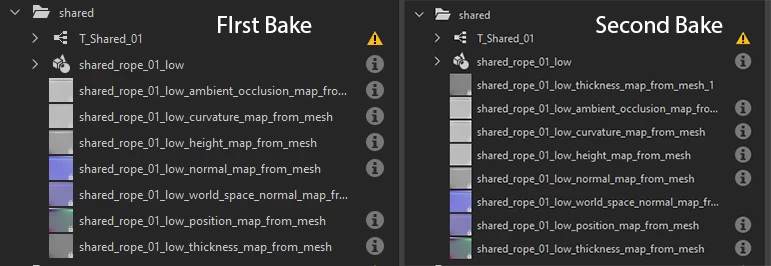
I didn't change any parameters or bakers between bakes, just pressed start render a second time after the first one was finished, without closing the baking window. Ive had this issue on multiple pc's on a few versions of designer, but this test was done on the 13.1.0. 


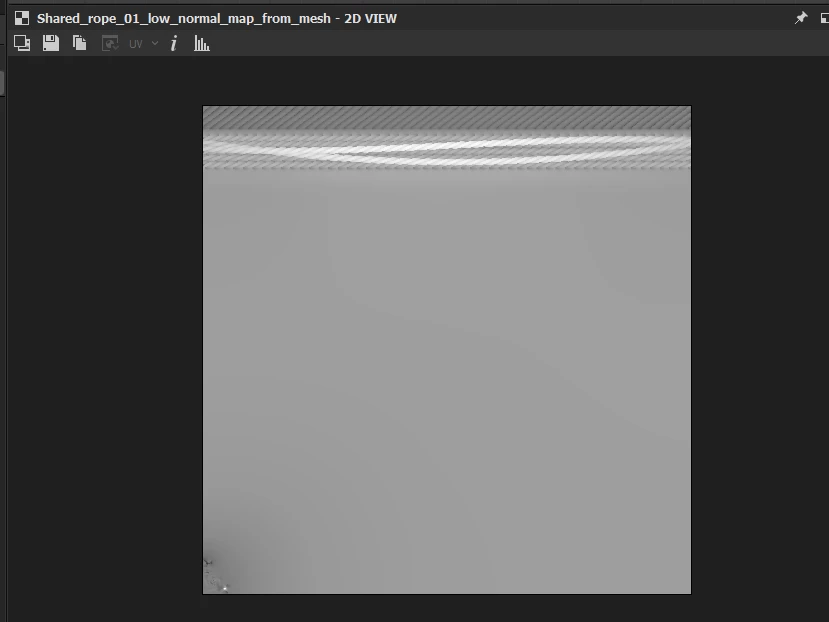
This is also not just a case of thumbnails not updating, this is one of the actual textures seen below, as you can see its a height map in what was previously my normal map texture.
 

Really have no idea what's causing this, any suggestions would be appreciated.

Cheers

    返信数 3

    lukeb31329651作成者
    Participant
    January 23, 2024

    Cheers, these were the baking settings Im using

    It seems to happen regardless of the baking settings though, and I can never reliably repro this myself or get anyone else to, but I always seem to run into it. I tried moving the textures to the root before rebaking to repro it but that doesn't cause it for me either.

    Some other things maybe worth mentioning are if I copy a model with this issue from the existing package into a new package, it doesn't have this issue. Also within a package, if I rename an existing model that doesn't have this issue, to one that does, it starts happening for that model, so maybe this issue gets tied to the name of a model somehow after it occurs?


    Thanks for looking into it though, let me know if theres anything else I can do 🙂

    Cyril Dellenbach
    Community Manager
    Community Manager
    January 23, 2024

    Hi @lukeb31329651,


    Thanks for your report.


    We've checked on our end and could replicate the issue, but only when moving the current baked textures to the root of the graph, before baking a second time.


    We're gonna make more tests on this bug, and I'll try to keep you updated on the subject.


    In the meantime, you can simply delete the current textures before doing a new bake.


    Regards,

    Cyril Dellenbach (Micro) | QA Support Artist | Adobe
    davescm
    Community Expert
    Community Expert
    January 23, 2024

    I tried but could not replicate the issue here using v13.1.0 Can you show a screenshot of your bake settings window so that I can ensure I'm using similar settings


    Dave