



johnrellis
Legend
November 17, 2025

P: (Windows-only) incorrectly rounds a capture date/time with fractional seconds of 0.99974

  • November 17, 2025
  • 返信数 6.
  • 236 ビュー

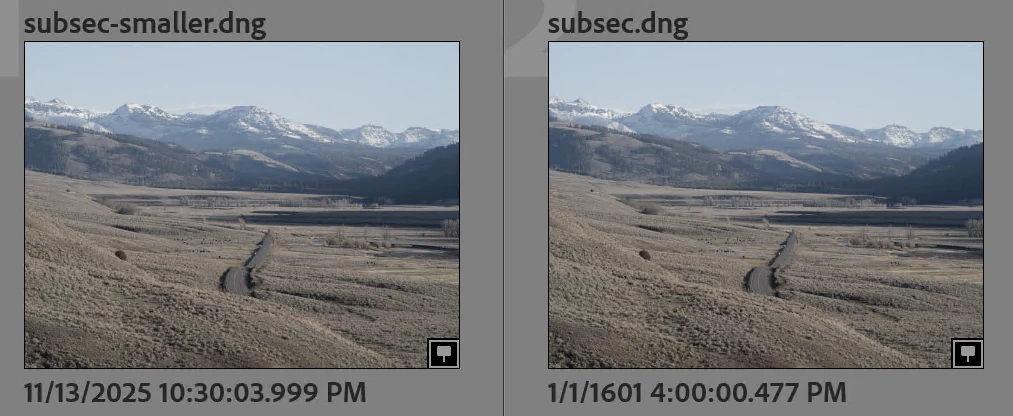
LR 15.0.1 / Windows incorrectly rounds a capture date/time of 11/13/25 10:30:03.99974 PM to 1/1/1601 4:00:00.477 PM.  But LR 15.0.1 / Mac correctly rounds it to 11/13/25 10:30:04.000 PM.


Tested on LR 15.0.1 / Windows 11 Intel, Windows 11 ARM, and Mac OS 15.7.1. To reproduce:


1. Download and open this catalog:

https://www.dropbox.com/scl/fi/3psajur7hfth6ezly98vk/subsec-bug.2025-11-18.zip?rlkey=e3ww25awh8wf3rmrf1nr6x8am&dl=0


It contains two photos with these capture date/times:

subsec.dng:         2025:11:13 22:30:03.99974
subsec-smaller.dng: 2025:11:13 22:30:03.99900


2. Right-click the folder "pics" and do Synchronize Folder.


3. On Mac, observe the capture/date times of the two photos have been rounded correctly:
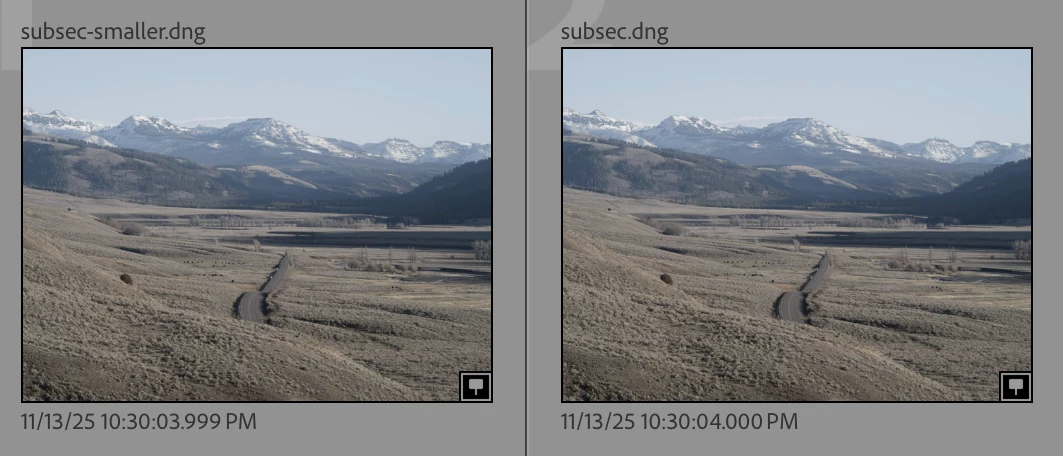
 

But on Windows 11, observe that the capture time of "subsec.dng" has been mangled to 1/1/1601 4:00:00.477:


返信数 6

johnrellis
johnrellis作成者
Legend
November 19, 2025

@Jake Frankhttps://drive.google.com/file/d/1b7dPRcsktqFIwkfu2df0Fm4HNIwgA-IY/view?usp=sharing


The .mp4 video has metadata stored in two different metadata sections governed by different standards, XMP and an ISO standard based on Apple's QuickTime, informally referred to as "QuickTime".  The two sections have different values stored for capture date, according to Exiftool:

[QuickTime] Create Date        : 2025:11:13 21:36:33
[XMP]       Date/Time Original : 1970:01:01 00:00


QuickTime:CreateDate is 2025:11:13 21:36:33, while XMP:DateTimeOriginal is 1970:01:01 00:00. The latter is clearly a bug and should be reported to the drone manufacturer.


LR gave precedence to XMP:DateTimeOriginal for capture date, and that's the value you see in the LR UI.


* * *


Why did LR give XMP:DateTimeOriginal precedence over QuickTime:CreateDate when reading the video? Unfortunately, there's no formal standard that defines what to do when both QuickTime and XMP fields are present.


There's an analogous situation with photos, where there's the older EXIF standard used by digital cameras and the new XMP standard used by apps and web services, containing fields with overlapping meanings. Over 15 years ago, Adobe and other major industry players formed the Metadata Working Group and defined a standard, "Guidelines for Handling Image Data", that specified how to reconcile the two sections if they're both present.  In particular, if EXIF:DateTimeOriginal and XMP:DateCreated are both present and differ, EXIF:DateTimeOriginal should be preferred. Similarly EXIF:DateTimeOriginal should be preferred over XMP:DateTimeOriginal.  (The standard recommends against duplicating EXIF fields one for one in XMP.)


The MWG is long dead, but Adobe's products still do a decent job of following its standard.


However, there is no similar standard governing how to reconcile the overlapping fields in QuickTime and XMP. I doubt there ever will be -- the video industry seems much less concerned with metadata than the photo industry, and even the photo industry doesn't seem to care much anymore.  


But by analogy with EXIF/XMP, it would be better if LR gave precedence to QuickTime over XMP using rules similar to those developed by the MWG.  But I very much doubt if the LR team would ever prioritize any effort into this, given all the other more serious problems LR has with QuickTime capture dates.

Legend
November 19, 2025

@johnrellis wrote


"Without getting into all the gory details of what they mean, one field, XMP:CreateDate, doesn't match EXIF:Date/TimeOriginal (though it should)."


EXIF:DateTimeOriginal has a corresponding EXIF:SubSecTimeOriginal


EXIF:CreateDate (also referred to as EXIF:DateTimeDigitized) has no corresponding EXIF:SubSecTimeDigitized


If the EXIF:DateTimeOriginal is actually 2025:11:13 22:30:02.99974, then it seems to me that the camera has (incorrectly) rounded the EXIF:DateTimeOriginal field's seconds to 03, while the EXIF:CreateDate with no subsec field has its seconds remaining at 02.


My NEF files have  EXIF:DateTimeOriginal, EXIF:SubSecTimeOriginal, EXIF:CreateDate and EXIF:SubSecTimeDigitized.


The SubSec fields are defined as the fractional seconds of the corresponding DateTime tag. The value 99974 must be interpreted as 0.99974 seconds.


How the LrC developers can get this so wrong as to produce a date 424 years ago is completely beyond me, but it certainly needs fixing quickly.


As for the video with a date 1970-01-01, that's the reference date for the Unix timestamp. LrC uses 2001-01-01 for its reference date, so that's also a mysterious error.


Participating Frequently
November 19, 2025
Rikk Flohr_Photography
Community Manager
Community Manager
November 19, 2025

Thanks for the report @johnrellis  I've logged this. 

Rikk Flohr: Adobe Photography Org
Legend
November 19, 2025

I modifiied one of my own test NEF files and found:


SubSecTimeOriginal <= 99950 gives the correct datetime

SubSecTimeOriginal > 99950 gives 1601-01-02 00:00:00 UTC


Go figure that one out. Some one has made a serious mathematical error here.


Participating Frequently
November 17, 2025

During import, some, but not all files appear to have no date attached. Video file dates revert 1970 and raw files revert to 1601. 


When I look at the metadata of the original file in File Explorer, it seems to be correct. Below is an example:


johnrellis
johnrellis作成者
Legend
November 18, 2025

To troubleshoot this most efficiently, please share a sample raw with the problem. If the forum won't let you attach the file here, upload it to Wetransfer, Dropbox, Google Drive or similar free service and post the sharing link here.

Participating Frequently
November 18, 2025