Inspiring
August 17, 2021

P: Photoshop Ghosting Background

  • August 17, 2021
  • 52 replies
  • 51087 views

PSD 22.5.0

MAC OS Catalina 10.15.7

This topic has been closed for replies.

52 replies

Participant
August 23, 2021

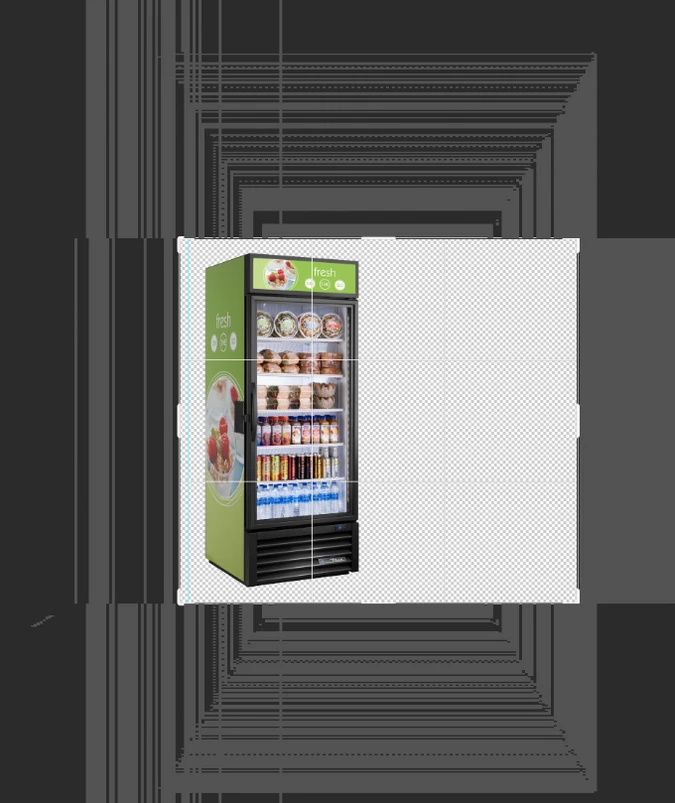
Snce the last download of Photoshop, when i open a file, in the background of Photoshop apear a strange things like pixels, when I use the zoom tool is worst.

johna96392811
Participant
August 20, 2021

Windows 10, 21H1

After installing PS update August 2021, I open PS, select an image, it opens but the home screen is still there behind it.

If I close the image and open a new one, PS freezes and the only way out is task manager.

Any Ideas?


John

Kevin Stohlmeyer
Community Expert
Community Expert
August 20, 2021

Have you tried resetting your Photoshop preferences?

Go to Preferences/General and click "Reset preferences on Quit" and relaunch PS. 

Participant
August 23, 2021

After the latest update, whenever i open a new document, these weird pixels appear. They stay still at the exact position, no matter i zoom in or out. Does anyone know how to fix this? I'm using Macbook Pro 16" 2019. Thanks.

c.pfaffenbichler
Community Expert
Community Expert
August 23, 2021

Does turning on »Deactivate Native Canvas« (Photoshop > Preferences > Technology Previews) and restarting Photoshop have any bearing on the issue? 

Does turning off »Use Graphics Processor« in the Performance Preferences (Photoshop > Preferences > Performance > Graphic Processor Settings) and restarting Photoshop have any bearing on the issue? 

Participant
August 23, 2021

Turning on Deactive Native Canvas does help fix the problem. Thanks!

Inspiring
August 22, 2021

I'm experiencing the same problem with Intel HD Graphics 4600 on an Intel Core i5-4310M (Windows 10 Pro 21H1). Deactivate Native Canvas seems to have solved the issue.

Mark C. Dahm
Community Manager
Community Manager
August 20, 2021

This problem did not reproduce on all systems here, and we had a fix that addressed the problem on the customer's systems that had the issue, so we thought we had it fixed; sorry for the inconvenience; the range of GPU hardware is vast and some combinations (that we don't have readily available to us) can exhibit issues.

sseb_
Participant
August 20, 2021

@mark_dahm Same issue happening with my Windows 10 program. Running a 1070 ti graphics card. Turning off the native canvas fixed it, but I'm pretty upset that a program update could make it through testing with this large of an issue.

Legend
August 19, 2021

*Stephen Joyner

Try this: Deactivate Native Canvas under Preferences > Tech Preview.

Restart Photoshop

Inspiring
August 19, 2021

@JeffreyTranberry I tried both suggestions in this thread but it still doesn't work for me on my surface pro.  Can you please help me fix this?

Inspiring
August 18, 2021

Same!
How do you fix it? I need to use photoshop for work. I'll get fired.

Mark C. Dahm
Community Manager
Community Manager
August 18, 2021

Go into Photoshop Preferences > Technology Preview and check 'Deactivate Native Canvas', then restart Photoshop. We're investigating the issue.

Inspiring
August 18, 2021

OMG! Thank Jeff the Deactivate Native Canvas under Preferences worked I didn't have to update to Big Sur. Thanks again I really appreciate your quick response.