


Inspiring
February 20, 2026

P: PS v27.4 Remove Tool (GenAI: On) is not working and producing artifacts

  • February 20, 2026
  • 53 replies
  • 2293 views

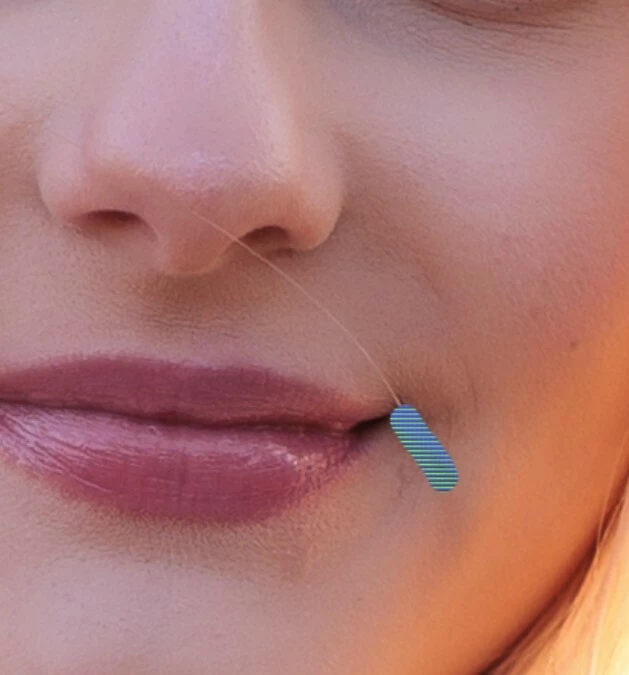
The AI ​​repair brush is not working in version 27.4. An error message appears when I set it to AI ON. When AI is set to AI AUTO, a pattern appears where the brush is supposed to repair.

Please fix this bug.
 

    53 replies

    tmyusuf
    Participant
    March 3, 2026

    You can reset all photoshop tool another reinstall the AI , Check your GPU , clean temp file . 

    Thanks

    GraphicXer
    Ged_Traynor
    Community Expert
    Community Expert
    March 3, 2026

    @jrm_photoworks try setting the remove tool to more stable in the preferences to see if it helps


    jrm_photoworks
    Participant
    March 3, 2026

    Thanks for the suggestion. I had already tried that before posting, but the issue persisted. I eventually had to downgrade to 27.3.1 to fix it. Thanks anyway.


    AJ1969vsxAuthor
    Inspiring
    March 3, 2026

    During my research on this problem, I came across this entry. So it's not actually a new problem; it's occurred before. Apparently, version 25.2 included a fix to get the tool working again. So please, Adobe, take another look and fix this problem.

    P.S. The errors are the same as the ones we described here.


    The removal tool does not work in version ....

    jrm_photoworks
    Participant
    March 3, 2026

    Photoshop 27.4.0 Bug: KI-Entfernen-Werkzeug löst sofortigen „Programmfehler“ aus. Problem besteht erst seit v27.4.0; Downgrade auf v27.3.1 behebt den Fehler (Regression).

    Participating Frequently
    February 28, 2026

    Is there any update on this? Is there any estimated date for a fix?

    AxelMatt
    Community Expert
    Community Expert
    March 1, 2026

    … Is there any estimated date for a fix?


    I don’t see any message that Adobe has identifying this offical as a bug. But anway…

    Adobe doesn’t announce any release dates of bug fixes or update.

    Updates are released regularly every two months. If important bugs occur, they may be fixed sooner.


    My System: Intel i7-8700K - 64GB RAM - NVidia Geforce RTX 3060 - Windows 11 Pro 25H2 -- LR-Classic 15 - Photoshop 27 - Nik Collection 8 - PureRAW 6 - Topaz Photo AI
    AJ1969vsxAuthor
    Inspiring
    March 1, 2026

    It would be nice if this could be forwarded to the relevant departments. It seems some users have encountered a problem, as can be clearly seen here. Nothing was changed on the computer; only a Photoshop update took place. And the old version is working fine. So, what did Adobe change? Surely Adobe could investigate this?

    jrcortez
    Known Participant
    February 25, 2026

    Hello again... As I said yesterday, and to add to that... I use RTX 306 (updated yesterday), Win 11 with 32 RAM.

    The remove tool does not work in either PS v 27.4 or Beta v 27.5. I have made all possible changes: I reset the preferences, disabled the GPU, and nothing worked! Is there still a solution? It's incredible that it works for some users and not others! Cheers!

    Trevor.Dennis
    Community Expert
    Community Expert
    February 25, 2026

    It would help if we had points of commonality between people seeing the issue.  So far we can see that ​@Wrivium  is using Windows 11 and an RTX2080 Ti.  I can’t see what driver he/she is using with the GPU.  The Studio driver works better than the Game Ready driver with Nvidea GPUs and Photoshop.  FWIIW I am using Windows 11 with RTX4080 with Studio driver, and I’m not seeing the problem.

    Participating Frequently
    February 25, 2026

    It's not the user who should worry about this. Adobe should test it on different cards and systems before releasing an update. They're probably doing it, but clearly not thoroughly. My drivers are fine. They'll just quietly fix it, and one day I'll run Adobe and it will work, but no one knows how long it will take :). It's always like that. Blaming the system, the card, etc. In my case, they spent nine days digging into my computer, and I finally fixed it myself. I just ran CC with Administrator privileges and set it to "forever," and that was it. And what I went through with them is worthy of a movie :).

    AxelMatt
    Community Expert
    Community Expert
    February 25, 2026

    It's not the user who should worry about this. Adobe should test it on different cards and systems before releasing an update. They're probably doing it, but clearly not thoroughly. 


    In principle, you're right, but...

    ...there are thousands of different hardware configurations, installed software in various versions, and so on.

    A software manufacturer simply isn't able to test all possibilities and relies, among other things, on user feedback. 


    My System: Intel i7-8700K - 64GB RAM - NVidia Geforce RTX 3060 - Windows 11 Pro 25H2 -- LR-Classic 15 - Photoshop 27 - Nik Collection 8 - PureRAW 6 - Topaz Photo AI
    francoise_3226
    Participating Frequently
    February 25, 2026

    Probleme avec l’outil supprimer (avec ou sans IA)J’ai désinstallée et réinstaller Photoshop,mis à jour mon pilote graphique Nividia,réinitialiser les préferences de Photoshop et ça ne marche toujours pas alors que tout marchait avant 

    Participating Frequently
    February 25, 2026

    I confirm. It's not working for me either :(. Knowing Adobe, they'll keep you on the hook for days or weeks before they fix it, or if you give them access to your computer, they'll clutter it with files, etc. I fought with them on a different issue for 9 days and the agency didn't work :).

    Sameer K
    Community Manager
    Community Manager
    February 25, 2026

    Hey, ​@Paweł267025364edj. Thanks for adding your comment. I’ve been trying to recreate this, but it doesn't seem to reproduce. Could you share a video showing the Layer Structure and the issue?

    It’ll help if there is a set of steps or conditions that must be met for the issue to appear. 

    Thanks!
    Sameer K

    Participating Frequently
    February 25, 2026

    @Sameer K 
    I don’t have installed 27.4, but I do have Beta (27.5) were I have the same issue.
    Here is a video: https://drive.google.com/file/d/1JEHm32IgHTkESPO7qkcFYmeQ1D-xIPSe/view?usp=sharing

    jrcortez
    Known Participant
    February 24, 2026

    Hello! My Photoshop was updated to v 27.4 two days ago and PS Beta v 27.5 was updated today. The remove tool does not work in either of them! What should I do? Thank you!

    Participating Frequently
    February 25, 2026

    I recommend going back to version 27.3 until they fix this. That’s what most of us have done.

    Participating Frequently
    February 25, 2026

    That's exactly what I did. I installed 27.3.1 and everything works fine. I posted here specifically about the update not working, but the moderators don't want to post it here because they're afraid users will find out the truth :)