
Adobe Reader download link in the body of an Outlook email
Good morning,
I work as IT support in a company. Our office suite is Office365. For some time we have noticed for some users an inconvenience in using Adobe Reader when inserting a PDF document into Outlook. In fact, the document is correctly inserted in the email, but an Adobe Reader download link still appears in the body of the email page, which hinders our users' production (see the screenshot).
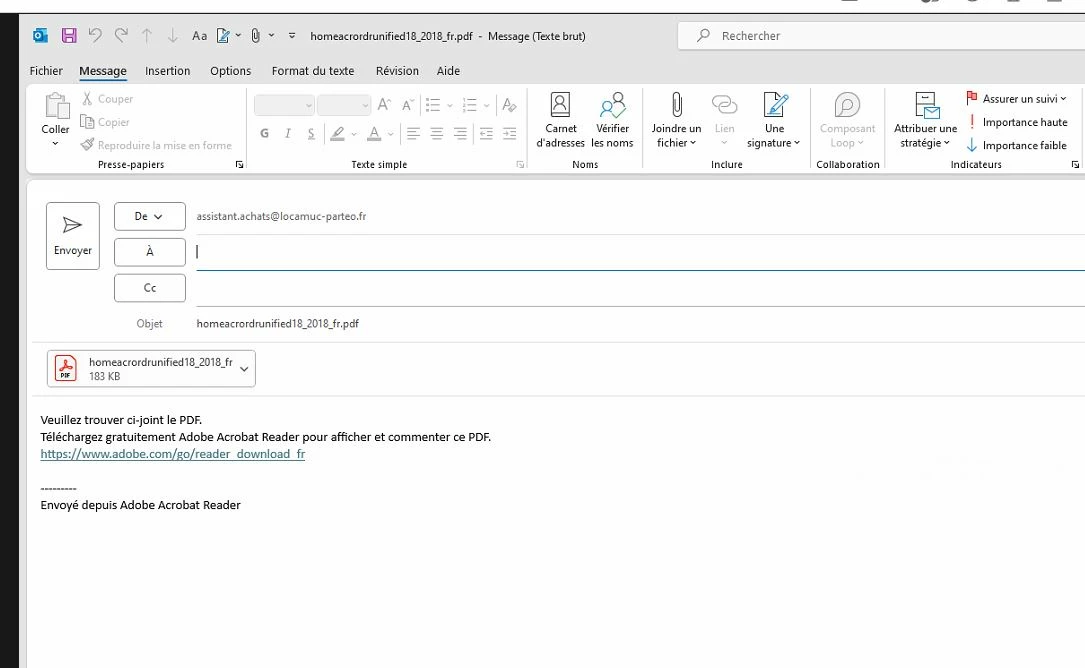
Is there a way to ensure that when inserting the PDF document into an Outlook email, the body of the email page is empty?
We carried out various actions to resolve this inconvenience which proved unsuccessful:
- search for a solution on the internet
- checking Outlook standard and advanced options
- checking Adobe Reader preferences without finding an option to delete the message
- MS Office365 repair
- Outlook sets as default
- Uninstalled and reinstalled Adobe Reader
- Windows image check
- Repair of system files
Thanks for your help
Sincerely,
PR


 AdChoices