
Participant
March 6, 2025
Question

Create an agreement from an uploaded document and send for signature and power automate

  • March 6, 2025
  • 1 reply
  • 262 views

I created a power automate flow in MS365 and use adobe sign: Create an agreement from an uploaded document and send for signature.

This is for multiple approvers. I want to get approvers email address from previous step by action: Compose

But in some case, may be 1 or 2 approvers have blank value of email address. Then the flow will be failed.

How to prevent of failed action in case of blank email?

Because the approver list is dynamic, depend on requester.
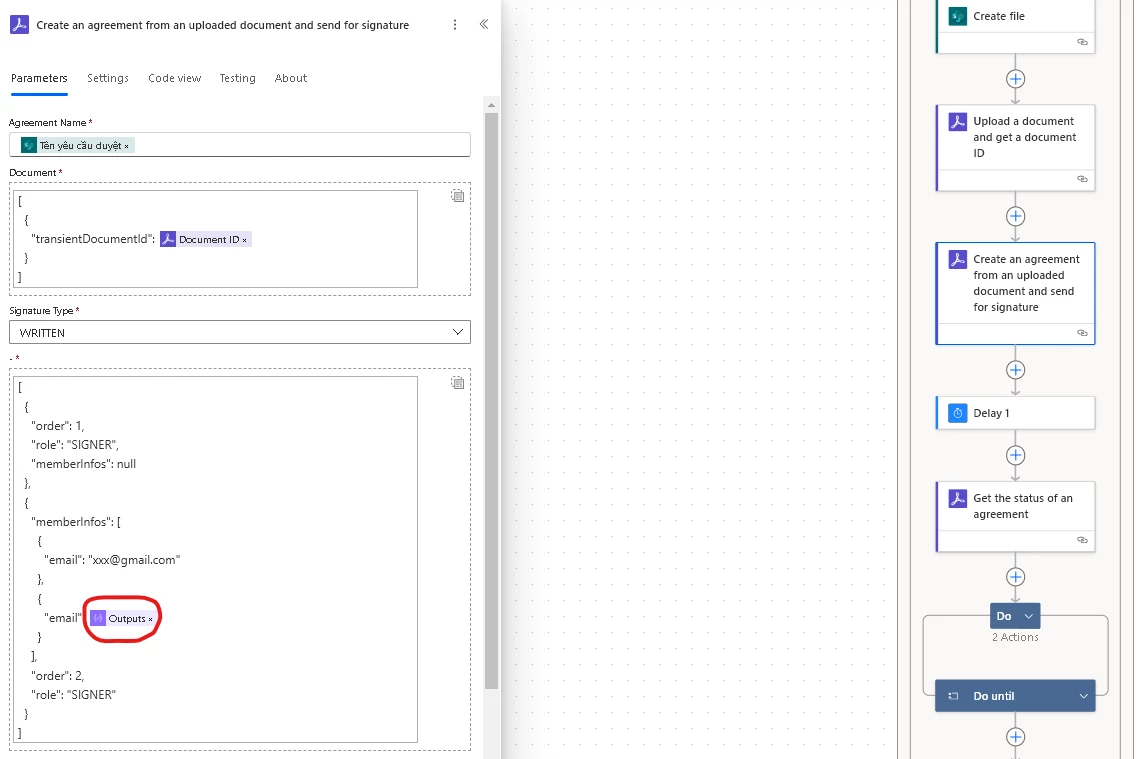


Any help or suggestion would be appreciated.


1 reply

Meenakshi Negi
Community Manager
Community Manager
March 6, 2025

Hi Tannv_Hanoi,


As you use the Acrobat Sign Developer service, we are moving this thread to the Acrobat Sign Developer board for visibility.

The experts can best answer interaction-related questions. With the developer account, you may also contact the pre-sales team. They will be able to provide you with pre-sales technical assistance and share the correct information.
Please refer to the following link to contact them: https://adobe.ly/41HUYhJ. You may use the Contact Us button for Adobe Sign Solutions under the team tab.


Thanks,

Meenakshi

Participant
March 6, 2025

Thank you.

The link does not work: https://adobe.ly/41HUYhJ