Participant
January 9, 2020
解決済み

How do I turn off cloud link question when attaching pdf in outlook?

  • January 9, 2020
  • 返信数 12.
  • 157053 ビュー

I have to send several hundred individual emails, and cannot use mail merge feature (don't ask).  I don't want to have to answer do you want to send a cloud link  every time?  Can I reset that so it defaults to no?  OR turn it off?


Thanks.
解決に役立った回答 Code24601236aonr

I dont have a MY ACCOUNT button on my home tab!!!


Please explain further - this is the MOST annoying feature ever!


The answer in ths post regarding Add-ins lead me to the full answer.  Here are the steps:

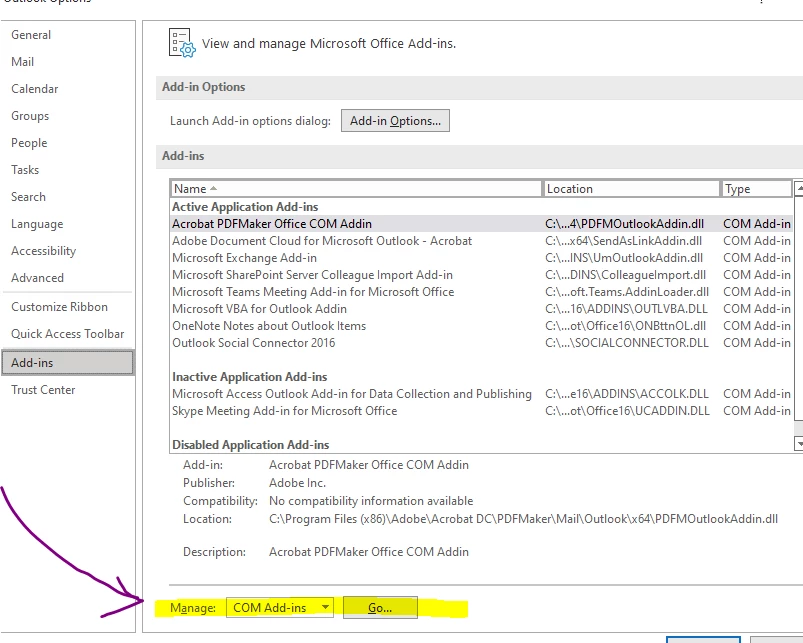
1.  In Outlook, go to File -> Options -> Add-ins - > Manage COM-Add-ins, Go:

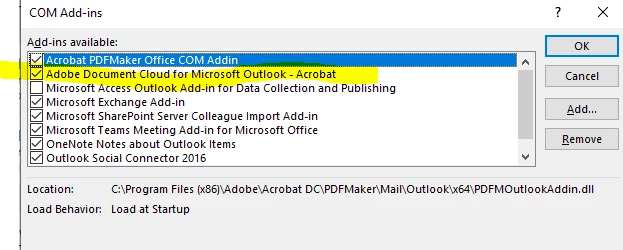
2.  After you Click "Go" you'll get a pop-up dialog box:


3.  Uncheck Adobe Document Cloud for Microsoft - Outlook

I just tested it in Outlook Office 16 and it removed that Adobe Cloud pop-up.

Good luck!

返信数 12

Participant
April 26, 2024

Is there a way to do ir orgwide? perharps regkey ?

Meenakshi Negi
Community Manager
Community Manager
June 5, 2024

Hi Bish36998623ls5g,


Thank you for reaching out.


Please let us know how you attach the PDF and the link you are trying to remove.

It would be helpful if you could share more details on the issue.


Thanks,

Meenakshi

Participant
January 19, 2024

The addin seems to re-enable if you use a managed 365 environment, the solution that I've been employing is the settings via the acrobat menu. But it must be known that you can only see this option from a new email, you can't see it from the normal home tabs.


BMcCarty's message shows this perfectly.

Participant
January 1, 2024

Thank you.  I have been trying to figure this out.


Participant
August 25, 2023

Thank you, that was simple, easy and painless.

Participant
July 31, 2023

Hello can anyone help with this? My outlook is a new version, and does not show my account.  I go under options, then to add-ins and it is not a drop down. This is slowing me down soo bad, someone pleaseee help me... 

Known Participant
July 31, 2023

Alma, you are almost there, my friend. Outlook >> File >> Options >> Add-ins >> Go . . .
In the Add-ins screen, click "Go," which is underneath the list of add-ins. Then you will see a screen where you can check and uncheck the add-ins. That's where you can turn off this Adobe add-in for Outlook, which is repeatedly added without explicit permission or announcement, and which causes workflow disruption for some of us.  

Participant
July 27, 2023

I'm not much help, but Code246... got it right I think...  It worked yesterday but it's doing it again and I just did it again.  How annoying is this? 


Participating Frequently
July 28, 2023
You know that old cliche, 3rd times a charm...; )
Known Participant
July 12, 2023

My problem is that the Aodbe Cloud Plugin for Outlook disables delayed send! I use delayed send extensively in my office procedures, so this is a disruptive bug for me. The Adobe Plugin causes delayed send emails in Outlook to not have send dates, so they just sit in the outbox, unable to send. I have uninstalled the Adobe plugin for Outlook twice, and Adobe has just added it back in the third time. This time, I have simply unchecked it. I hope that will stop Adobe from forcing this on me a fourth time.

That being said, I really love the way this plugin works. It is so convenient and to have a one-click FTP for my large file shares. I hope Adobe makes a very clear announcement if they fix the bug wherein the Adobe Cloud Plugin for Desktop Outlook disables Outlook's delayed send feature. 

BMcCarty
Known Participant
June 7, 2023

Here's the process that worked for me
Click "New Email" in Outlook

  • There should be an "Acrobat" item in the new message's menu
  • Click "Acrobat"
  • Select the "Settings" option
  • Check the "Never prompt while attaching" box.

I'm also attaching some pictures


Participant
June 20, 2023

Did not work for me, as I have no "acrobat" menu item.

The only solution that worked for me was the "Manage COM Add-ins" solution posted above. 

Participant
May 31, 2023

I don't have a "My Account" button and there's "prompt when attached" dialog on any of the only three options under the Adobe tab (selected messags, selected tabs, and set up automatic archival).


Any ideas how to turn off the prompt in that situation?


Thanks!

Participating Frequently
May 31, 2023

Try the steps in my post on May 25, 2022.

Participant
May 31, 2023
Thank you. My Outlook is not set up the way this one in the post is. I discovered that I have to open a new email, navigate to the option shown below, and then the dialog box in your post shows. I don't have "my account". Anyway, if another user has the same situation, here's how to resolve it!

[cid:image001.png@01D993CB.52B925D0]

Regards,

Kandi Molyneaux
Founder & CEO
LOYALitix(r)
571.276.7905
LOYALitix.net

Confidentiality Notice: This email and any attachments are PRIVATE and may contain material that is
Molyneaux Consulting, LLC(r) Proprietary Information, Confidential, Privileged Work Product for the
Sole use of the Intended Recipient. Any review, reliance, distribution, disclosure, or forwarding without
expressed permission is strictly prohibited. If you are not the Intended Recipient, please delete all copies
without duplicating, reading, printing, or saving in any manner. - Thank you.
Participant
April 19, 2023

No add in for MS Outlook 365 also nothing else lined up for a fix when following suggestions. I did a lot of things so not sure if this was what fixed it but hopefully someone will reply back and let us know. 

Participant
April 19, 2023

Forgot to add close MS Outlook and reopen after unchecking box.