
Participant
December 26, 2024
解決済み

How to make a material from maps?

  • December 26, 2024
  • 返信数 1.
  • 2086 ビュー

Hey guys, have mercy on me. I enjoy making models and using Substance Painter, but I don't make materials/textures. I went to Free PBR and got all their texture sets, but it's a folder with a bunch of maps. I want to convert them to a material for ease (a .SBSAR file?). I have a free trial of Designer and permanent Substance Painter. Is there anyway to do this? Thanks in advance everyone! 
解決に役立った回答 davescm

Hi

In Designer start a new graph using the PBR metallic roughness template.

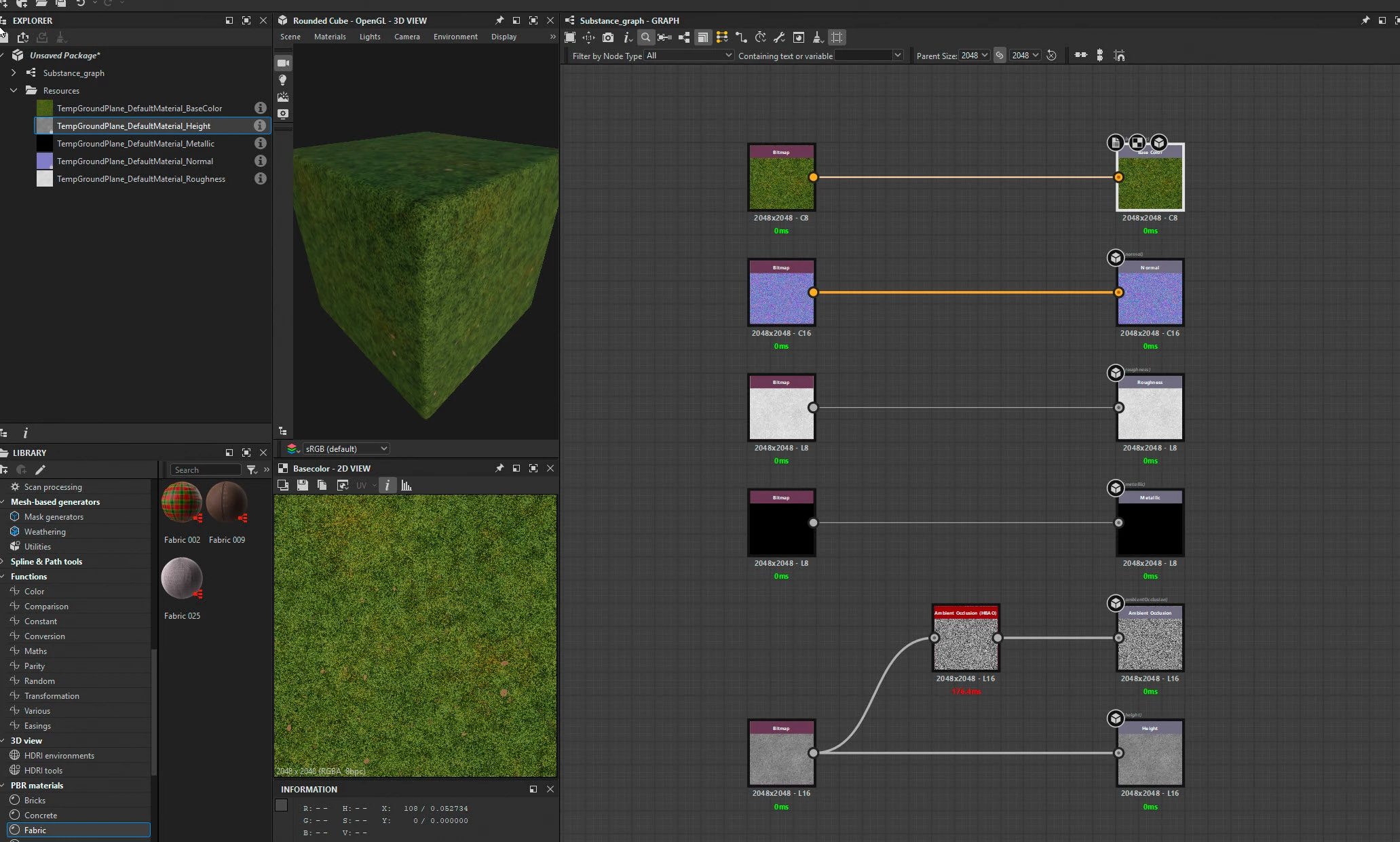
Import your texture maps (right click on the package in the Explorer panel and choose Import > Bitmap) and then drag them, from the Explorer panel, onto the graph as bitmap nodes

Connect each to the relevant output node (disconnect and delete and default nodes that are plugged into the outputs.

If you have an AO map use it, if not you could try a Height Based Ambient Occlusion node to create one from the height map (as I've done in the example)

Once done you can save the graph as an SBS file, then publish it as an SBSAR material.


You can of course add additional nodes and parameters to control the look of the material, but the simple example here should get you started.

Dave

返信数 1

davescm
Community Expert
Community Expert
December 28, 2024

What maps do you have, for each material?

Dave

Jaquline55作成者
Participant
December 28, 2024

A normal map, albedo map, roughness map, metallic map, ambient occlusion map, and sometimes a height map. 

davescm
Community Expert
davescmCommunity Expert解決!
Community Expert
December 28, 2024

Hi

In Designer start a new graph using the PBR metallic roughness template.

Import your texture maps (right click on the package in the Explorer panel and choose Import > Bitmap) and then drag them, from the Explorer panel, onto the graph as bitmap nodes

Connect each to the relevant output node (disconnect and delete and default nodes that are plugged into the outputs.

If you have an AO map use it, if not you could try a Height Based Ambient Occlusion node to create one from the height map (as I've done in the example)

Once done you can save the graph as an SBS file, then publish it as an SBSAR material.


You can of course add additional nodes and parameters to control the look of the material, but the simple example here should get you started.

Dave