


Participant
November 26, 2018
Answered

Change y-axis of other symbols

  • November 26, 2018
  • 2 replies
  • 245 views

I have a question I hope someone here  can either answer or point me in the right direction to find an answer myself.

I have a set of symbols like so:
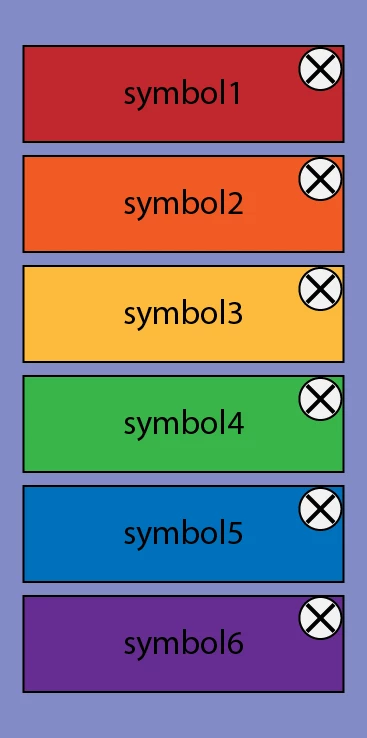
I would like to be able to close any given symbol and have the symbols below move up along their y-axis. Lets say I close symbol3, then symbols 4, 5, and 6 would move up like so:
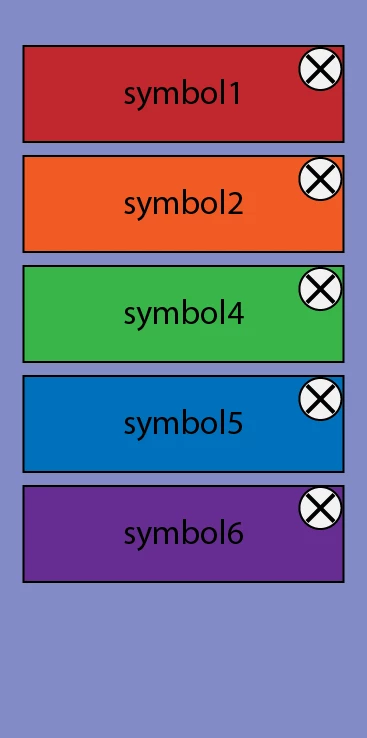
I know I could create an animation for each and every instance however that's a lot of separate frames ( 279936 I think ) and I would think there is an easier way.

Any thoughts on how to go about this?

This topic has been closed for replies.
Correct answer JoãoCésar17023019

Hi.

An approach would be:

- Put all of your thumbs inside of a container called something like "column";

- Create a function that positions the thumbs in a column layout;

- Assign a click listener to the column container;

- Check if the clicked object (e.target) is the close button;

- Remove the thumb that the close button belongs to;

- Run again the function that positions the thumbs.

Like this (without using advanced layers mode, supposing that is AS3 and that the close button has its mouseChildren property set to false):

AS3 code:

import flash.display.MovieClip;

import flash.events.MouseEvent;

function createColumn(offset:Number = 0):void

{

    for (var i:uint = 0, total:uint = column.numChildren; i < total; i++)

    {

          var child:MovieClip = column.getChildAt(i) as MovieClip;

          child.y = (child.height + offset) * i;

    }

}

createColumn(10);

column.addEventListener(MouseEvent.CLICK, function(e:MouseEvent):void

{

    if (e.target.name == "button")

    {

          e.currentTarget.removeChild(e.target.parent);

          createColumn(10);

    }

});

FLA download:

animate_cc_as3_resize_column.zip - Google Drive

Regards,

JC

2 replies

JoãoCésar17023019
Community Expert
JoãoCésar17023019Community ExpertCorrect answer
Community Expert
November 26, 2018

Hi.

An approach would be:

- Put all of your thumbs inside of a container called something like "column";

- Create a function that positions the thumbs in a column layout;

- Assign a click listener to the column container;

- Check if the clicked object (e.target) is the close button;

- Remove the thumb that the close button belongs to;

- Run again the function that positions the thumbs.

Like this (without using advanced layers mode, supposing that is AS3 and that the close button has its mouseChildren property set to false):

AS3 code:

import flash.display.MovieClip;

import flash.events.MouseEvent;

function createColumn(offset:Number = 0):void

{

    for (var i:uint = 0, total:uint = column.numChildren; i < total; i++)

    {

          var child:MovieClip = column.getChildAt(i) as MovieClip;

          child.y = (child.height + offset) * i;

    }

}

createColumn(10);

column.addEventListener(MouseEvent.CLICK, function(e:MouseEvent):void

{

    if (e.target.name == "button")

    {

          e.currentTarget.removeChild(e.target.parent);

          createColumn(10);

    }

});

FLA download:

animate_cc_as3_resize_column.zip - Google Drive

Regards,

JC

avid_body16B8
Legend
November 26, 2018

HTML5 or Action Script?

You will need a conditional on your click event.