


Participant
June 19, 2018
Question

Phantom Workspace Icons

  • June 19, 2018
  • 1 reply
  • 160 views

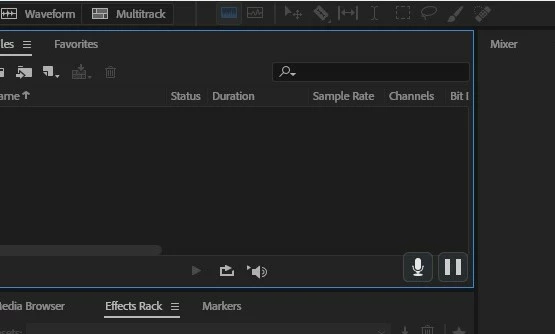
Since upgrading to Audition CC 2018, I have 2 phantom icons that appear in every workspace window within audition CC 2018 and i can not get rid of them.

I run a suite of Adobe products and this is the only one that has this issue. The icons in question are the mic and pause icons as depicted in picture below at bottom right.

If anyone knows how to get rid  of them I would be greatly appreciated.

I have uninstalled and reinstalled and this has not changed it
This topic has been closed for replies.

1 reply

SteveG_AudioMasters_
Community Expert
Community Expert
June 19, 2018

Not seen that before! Just as an experiment, can you try restarting Audition with the shift key held down? If it starts correctly without them, it's something odd about your profile settings. What's really odd is that there's a mic symbol - Audition is notorious for not caring where a signal comes from, as long as it's from a legal sound device. I can't imagine why it would have any truck with a mic symbol at all!