


Inspiring
July 21, 2017
解決済み

Text drop shadow

  • July 21, 2017
  • 返信数 2.
  • 3064 ビュー

I recently upgraded to IA 2017 and can no longer achieve drop shadow on my text (Born With A Chance text line). When I try, all I get is a big drop shadow circle without any way to control the effect once applied. Here is a pic of the file. Notice the big circle. There is no way to control the shape of the shadow, which should wrap around the text.
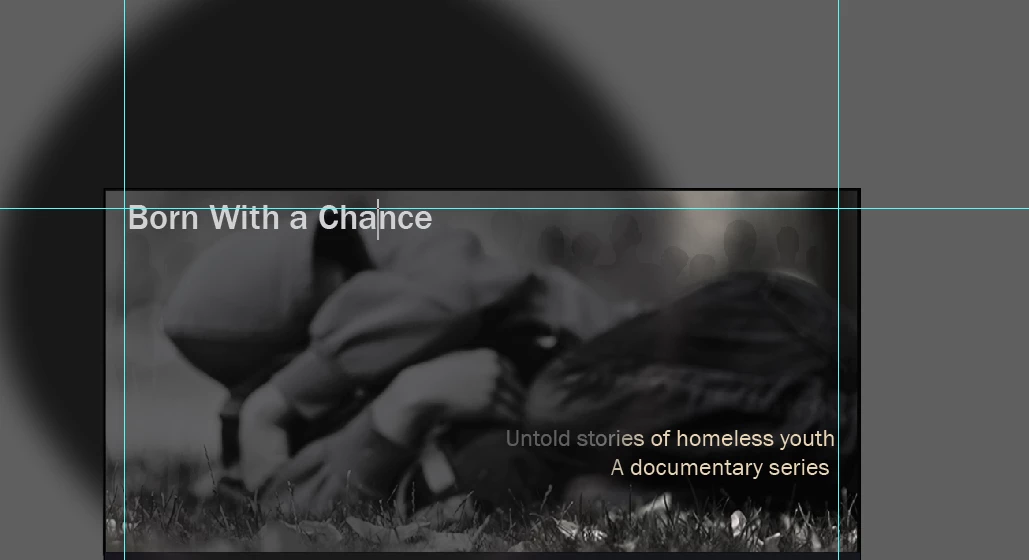
I'm assuming with all updates, there is a bug in the drop shadow tool. The instructions posted on the help section do not work. Is a drop shadow a real feature or just vapor ware in IA 2017?  Should I use Photoshop to create drop shadow text an import into IA instead or just scrap AI and use PS instead?

このトピックへの返信は締め切られました。
解決に役立った回答 barbara_a7746676

My guess is that there is something selected besides the text or something grouped with the text. Try deleting or hiding the text layer. Then create a new text layer and apply the drop shadow style.

返信数 2

barbara_a7746676
Community Expert
Community Expert
July 21, 2017

My guess is that there is something selected besides the text or something grouped with the text. Try deleting or hiding the text layer. Then create a new text layer and apply the drop shadow style.

Indie767作成者
Inspiring
July 21, 2017

Thanks Barbara,

That did the trick. However, I still don't have much shadow control like I do in Photoshop. I'm attempting to build a template for a business card but AI doesn't seem well suited for that kind of work.

I don't have my head wrapped around AI, why I should use it and how it's different from PS. I'm going back to Photoshop. It's a better design and drawing tool for me.

Thanks for your help.

barbara_a7746676
Community Expert
Community Expert
July 21, 2017

You're welcome.

I can see why you would want to use Photoshop for the business card because the card is mainly photographic.

Illustrator is great for most business cards that are mainly vector.

Monika Gause
Community Expert
Community Expert
July 21, 2017

Please select the object and then show us a screenshot of the appearance and the layers panel.