


Inspiring
January 28, 2026
Answered

My team and I are having a tracking or kerning problem (especially with Times family fonts)

  • January 28, 2026
  • 4 replies
  • 0 views

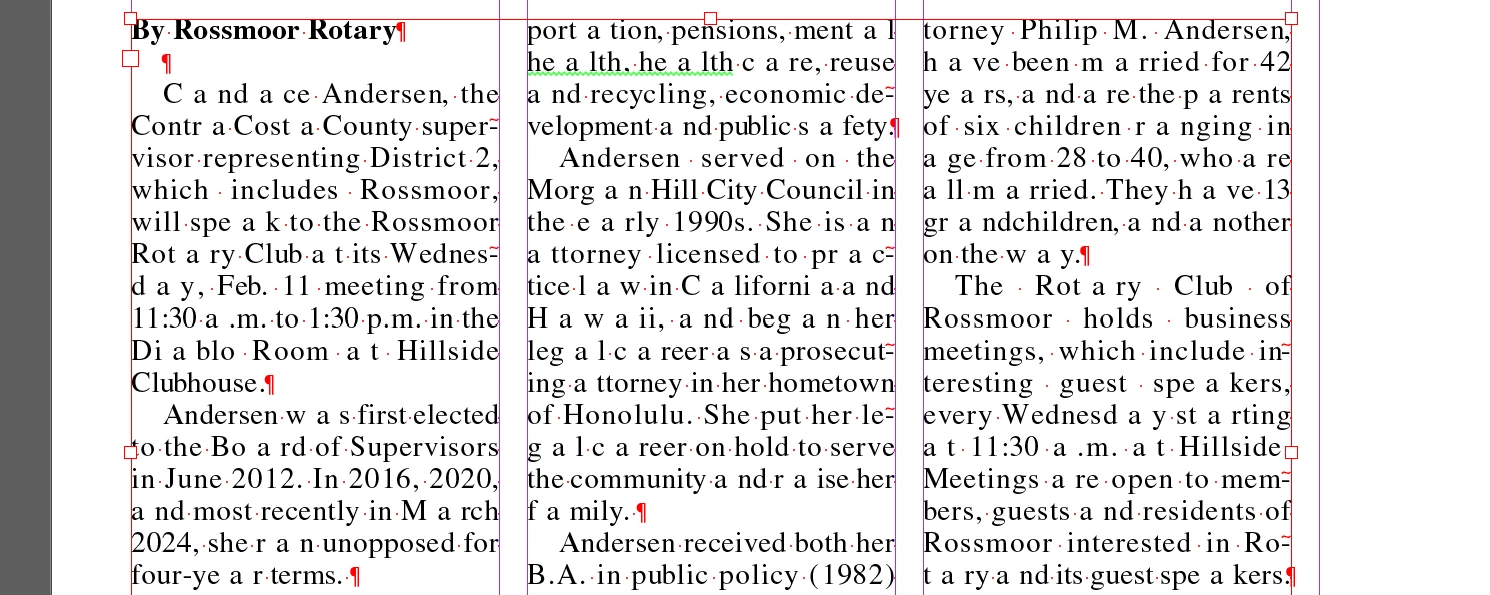
There's weird spaces sometimes showing up randomly in the text in our text boxes (see below). It doesn't happen all the time and only happens in blocks of text (not the text in the graphics we create). We tried reloading all of fonts in the Times family and recreating our paragraph styles, but the problem continues. Does anyone know what might be causing this and how to fix it?


    Correct answer Eccentric_contributor5CCF

    I think you might be onto something with the justification settings. Those appear to be well off the default settings. The word spacing on one of our templates was minimum 50% and maximum 200% with letter spacing -5% to 25% and auto leading 120%. I’m not sure why this has become an issue all of the sudden but this definitely looks like it could be our issue. Thanks for the advice.

    4 replies

    Abhishek Rao
    Community Manager
    Community Manager
    January 29, 2026

    Hi ​@Eccentric_contributor5CCF,


    Thanks for sharing the details. I hope the suggestions from the experts help improve the spacing behavior you’re seeing. Could you please let us know if the issue is resolved after trying those recommendations, or if you’re still running into the random spacing problem across your documents?

    In the meantime, I’m also sharing a few similar community threads where users have discussed comparable spacing and justification behavior, which might offer additional context or workarounds:
    https://community.adobe.com/questions-671/random-leading-space-in-paragraph-text-overflow-881963
    https://community.adobe.com/questions-671/problem-with-strange-character-spacing-827778
    https://community.adobe.com/questions-671/extra-spaces-between-words-after-applying-a-text-wrap-901879

    Please let us know how it goes.


    Looking forward to your update.

    Abhishek

    Barb Binder
    Community Expert
    Community Expert
    January 29, 2026

    These are the defaults:


    And these are the ones I use, as advised by Nigel French


    ~Barb at Rocky Mountain Training
    Peter Spier
    Community Expert
    Community Expert
    January 28, 2026

    Is this happening with all files, just this one, only new files, or only old ones?

    What are the justification settings in your paragraph style?

    Peter Spier
    Community Expert
    Community Expert
    January 28, 2026

    And it sound, from your first post, like this happens across multiple users/workstations?

    That would make a prefs problem less likely, I think.

    Peter Spier
    Community Expert
    Community Expert
    January 28, 2026

    Which version of InDesign and OS are you using? And which paragraph composer?

    This looks like it’s some sort of problem in the justification settings, but whether it’s font related, settings related, composer related, or maybe a bug I can’t say.

    Peter Spier
    Community Expert
    Community Expert
    January 28, 2026

    And have you tried resetting the prefs?

    Inspiring
    January 28, 2026

    We have not tried resetting the preferences because we have a lot of custom settings. I was hoping that would be a last resort.