


Sister Sabina
Inspiring
September 10, 2020
解決済み

Adjustment layers not showing mask when selected in Photoshop CC 2020 21.2.2

  • September 10, 2020
  • 返信数 1.
  • 3018 ビュー

I'm working through some tutorials on Photoshop and whenever the tutor adds an "New Adjustment Layer" it comes with a "mask".  On my copy of Photoshop CC 2020 21.2.2 there is no "mask" being added so what is the benefit of using the "New Adjustment Layer" over just a plain "adjustment" e.g. image/adjustment/brightness-contrast" as compared to "Layer/New Adjustment layer/brightness-contrast"?  As it stands I have to add the "mask" manually for it to work. Has the "mask" been done away with on the latest version of Photoshop CC 2020? Or have I missed a setting somewhere along the line?

Your help would be much appreciated.  Thanking you in advance.

Sister Sabina

ps.  I am on a Macbook Pro 16 running the latest version of Catalina should that make any difference.
このトピックへの返信は締め切られました。
解決に役立った回答

Hi

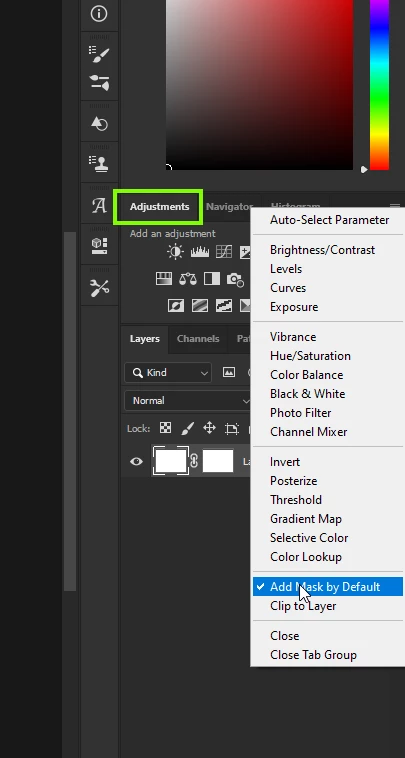
Is this option enabled from the flyout menu for the adjustment panel

返信数 1

解決!
September 10, 2020

Hi

Is this option enabled from the flyout menu for the adjustment panel

Sister Sabina
Sister Sabina作成者
Inspiring
September 10, 2020

Many thanks for that information.  I knew that I must have something unchecked for this to be happening.

Sr. Sabina
Sister Sabina
Sister Sabina作成者
Inspiring
September 11, 2020

I have another problem today in creating a "new fill or adjustment layer" from the menu at the bottom of the right hand side of the Photoshop menu.  I'm trying to create a "solid color" adjustment layer but it isn't showing a "mask" as the tutors example.  There is nowhere here on the "properties" window to "add as default".  Can you suggest how I can get it to load a "mask" automatically on creations please?

Thanking you in advance.


Sr. Sabina