

解決済み
How do I print a very large photo across multiple 8 x 10 pages?
I am trying to use Photoshop to create a glass pattern that is larger than letter size paper. Is there a way to print a single photo split across multiple pages?

I am trying to use Photoshop to create a glass pattern that is larger than letter size paper. Is there a way to print a single photo split across multiple pages?
Although that works, it’s a lot more work than the other suggestions. Using the automatic tiling in Acrobat or InDesign means you just set it up, click Print, and it works.
The Slice tool method also has several problems:
Overall, it is much easier, faster, and more reliable to use automatic tiling.
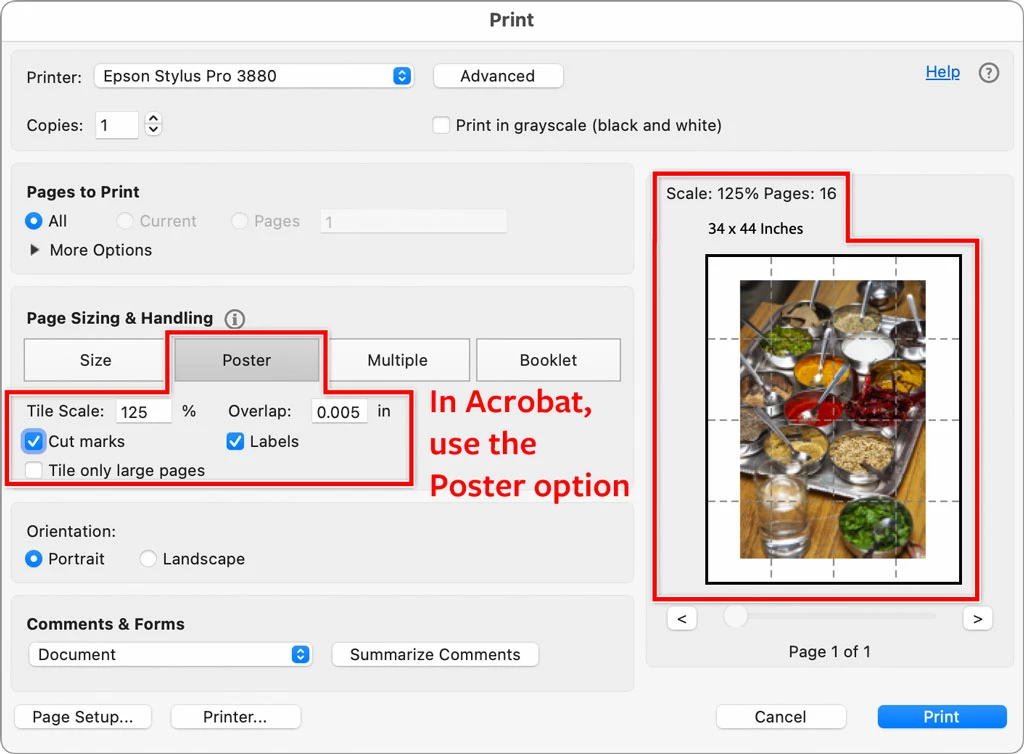
Using Acrobat is easy because the Reader is free, and can open Photoshop files, so you can be ready to print in less than a minute. Just open the Photoshop file in Acrobat, choose Print, set up tiling, and you are done.
I agree this feature should be in Photoshop. But until then, tiling in Acrobat or InDesign is the simplest, fastest way. In the picture below, a Photoshop file is shown ready to tile in the Print dialog box in Acrobat.
Enter your E-mail address. We'll send you an e-mail with instructions to reset your password.
 AdChoices