


Known Participant
May 11, 2023
解決済み

Photoshop 24.4.1 Clears Recent Files After Edit>Purge>Histories or Edit>Purge>All

  • May 11, 2023
  • 返信数 1.
  • 1807 ビュー

I sometimes use the Edit>Purge>All  or Edit?Purge>Histories menu command when I have a large image file that has many layers or is slow to process.  It seems to free up some space and allow me to finish the edits that I am working on.  Unfortunately, it now also seems to clear out the thumbnails of recently opened files from the PS home page and list of recently opened files from the file menu as well.  It didn't do this in the past.  Is this a change or is there a setting that I may have to reset to stop this behavior?  I use the recently opened files list of thumbnails on the PS home screen a lot, and it is a hassle whenever they disappear.


I am running PS 24.4.1 on Windows 11 ver 22H2 (OS Build 22621.1702)
このトピックへの返信は締め切られました。
解決に役立った回答 Sameer K

Hey @scenicshutterbug. I'll need more info to help you figure this out. Please share the system info of Photoshop from Help > System info > Copy & paste into a text document > Upload to Creative Cloud files (https://assets.adobe.com/files) and share the link with us.


The Home screen is a component in Photoshop & I've tried to recreate this; the recent list seems unaffected on the test machines. Ensure Photoshop is in the default state, go to the location of the preference folder below, and rename it to backup. https://helpx.adobe.com/photoshop/using/preferences.html


  • Windows 10/11: Users/[user name]/AppData/Roaming/Adobe/Adobe Photoshop [version]/Adobe Photoshop [version] Settings
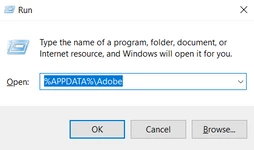
  • Press Windows + R & type this is the Run Window - %APPDATA%\Adobe


  • Rename the Adobe Photoshop folder by adding a .old at the end. (Adobe Photoshop 2023 > Rename > Adobe Photoshop 2023. old)


These changes will give a fresh start to Photoshop as a fresh install. Let me know how it goes.

Thanks!

Sameer K

返信数 1

Sameer K
Community Manager
Sameer KCommunity Manager解決!
Community Manager
May 11, 2023

Hey @scenicshutterbug. I'll need more info to help you figure this out. Please share the system info of Photoshop from Help > System info > Copy & paste into a text document > Upload to Creative Cloud files (https://assets.adobe.com/files) and share the link with us.


The Home screen is a component in Photoshop & I've tried to recreate this; the recent list seems unaffected on the test machines. Ensure Photoshop is in the default state, go to the location of the preference folder below, and rename it to backup. https://helpx.adobe.com/photoshop/using/preferences.html


  • Windows 10/11: Users/[user name]/AppData/Roaming/Adobe/Adobe Photoshop [version]/Adobe Photoshop [version] Settings
  • Press Windows + R & type this is the Run Window - %APPDATA%\Adobe


  • Rename the Adobe Photoshop folder by adding a .old at the end. (Adobe Photoshop 2023 > Rename > Adobe Photoshop 2023. old)


These changes will give a fresh start to Photoshop as a fresh install. Let me know how it goes.

Thanks!

Sameer K

Known Participant
May 12, 2023

Thank you, Sameer K,


I have uploaded the system info file to my shared folders.  It is called Scenicshutterbug Adobe Photoshop Version System Info.rtf.  Can you see it?  (Just in case you can't find it, I have attached it below.)


I also followed your instructions for renaming the existing files and then reopened PS 24.4.1.  As expected, the new install opened with no history.   I them opened three files and resaved and closed two of them.  I jumped back to the Home screen and it showed all three files.  I then made some changes to the third one, and executed Edit>Purge>All, and saved the changed file as a new filename in another directory.  I checked the Home screen and it showed all four files (the three original ones plus the one I had modified and resaved under another name.)  Finally, I closed and reopened PS 24.4.1 and the same four files still appeared as Recent File thumbnails on the Home screen.   That seems to have solved the problem.  


Scenicshutterbug