



🗞️ Photoshop Newsletter - November/December 2021

Photoshop December 2021 update
It is hard to believe we are almost at the end of 2021! Here's to a terriffic holiday season, whatever you celebrate. I hope everyone attended Max in October and learned something new. Since then, we had a few smaller releases where we added performance enhancements to Photoshop and fixed several customer-reported issues. On Photoshop on the iPad, we added the Smudge tool so you can blend colors with a smudgy effect that simulates traditional painting. Then you can make your work more colorful with the Sponge tool by adding (or subtracting) color with a brush stroke. After you try the new features, check out the Quick Tips, read the blog posts, and learn something new watching the latest Photoshop tutorials. In case you missed any of our previous newsletters, you can find a bunch more Photoshop stuff here: Newsletter home page.
ACP Highlight

Jane E - Jane is an Adobe Certified Instructor (ACI) who was recruited during an Adobe Roadshow in 2014 to be an Adobe Community Professional (ACP) for the Adobe forums. She has been working with Adobe software for over 30 years, specializing in long documents using InDesign and its predecessors. Jane started using Photoshop 3.0 when the industry standards changed from leaving an empty space for images in documents to placing an electronic version, and fell in love with it. She also uses and teaches Illustrator and Acrobat and is a regular contributor to the bi-weekly Photoshop Challenge on the forums.
What's new?
PHOTOSHOP DESKTOP
Supported camera models and Supported lenses
PHOTOSHOP ON THE IPAD
Smudge areas in your images with Photoshop on the iPad
Saturate or desaturate areas of your image with the Sponge tool
PHOTOSHOP BETA
Full WebP support (read/write)
Photoshop beta now has full support for the WebP file format! WebP files can now be opened, created, edited and saved in Photoshop beta without the need for a plug-in or preference setting.
Cloud Processing for Select Subject
You can choose to store the Select subject AI machine-learning model in the cloud. This sends your image to the cloud to be processed instead of processing it on your device.
Quick Tips

Quick Tip #10: Optimize Photoshop preferences
Learn how to tweak preferences to improve performance
 Quick Tip #9: Reset Photoshop Preferences
This tip shows you how to go back to default settings. This is a common step when troubleshooting issues.

Quick Tip #8: Move artwork between Photoshop and Illustrator
People often take projects back and forth between Photoshop and Illustrator. Learn about the different options available and the benefits of each.
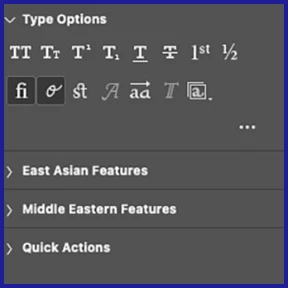
Unified Text Engine - Learn about the new unified typographical support for scripts and languages across the world

Check out the whole list of Photoshop Quick Tips
Visit the Photosho Quick Tips home page for links to previous Quick Tips topics.
News and Blog Posts

MAX 2021 recap — creativity, community and tech come together

Learn Something New
What's NEW in Photoshop Fall 2021- Terry White
Easy Skin Touch-ups Using New Camera Raw Features in Photoshop - Paul Trani
Adding Vibrant Color – Paul Trani
How to Create and Use New Gradient Interpolations in Photoshop – Paul Trani
What's New in Photoshop and Lightroom on Mobile - Terry White
Troubleshooting
Basic Photoshop troubleshooting steps
Troubleshoot Scratch disks are full error
Handy Links
What's new in Photoshop
Photoshop Feature Summary.
Are you curious what's going on with our other apps? Check out their Newsletters, too:
Photoshop | Lightroom | Lightroom Classic | Illustrator | InDesign | After Effects
 AdChoices