


mattg82421713
Participant
April 17, 2020
Answered

Randomly losing pressure sensitivity with Photoshop

  • April 17, 2020
  • 13 replies
  • 9221 views

First off, let me say that I know this has been brought up before (usually when using Wacom tablets) but has never had a solid fix. I have had this issue on and off with Photoshop with multiple Wacom devices and now a Huion Kamvas Pro 20 (2019). I've also had this issue when using various PCs using different Windows OSs. I believe some people also had this issue on Mac. The only constant there has been between all of this time is that it's always when using Photoshop.
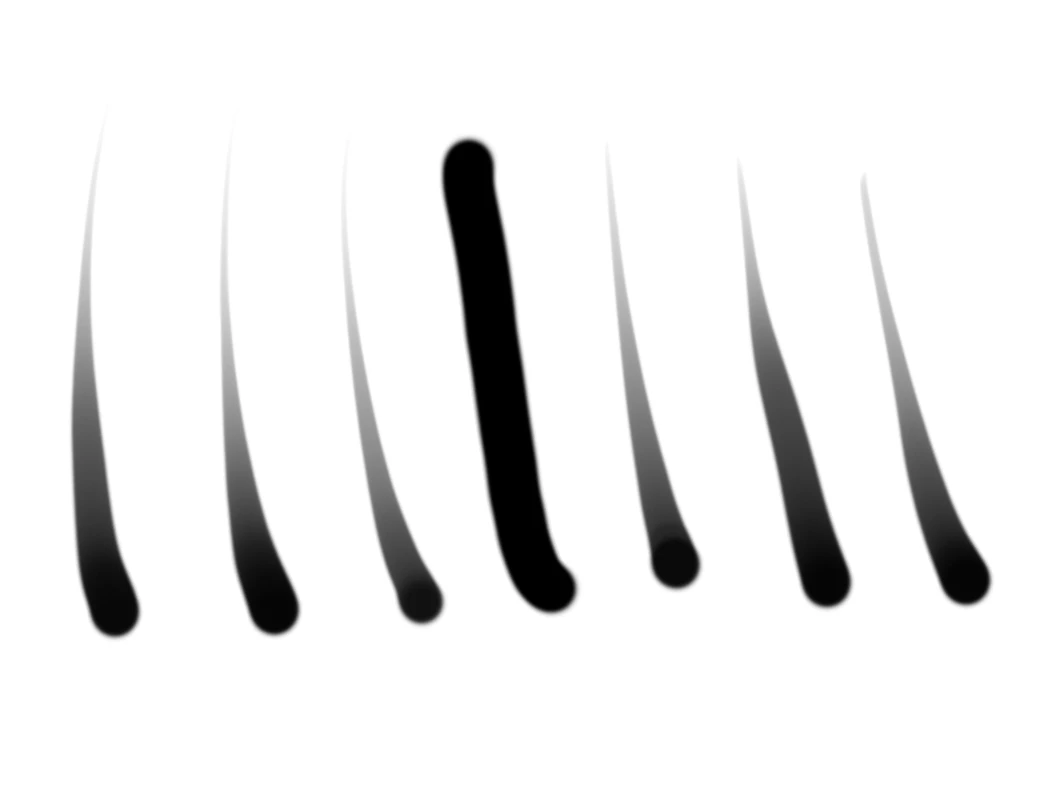
 

My drivers are up to date. Photoshop CC is on version 21.1.2.


This is very clearly an issue with Photoshop. Some temporary workarounds have been found with Wacom tablets but none with Huion to my knowledge. Maybe someone out there can finally figure out what exactly is causing this and even how to finally fix it.


13 replies

Participating Frequently
April 19, 2020

I posted a thread with the same problem, but it only came up with the lastest Ps update, 21.1.2.  If I revert to an older version, the pen pressure issues go away, and like you said the pressure sensitivity issues are ONLY in Ps (21.1.2 only for me).  I'm fully up to date on Win 10 Surface Pro 7.


I spent an hour on chat with their useless customer service reps with no resolution.  There have been so many bugs this year, a new one in every version, that I can't help but feel frustrated that we're basically paying them to be their beta testers. 

mattg82421713
Participant
April 20, 2020

I've had this issue pop up on and off for years across multiple tablets and multiple versions of Windows. They will tell you every time that it is the tablet's fault and you need to contact them. There is even a Feng Zhu video that was posted years ago where he mentions having the issue with Photoshop.

PECourtejoie
Community Expert
Community Expert
April 17, 2020

Hello, I guess you mean 21.1.2

Are you using Wintab or Windows Ink in the Wacom drivers?

mattg82421713
Participant
April 20, 2020

Yes, I fixed the number. Thank you.


I am not using a Wacom tablet. I'm using a Huion Kamvas Pro 20. I have had this issue in the past with multiple Wacom products and now with the Huion Kamvas Pro. Clearly the issue lies somewhere in Photoshop itself. Windows Ink is enabled otherwise I am left without pressure sensitivity completely. 

xavierl97647946
Participating Frequently
April 17, 2020

Having the same issue. I've uninstalled/reinstalled my wacom driver (Wacom Intuos Medium BT) and still getting no pen pressure in some strokes.