

vinny dellay
Known Participant
October 28, 2022
解決済み

Re: last version of Photoshop 22.4.1 is crashing immediatly when opening file on Windows 10

  • October 28, 2022
  • 返信数 11.
  • 2460 ビュー

I've turned off Use Graphics Card and am still getting the same problem...

 

    このトピックへの返信は締め切られました。
    解決に役立った回答 Mark C. Dahm

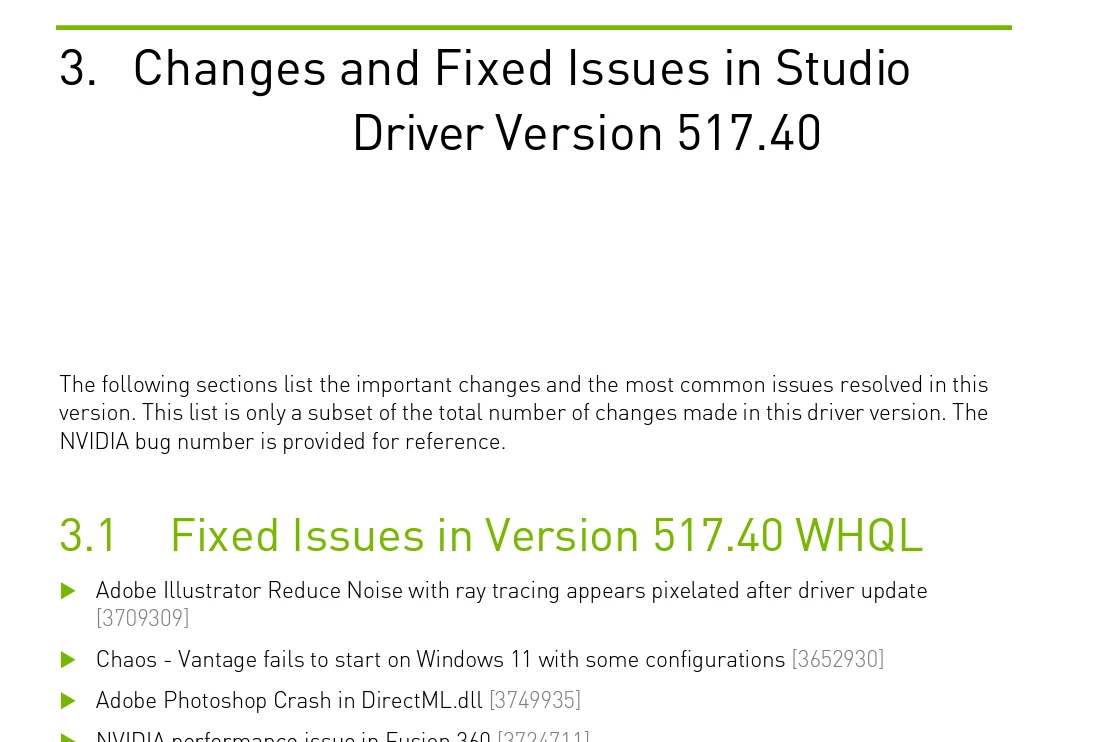
    Those of us with nVidia GPUs, driver 517.40 came out on Sept 20, and it includes a fix for a Photoshop error. If your driver is older than Sept 20, grab the update and see if that mellows things out.


    返信数 11

    Mark C. Dahm
    Community Manager
    Mark C. DahmCommunity Manager解決!
    Community Manager
    November 18, 2022

    Those of us with nVidia GPUs, driver 517.40 came out on Sept 20, and it includes a fix for a Photoshop error. If your driver is older than Sept 20, grab the update and see if that mellows things out.


    Inspiring
    November 23, 2022

    Photoshop 24 came out on October 18th. So how does an older Nvidia Driver from September fix the problem?

    I initally had Photoshop 2023 V24 with Nvidia Studio Driver 522.30 which is newer and PS 24 would reandomly close without a crash report dialog box.

    Now we are now up to: NVIDIA Studio Driver Version: 526.98 WHQL Release Date: 2022.11.16 and PS 24.0.1 and I still get PS randoml;y closing. 

    Problem not solved!

    Mark C. Dahm
    Community Manager
    Community Manager
    November 23, 2022

    @Viscott , the note was for those that had older versions of the driver, which would have been problematic for any version of Photoshop.


    If you have 24.0.1 installed, then could you try the following:


    Navigate with Windows Explorer to: [Installation Drive]:\Users[User Name]\AppData\Roaming\Adobe\Adobe Photoshop CC 2023\Adobe Photoshop CC 2023 Settings\
    Create a text file called "PSUserConfig.txt" with the only text line in that file as follows:

    GPUAllow3D 0


    This does NOT work in versions of Photoshop before 24.0.1.

    Restart Photoshop and test.

    Mark C. Dahm
    Community Manager
    Community Manager
    November 18, 2022

    @PECourtejoie , escalating that thread you shared regarding the diagnostic plugin; will update when I have new information.

    Mark C. Dahm
    Community Manager
    Community Manager
    November 18, 2022

    @vinny dellay we will be rolling out 24.0.1 tomorrow; give that a whirl once it shows up in your Creative Cloud app and let me know how it goes.


    vinny dellay
    vinny dellay作成者
    Known Participant
    November 1, 2022

    Hello again!


    Ther beta version worked right out of the gate, but the pressure sensativity didn't.  So I then did created a PSUserConfig.txt file with:

    # Use WinTab
    UseSystemStylus 0
    WarnRunningScripts 0


    and that got the pressure sensativity working again.


    I did delete Photoshop preferences previously to no avail.


    Another person had commented that it might have something to do with the sniffer file.  I had previously uninstalled the softwre/drivers for my Nvidea card and reinstalled making sure to check the "studio" driver, not the "game ready" driver, but I can't recall if I checked "cl;ean install" or not.


    I'm in the middle of a job now and the beta is performing well, so I'll have to wait till tonight before I repeat the process with the nvidia card.


    Thanks again for your assistance.  It's maddening when you're under a deadline and can't figure things out!


    I'll post again tonight with the latest results!


    Mark.Dahm
    Community Manager
    Community Manager
    November 1, 2022

    @vinny dellay , did you do the PsUserconfig file workaround with the Beta?


    I'm not very deep on the wacom issues; will need to call in for support on that. But interesting that the crashing has stopped. Presuming you tried deleting preferences for both Photoshops, as well?


    vinny dellay
    vinny dellay作成者
    Known Participant
    November 1, 2022

    Crap.. I just noticed that the pressure sensativity is no longer working .  It works in other programs.. just not photoshop (this is in reference to both the Beta version and version 24.0).


    I just wen ahead and uninstalled my wacom tablet software and then reinstalled it along with the drivers and it's still not working..

    vinny dellay
    vinny dellay作成者
    Known Participant
    November 1, 2022

    Hello, Mark!


    I went ahead and installed The Beta version and it so far it works perfectly!  Should I just stick to using the Beta version?

    vinny dellay
    vinny dellay作成者
    Known Participant
    November 1, 2022

    Oh.. just realized that I haven't answered your initial question:


    I am not opening any files with 3D in them.  Just standard jpegs and PSDs..

    vinny dellay
    vinny dellay作成者
    Known Participant
    November 1, 2022

    Thank you so much for replying!  I'm going to install the Beta now and I'll let you know how it pans out..

    Mark.Dahm
    Community Manager
    Community Manager
    October 31, 2022

    @vinny dellay , based on the other thread you posted, it looks like your GPU is plenty powerful, and the Intel integrated card is NOT the primary, so you should be set as far as a good GPU goes.


    Are you using any of Photoshop's 3D tools? Opening files with 3D content in them? If not, can you try the following: 

    1. In the creative cloud app, click the Beta in the list on the left, and install Photoshop (Beta). This will install a version of Photoshop that is newer than 24.0, but into a different directory so that it will not overwrite the retail version you already have. Double clicking on .psd files will open in the Beta version of Ps, so if you want to return file associations back to the retail version for double click support, you can uninstall the Beta or reinstall the retail after the Beta. It contains a feature that I want to try out, but first it would be great if you can confirm the problem still happens with the Beta.

    2. If the problem still happens, quit Photoshop.

    3. Navigate to: [Installation Drive]:\Users[User Name]\AppData\Roaming\Adobe\Adobe Photoshop CC (Beta)\Adobe Photoshop (Beta) Settings\

    4. Create a text file, name it "PsUserconfig.txt"

    5. add the following test to that file, then save the file:

    GPUAllow3D 0

    6. Launch Photoshop and see if it crashes the same