


Participant
November 18, 2023
解決済み

Who tied Generative Fill to the crop tool

  • November 18, 2023
  • 返信数 1.
  • 587 ビュー

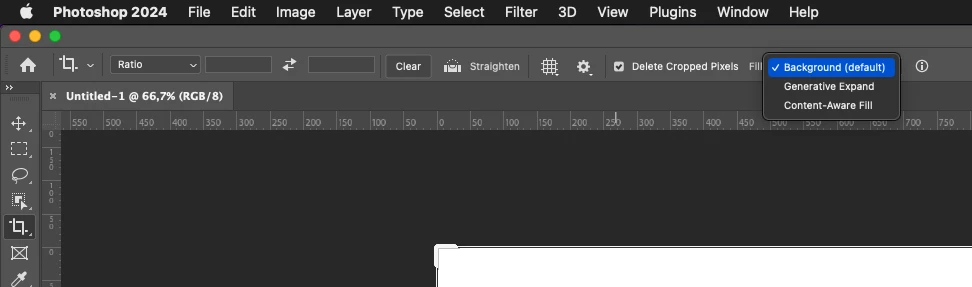
Now that this fake photo AI has transformed "PHOTO"shop in to "FAKEREALITY"shop, the generative AI function is embedded in the crop tool.  So you've lost the capability of resizing an image on the fly since you can't touch the crop tool without FakeReality function popping up.   It's truly not ready for prime time anyway since it perpetually says any request is against "community standards".


[abuse removed]


Can you turn the AI Generative FIll OFF  and stop it from interferring with simple crop functioning????
このトピックへの返信は締め切られました。
解決に役立った回答 rudo123

Just set Fill to Background (default)?


返信数 1

rudo123解決!
Inspiring
November 18, 2023

Just set Fill to Background (default)?


Participant
November 18, 2023

Thanks.... it seems like every time you update they move settings locations to someplace new location.   While I thank. you for pointing out where it is and how to turn it off, it's not the default.   Every update since they added the generative fill, the crop function has been set to override to the generative fill.   When the AI Fill is so painfully awful, I'm not sure why they keep forcing it to the foreground.   Must be a part of their sales pitch, more than practical use for photography.

davescm
Community Expert
Community Expert
November 18, 2023

'............it's not the default'


It is here - it will be set to Background as the default if 'delete cropped pixels' is checked and Transparent as the default if 'delete cropped pixels' is unchecked. If you are seeing something else, click on the reveal arrow at the left of the option bar (next to the crop symbol) then on the cog and choose 'Reset tool'


Dave