

ashlayw
Known Participant
December 24, 2019
Answered

Video Clip Audio is out of Sync with the video on my project in Premiere Rush

  • December 24, 2019
  • 8 replies
  • 22624 views

Hi

Recently, I have had an issue with my project audio being out of sync of the video, when I have cut the clips into smaller segments. The initial clip seems to be in sync but the other ones are not. The final clip is also out of sync slightly.


I have an image describing my issue here:
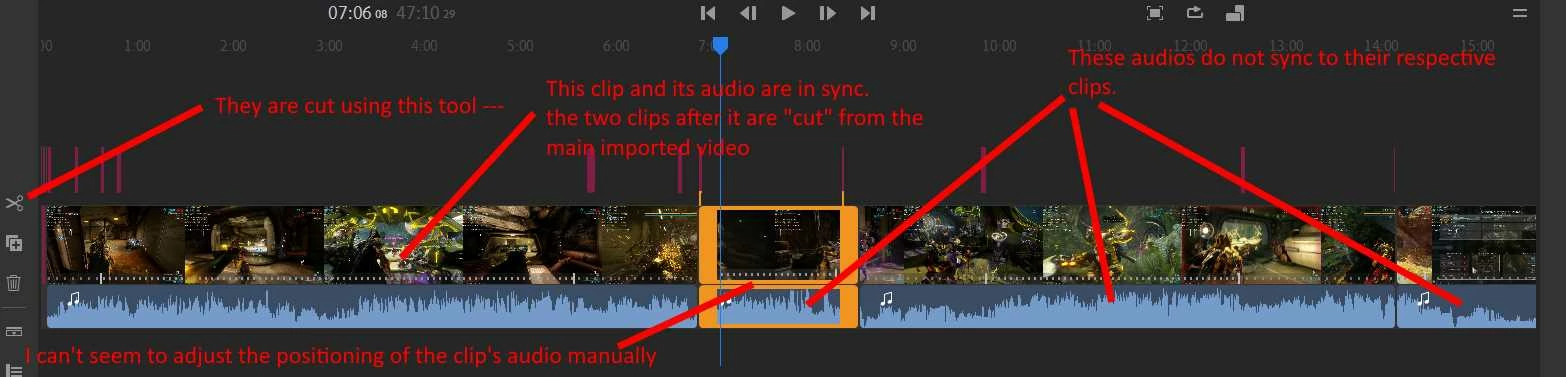
 

Any advice would be greatly appreciated. Maybe it is something I am doing wrong.


Thanks


Ash.


Title edited by mod

Correct answer Adel5FF3

HandBrake worked:DDDDDDD

8 replies

Participant
January 31, 2024

One thing I just learned. DO NOT EDIT YOUR VIDEO BEFORE YOU TAKE IT TO RUSH. This make your sound go of sync. If you for example edit in iPhones own editor, at least save it as a new video and then take it in to adobe. Fixed my problems.

Kevin-Monahan
Community Manager
Community Manager
March 12, 2024

Thank you very much for letting us know your observation, @Teo35084491msmr! I didn't know that. Your tip is going to help a lot of folks. You're a saint!


Cheers,
Kevin

Kevin Monahan - Sr. Community and Engagement Strategist – Adobe Pro Video and Audio
Participating Frequently
December 9, 2023

I have the same problem when I'm pasting multiple .MTS files together without cutting anything. The fact that this bug has gone unresolved for so long says all you need to know about Adobe's expensive subscription software.

Participant
January 19, 2024

I am having this issue too and I wish I would have found this thread prior to spending hours uploading and editing a vlog...Adobe come on!!!

Participant
September 21, 2023

Oh my soul😱 Am new to video creation, but just spent weeks on footage, audio & visuals, just to see in the final version the audio is out of sync!!!!! Such a basic thing but wildly NB. Exprnsive software to have such a glitch! Ambusing iphone to film so not fancy footage at all. Would Capcut have same problem?

Participant
September 21, 2023

Nope, every other video editor - like Capcut - works just fine!

Participant
September 18, 2023

My iPhone HD 60 frames always out of sinc bad.  So I run my vid through splice first then put it in rush.  Good to go then.  
It's still sucks to have to do though.

Participant
September 10, 2022

I am having this issue but when I export it


Kevin-Monahan
Community Manager
Community Manager
June 7, 2023

Hi @Laura23975673riu0,

I read your message. You say you are having A/V sync issues on export. Does that mean that the exported file itself has these issues? If so, try uploading it to a site like Google Drive or YouTube. Does the sync problem occur in the uploaded file? If the so, it may be that your computer's graphics card cannot playback your file for hardware reasons. That is the case with certain computers and 4K exports. Is your export 4K? Let us know the results of your test.

If the advice here does not help, please feel free to reach out for one-to-one support here. The chat pod is in the lower-right corner. Ask for the "video queue." Let us know what they say.


Sorry for the hassle.


Thanks,
Kevin

Kevin Monahan - Sr. Community and Engagement Strategist – Adobe Pro Video and Audio
Participant
August 31, 2023

Hi


I am extending more than replying.  My issue is similar.  I import 4K files shot on Sony Tough cards and my computer won't play them at all.  When I import into Premiere (latest version) it plays, but out of sync making editing very difficult.  When I export the video IT IS IN SYNC.  When I put this problem to Adobe Help, they give me two dozen answers, not one of which mentions sync.  Simple problems seem to confuse them.

Bob, Baffled in Burlington

Participant
August 16, 2021

Hello I am also having this issue. If I import a 1 minute video that has been trimmed in iOS Photos and plays back fine, when I save as new clip, close that and open Rush to import the rendered clip (which plays in sync in apple photos), it is out of sync. I tried it with 2 diff exports of the same clip.


unrelated but I have been having problems with audio filmed using the DJI 4 gimbal/app, opened and edited directly with Adobe Rush, the right audio channel disappears completely. It may have something to do with opening the file on my windows 10 machine but once it's gone, that's it- I actually had to start from scratch and redo an entire hour and a half long edit of my cousins first show (most of it was just them performing and I already had all the times stamped etc so it was slightly less painful but still), and even then the error happened a second time on the minute and a half long opening clip of the new version in which I had to re-upload the entire clip again and just drop that over the old one (thank god that was the easiest one it could have happened to). 

thank you for reading my concerns

Aaron

Participant
August 16, 2021

PS- I am using the most current iOS and Rush as of Aug 14, 2021 on an iPhone 11pro. Win10 Computer is Aorus 15G, also up to date apps + OS

Adel5FF3Correct answer
Participant
February 2, 2021

HandBrake worked:DDDDDDD

Participant
March 13, 2024

Did you put all files through handbrake first or put entire file in handbrake after. Do you mind going into more detail on your workflow, thank you 

Kevin-Monahan
Community Manager
Community Manager
March 13, 2024

Hi @ah28766,

The former. Process the clips first, then edit them. Sync won't be an issue during an edit or afterward. Please try that and report back.


Thanks,
Kevin

Kevin Monahan - Sr. Community and Engagement Strategist – Adobe Pro Video and Audio
Kartika Rawat
Community Manager
Community Manager
December 24, 2019

Hi Ash!

Welcome to the community. According to the attached screenshot, I understand that after trims the media files, video and audio go out of sync. Am I correct?

We would need more info to understand the issue.

You may try to export the media files and check if it's still out of sync in the final render.


Looking forward to your response.

Thanks,

Kartika

ashlayw
ashlaywAuthor
Known Participant
December 25, 2019

Hi,


Thanks for your reply. Yes, the audio for the video clips are out of sync after the trimmed edits.

Here is the version:


My PC is a custom-built computer running Windows 10 Professional, the specifications are:


AMD Ryzen 7 3700X 8-core processor

32GB DDR4 3200 MHz RAM

AMD Radeon RX 5700

Corsair Force MP510 480 GB M.2 NVME SSD


Nothing is overclocked.


The files are created by Radeon ReLive. They are MP4 files and are using HEVC for compression.


I have had this issue before, with another project. Though all of my projects are using MP4 HEVC files created by Radeon ReLive (gameplay footage recorded by the graphics card).


I have exported the media and the resultant file remains out of Sync 😞 It's not massively out of Sync, but enough to really break characters that are speaking, or sudden events, are really noticable.


Ash


Kartika Rawat
Community Manager
Community Manager
December 26, 2019

MP4 (H.264 and HEVC) files are not good for editing because they have variable frame rates. I think that is the reason why your files are out of sync.

Could you please share a sample file so that we can get it checked by the Rush team? https://helpx.adobe.com/creative-cloud/help/share.html


Thanks,

Kartika