


Participating Frequently
August 8, 2019
解決済み

Invisible text in Adobe Acrobat DC

  • August 8, 2019
  • 返信数 7.
  • 20608 ビュー

I have been having a problem with some of the pdfs that I have downloaded. Most turn out fine but some of them in some sections, the texts do not show up. There are a couple of lines of yellow text on the page but other than that it is blank. For example, I may download a magazine that most of the articles show up just fine while some of them show up as I have described. I was wondering, how do I fix this problem so that I can read the pages?
このトピックへの返信は締め切られました。
解決に役立った回答 vdobhal


Hi alphagenius​,

I would suggest you to, uninstall the product and clean the product using the Acrobat Cleaner tool - version 4 (link provided below).

http://labsdownload.adobe.com/pub/labs/acrobat_ittools/AdobeAcroCleaner_DC2015.zip

You can install the product again and see if this fixes the issue.

For more details on cleaner: Download Adobe Reader and Acrobat Cleaner Tool - Adobe Labs

Thanks,

Vinod

返信数 7

ls_rbls
Community Expert
Community Expert
August 14, 2019

you can also confirm online with a adress lookup tool to confirm the results that you gathered through your command line terminal(s):

ls_rbls
Community Expert
Community Expert
August 14, 2019

One more thing and I apologize for taking over so much in this thread (it is not my intention to deviate from the main topic and the sugestions of the other memebers who are trying to help you),

When you try and reach those links through your web browser(s), do you Google or Bing a search and then you click from the displayed results, OR, do you actually enter the address manually in the URL bar(long method)?

Reason I'm asking is because of browsing hi-jacking issues in the past. I'm not saying this is your case, but you stressed that sometimes you can display the document correctly and sometimes in comes out with blank areas.

Is good to get in the habit  of checking if the URL's that you click on are redirected to an obfuscated URL rather than a legitimate web server where the original file is mirrored for downloads. Additionally I found the following thread posted back in Jan 14, 2014 in which the user posted MIME file extensions can partially be part of the problem

https://forums.adobe.com/thread/1378243

So for the sake of healthy curiosity and adventuruous Raspberrian fun you can inspect the elements on the page of the address that you are punching in your browser(s) like shown in the slides below:

You can use your command terminal and perform a nameservice lookup query or using the Windows Power Shell :

In the image above I configured Cloudfare DNS servers for use in my network. More infor here if it is of your interest to harness the capability your clients when reaching out for DNS queries on the original web server(s) you are trying to hit (https://www.windowscentral.com/how-configure-cloudflare-dns-1111-service-windows-10-and-router )

Next slide, using Power Shell, same comand:

And the last slide is to back up what I tried to say earlier about the possibility of updating the MIME file extensions:

ls_rbls
Community Expert
Community Expert
August 14, 2019

Hello again,

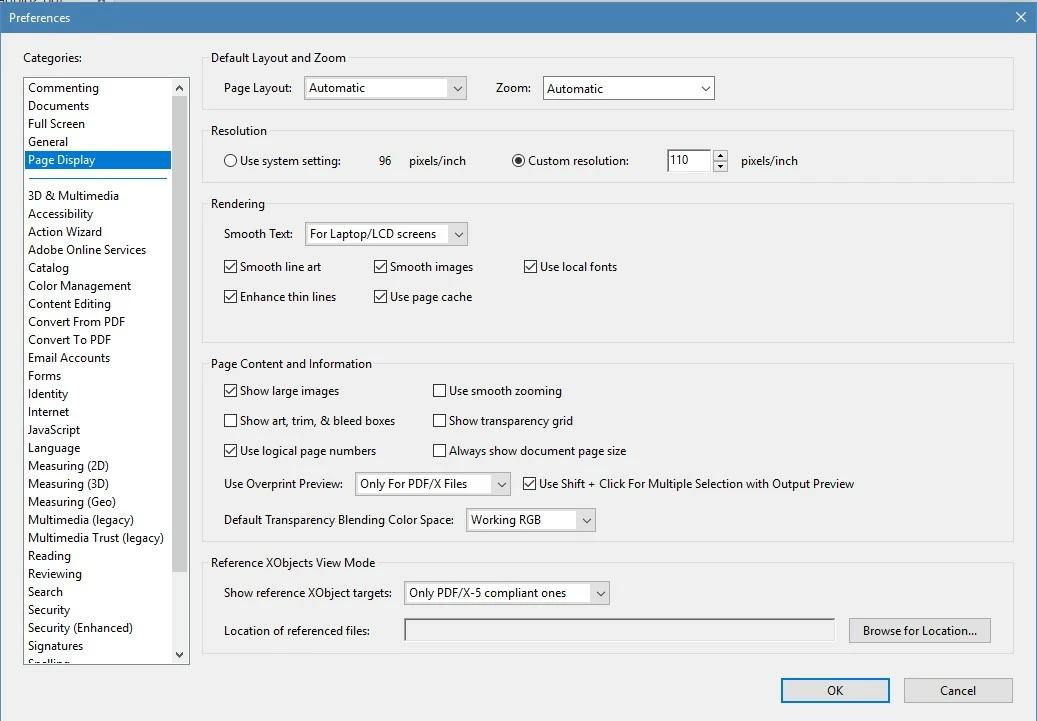
I am including a screenshot of the same Preference  settings under "Page Display". If it helps, please note that keeping my producted updated incorporated new configuration options. I downloaded some PDF magazines from the links you provided and worked for me too like in the case of Vinod.

I don't see in your last reply if you applied or not the update that was announced yesterday in these forums.

This is how it looks in my Acrobat with updates applied:

I also have an LCD screen but for the Smooth Text I selected "For Monitor" and maybe changing this setting could improve the viewing experience.

ls_rbls
Community Expert
Community Expert
August 14, 2019

Aside from considering to install the new update 2019.012.20036 that was announced today in these forums, is your Windows 10 configured as Desktop Mode or Tablet Mode? If it is in Tablet Mode switch to Desktop Mode.

Also, if you change this option to let Windows choose "Use appropriate mode for my hardware" would it do any difference?

And see if the Tablet Mode settings where it says "When this device automatically switches on or off" , select "Don't ask me don't switch" from the drop down menu.

I got curious also, when you said that you can view some and others have areas in blank.

Do you think if by disabling the Adobe PDF plugin from the browser and would do any difference to the viewing experience after downloading the files?

Configure browser to use the Adobe PDF plug-in to open online PDF files

Display PDF in browser Adobe Acrobat, Acrobat Reader

jennylynn99作成者
Participating Frequently
August 14, 2019

I disabled the browser plugin and downloaded the pdf again and it still gave the same problem.

I was already set to desktop mode. I also change the setting to use desktop all of the time and I still did not get any change. It was already set at "Use appropriate mode for my hardware."

ls_rbls
Community Expert
Community Expert
August 9, 2019

With the document opened take a screen shot of your desktop using the following keyboard short cuts : press the "Ctrl" key and while keepimg it depressed hit the "Print Screen" key once in your keyboard.

Then open an image editor like MS Paint and paste it there: press "Ctrl" key and letter "V" key to paste it

Then save the image as PNG for example.

Then come back here to the reply box;  take a look at the icons provided in the top toolbar ribbon of this reply box.

If you you hover the mouse pointer over each icon for about a second,  a banner will display giving you a brief description of that icon toolset. So, starting from the left to the right of the toolbar ribbon hover the mouse pointer until you see "Insert Image" banner pop up. Click on the Insert Image Icon and upload your screen shot here.

jane-e
Community Expert
Community Expert
August 9, 2019

Where are you downloading the PDFs from?

jennylynn99作成者
Participating Frequently
August 9, 2019

I am downloading them from https://hackspace.raspberrypi.org/issues & https://www.raspberrypi.org/magpi/issues/. How can I upload a couple of examples?

Dov Isaacs
Legend
August 9, 2019

You can share via the Document Cloud Share service accessible in Acrobat DC.

          - Dov

- Dov Isaacs, former Adobe Principal Scientist (April 30, 1990 - May 30, 2021)
Dov Isaacs
Legend
August 8, 2019

Without providing a screen shot of what you see (and don't) as well as posting an example PDF file exhibiting this issue, there isn't much we can do to assist you.

          - Dov

- Dov Isaacs, former Adobe Principal Scientist (April 30, 1990 - May 30, 2021)