


Acrobat Returns Failure: ".. Request could not be completed..License Expired or Not Activated
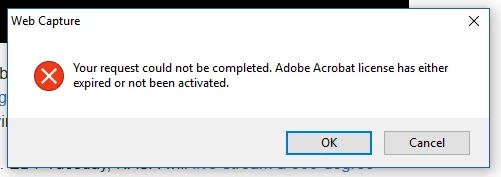
I have recently been receiving this error when using "Convert Webpage To PDF". , "Your request could not be completed..Adobe Acrobat License has either expired or not been activated."
I am logged in to Creative Cloud, checked my active membership status, and I cannot use the extension on either Chrome or Firefox. Cannot print using Adobe PDF printer.
The Acrobat Version is: 17.009.20044.25828, Win 10, Chrome Version 57.0.2987.133 (64-bit), FireFox Version 52.0.2 (32-bit)
When opening Adobe Acrobat DC Application and inserting the URL, the response displayed is
"Bad Image http://b.scorecardresearch.com/b?c1=7&c2=13739933&c3=20121515121&ns__t=1492597634785796&ns_c=UTF-8&cv=3.1&c8=Watch%20NASA%20Rocket%20Launch%20in%20Live%20360%20Video%20for%20the%20First%20Time%20Ever%20-%20NBC%20News&c7=http%3A%2F%2Fwww.nbcnews.com%2Fmach%2Fspace%2Fwatch-nasa-rocket-launch-live-360-video-first-time-ever-n747736&c9=
General Error http://idsync.rlcdn.com/360897.gif?partner_uid=422631731756675"
I suspect that the PDF is attempting to connect to a 3rd party which hosts the graphic or video, my commonly used sites, even my own, create the same issue or just hangs. I have reinstalled the extension on both browsers and deleted/reinstalled Adobe Acrobat DC as a printer and still the same luck. None.
It won't even convert this page.
I use this for downloading college notes and pages and now it won't work.
Any clues?
Thanks in advance,
Rick
 AdChoices