


BUG? Adobe Acrobat Pro breaks Semibold and Medium Italic fonts when creating PDFs from Word
Dear Community Members,
Adobe Acrobat Pro breaks Semibold and Medium Italic fonts when creating PDFs from Word - Multiple fonts affected since August 2025. Adobe Acrobat Pro fails to correctly embed or preserve some (or all?) Semibold Italic and Medium Italic font variants when creating PDFs from Word docx files. This issue affects multiple font families and appears to have emerged between June 28 and August 10, 2025.
Does this affect you too? Please reply if you're experiencing similar issues with Semibold or Medium Italic fonts in recent Adobe versions.
My system info:
- Adobe Acrobat Pro Version: 2025.001.20844
- Windows Version: Windows 11 Pro Version 10.0.22631 Build 22631
- Last working PDF created: June 28, 2025
- First PDF with font problems: August 10, 2025
- Problem persists as of: November 10, 2025
SOME AFFECTED FONTS (Confirmed with testing): See attached screenshot showing side-by-side comparison of Word document vs Adobe-generated PDF.
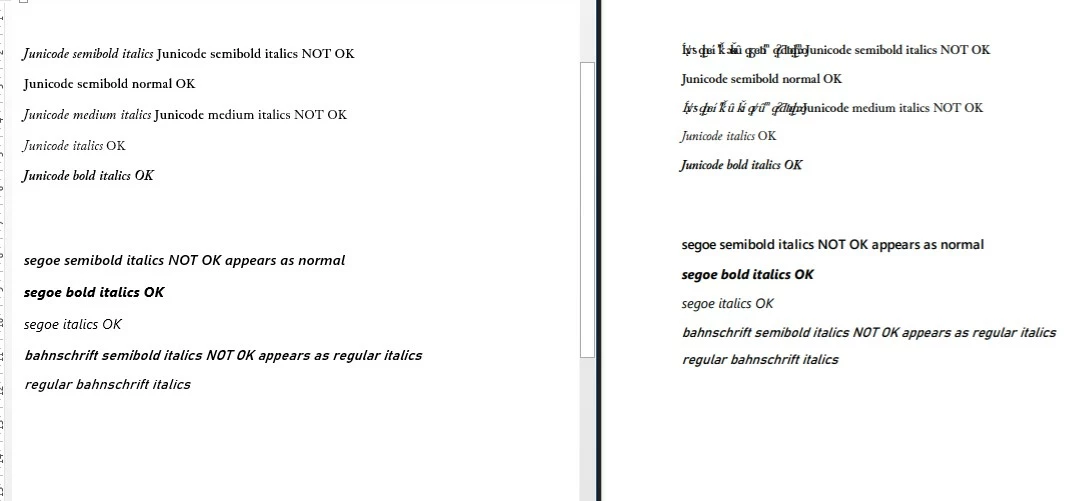
FAILS:
- Junicode Semibold Italic → Garbled characters (substitutes with Courier)
- Junicode Medium Italic → Garbled characters
- Segoe UI Semibold Italic → Semibold only (removes italic)
- Bahnschrift Semibold Italic → Regular Italic (removes semibold weight)
WORKS:
- Junicode Semibold (regular) → Correctly rendered
- Junicode Italic (regular weight) → Correctly rendered
- Junicode Bold Italic → Correctly rendered
- Segoe UI Bold Italic → Correctly rendered
PATTERN: Adobe fails with Semibold Italic and Medium Italic combinations across these tested fonts, but Bold Italic works correctly.
ERROR MESSAGES: When using Adobe Distiller, the following error appears in the log:
%%[ ProductName: Distiller ]%%
Junicode-SmBoldItalic not found, using Courier.
%%[ Error: invalidfont; OffendingCommand: xshow ]%%
No warning dialogs appear to the user - Adobe silently substitutes fonts or removes styling.
REPRODUCTION STEPS:
- Create a Word document (.docx) with text in Junicode Semibold Italic (or Segoe UI Semibold Italic, or Bahnschrift Semibold Italic)
- Use Adobe Acrobat Pro: Create PDF → From File (or File → Create → PDF from file)
- Open resulting PDF
- Result: Font is incorrectly rendered (garbled text, wrong weight, or missing italic styling)
EVIDENCE SUGGESTING THIS IS AN ADOBE BUG:
- Fonts display perfectly in Word - the font files themselves are not corrupted
- Microsoft Print to PDF embeds Semibold Italic correctly - the same fonts work when using Word's "Save as PDF" or "Microsoft Print to PDF"
- Fonts are confirmed embeddable - Windows font properties show embedding permissions are allowed
- This worked previously - PDFs created on June 28, 2025 with the same fonts embedded correctly
- Multiple fonts affected - This is not specific to one font family; pattern is consistent across different font vendors
This bug prevents my professional book publishing workflow where Semibold Italic is commonly used for emphasis.
REQUEST:
- Can Adobe confirm this is a known issue?
- Can a timeline be estimated for a fix?
- Are other users experiencing this?
- Is there a workaround within Adobe?
 AdChoices