Participant
December 20, 2020
解決済み

How to get rid of the dash marks at bottom of each page in a PDF

  • December 20, 2020
  • 返信数 2.
  • 1481 ビュー


I'm really wanting to get rid of the ( ------------) dash marks which show up at the bottom of each page in a PDF - is this possible? The document was made in Word and don't show up in the Word file but only when I convert to a PDF. 



このトピックへの返信は締め切られました。
解決に役立った回答 JR Boulay

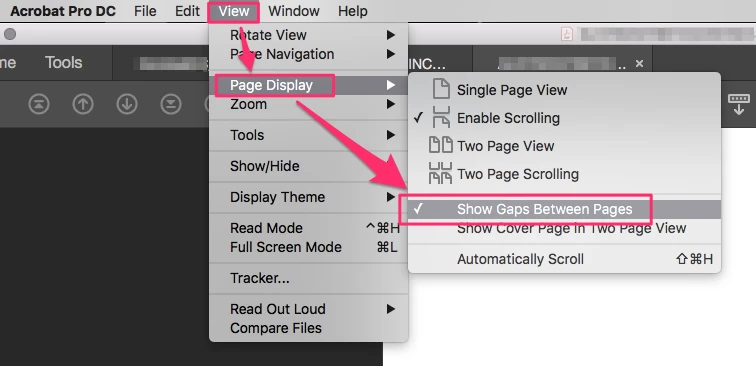
Go to the View menu : Page Display : Show Gaps Between Pages (check on)


返信数 2

JR Boulay
Community Expert
JR BoulayCommunity Expert解決!
Community Expert
December 20, 2020

Go to the View menu : Page Display : Show Gaps Between Pages (check on)


Acrobate du PDF, InDesigner et Photoshopographe
Participant
December 20, 2020

Thank you so very much JR - that's exactly what I needed to do! 

Legend
December 20, 2020

I don't think I've ever seen marks like this. What is the grey area? Perhaps a view of the whole window, including title bars, will tell us more.