



Jan Nordlund
Participating Frequently
June 21, 2021
解決済み

Letters å, ä and ö disappears when copying text from Adobe Acrobat (Reader and Acrobat Pro)

  • June 21, 2021
  • 返信数 3.
  • 6188 ビュー

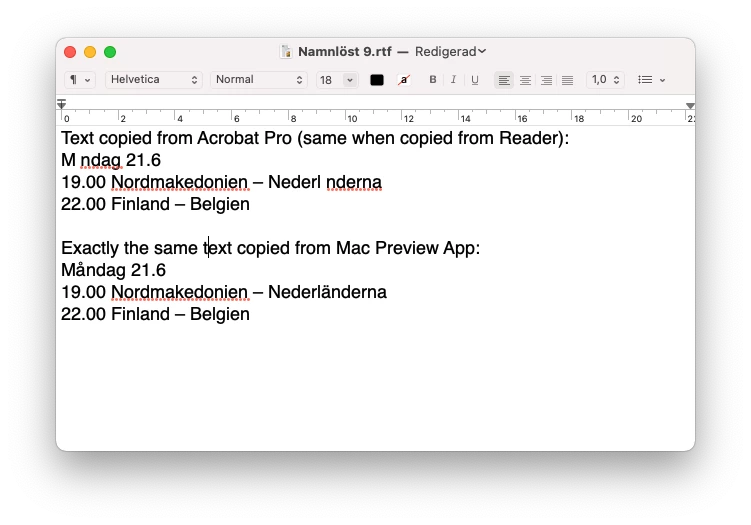
A couple of weeks ago a problem has started when I copy text from a PDF-file in Adobe Acrobat (Reader and Acrobat Pro). The swedish letters å, ä and ö disappears when I paste the text into InDesign, Mac Text Editor or any other text app. It leaves a blank space where those letters should be. It does not matter if the file is produced in Acrobat or if I open a PDF made in InDesign. The fonts do contain the letters å, ä and ö, because it's no problem when working in InDesign AND the letters are VISIBLE when looking at the file in Acrobat. Making a print file also works – the å, ä, ö letters are included. 


It feels that the problem must be in Acrobat since when I open exactly the same PDF-file in Mac OS preview app and copy the same text it works! At home I use a Mac Pro (late 2013) and Mac OS Big Sur (11.4) and at work I use an iMac (Retina 5K, 27-inch, 2019) and Mac OS Mojave (10.14.6). Same problem despite different Mac computers and Mac OS and different versions of InDesign. But the Acrobat versions are the same, 2021.005.20048


I enclose a screenshot from Mac Text Editor to visualize how it looks. Hoping for a solution.
このトピックへの返信は締め切られました。
解決に役立った回答 AnandSri

Hi @Janne the Searcher 


Thanks for your time and for your cooperation on this.


Hope you are doing well.

The fix is available now with the latest update of Acrobat and Reader DC. Please install the latest update from the following link: https://www.adobe.com/devnet-docs/acrobatetk/tools/ReleaseNotesDC/continuous/dccontinuousjunehotfix2... 

Download the setup, run it, reboot the machine (if possible) and check the app functionality. 


To know more about the latest update, you can refer to this article: 21.005.20054 Optional update, June 23, 2021


Let us know if you still experience any issues.


Regards,
Anand Sri.

返信数 3

AnandSri
Community Manager
AnandSriCommunity Manager解決!
Community Manager
June 23, 2021

Hi @Janne the Searcher 


Thanks for your time and for your cooperation on this.


Hope you are doing well.

The fix is available now with the latest update of Acrobat and Reader DC. Please install the latest update from the following link: https://www.adobe.com/devnet-docs/acrobatetk/tools/ReleaseNotesDC/continuous/dccontinuousjunehotfix2... 

Download the setup, run it, reboot the machine (if possible) and check the app functionality. 


To know more about the latest update, you can refer to this article: 21.005.20054 Optional update, June 23, 2021


Let us know if you still experience any issues.


Regards,
Anand Sri.

Participant
January 27, 2022

I updated again today and now there is the SAME PROBLEM!!!

Letters Æ Ø Å is lost when copy from Acrobat 😞


What to do?

Participating Frequently
February 9, 2022

Here is a direct copy/paste from the title line just under the picture

Centern lägger förslag för att sänka bränslepriserna

The accents seem complete. Since they aren't complete for you it is probably useful to know what is different. Please check with the same text (title line)

My setup:

- Windows 10 English

- Acrobat Reader English 2021.011.20039 (64-bit)

- Pasting into Microsoft Edge or Microsoft Notepad (both work)


I am a Mac user, pasting in Word.


Amal.
Community Manager
Community Manager
June 21, 2021

Hi Janne


++ Adding to the discussion


Hope you are doing well and sorry for the trouble.


We are aware of this issue and it is already reported to our engineering team to find the fix.


We will be sharing the update as soon as we will hear anything from them.


Thanks for your time and patience.


Regards

Amal

try67
Community Expert
Community Expert
June 21, 2021

This is indeed a known bug in the application that was introduced in the latest update. Either roll back to a previous version or wait for a new update to come along and fix it (hopefully)...