


Inspiring
June 7, 2023
解決済み

Monitor does not show all of the lines in tables on a PDF

  • June 7, 2023
  • 返信数 2.
  • 1540 ビュー

I thought I was having issues with the app I exported from but the problem seems to lie with Acrobat.


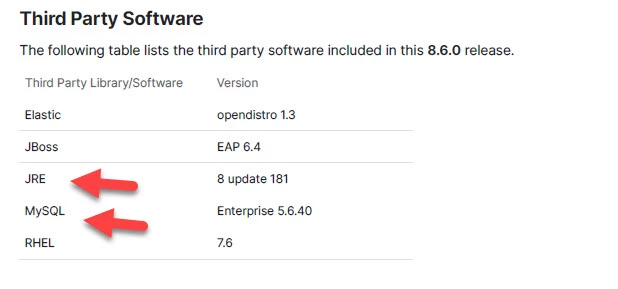
If I print a PDF it shows all the table lines correctly. If I display the PDF on another PC they display properly. However, when I display the PDF on my monitor it "loses" some of the tablelines. Any ideas?

The lines are missing under JRE and MySQL.
このトピックへの返信は締め切られました。
解決に役立った回答 gary_sc

Yes, change the magnification of your viewing. 


What's happening is that as the pixels lie in the document, they do not necessarily lie with the pixels on your monitor.  It has to do with the alignment of pixels at any given magnification and how the document was made.

返信数 2

JR Boulay
Community Expert
Community Expert
June 8, 2023

Try to play with these settings:

Acrobate du PDF, InDesigner et Photoshopographe
gary_sc
Community Expert
gary_scCommunity Expert解決!
Community Expert
June 7, 2023

Yes, change the magnification of your viewing. 


What's happening is that as the pixels lie in the document, they do not necessarily lie with the pixels on your monitor.  It has to do with the alignment of pixels at any given magnification and how the document was made.

Inspiring
June 8, 2023

Thanks! I never would have thought of that.