Inspiring
July 8, 2024
解決済み

OCR: Page elements get rotated instead of leaving them level

  • July 8, 2024
  • 返信数 1.
  • 3426 ビュー

I would like to OCR the attached PDF page, preferably into editable text and images. However, whatever I try, it rotates the elements on the page by something like 20°. If I select Searchable Image (Exact), then the recognized text gets rotated. The rotation doesn’t even make sense.

How do I tell Acrobat not to rotate the elements on the page?

このトピックへの返信は締め切られました。
解決に役立った回答 gary_sc

OK, I also had the Old UI going, so I used that.

First, go into Scan & OCR

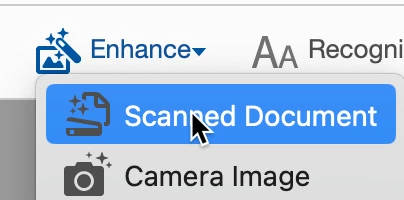
Next, along the top bar, select "Enhance" and then Scanned Document

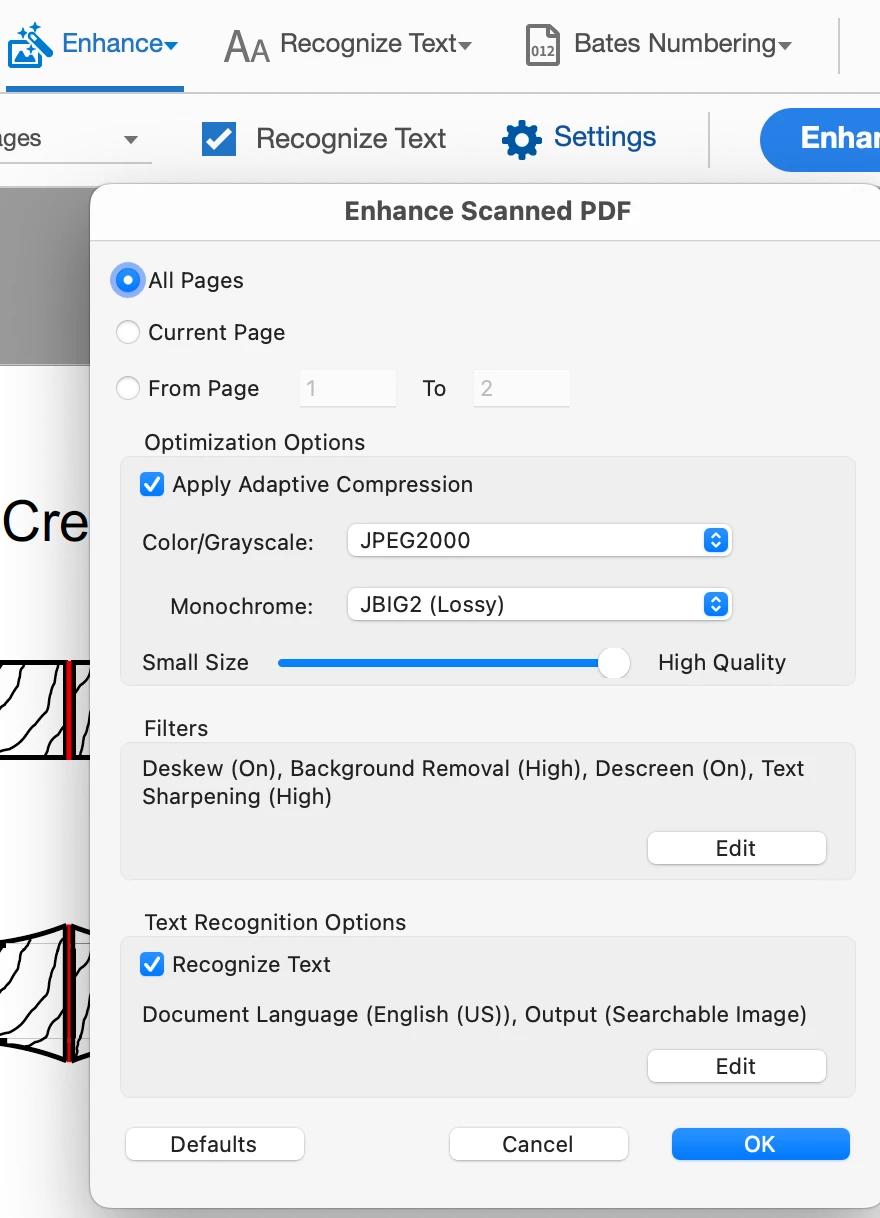
Next, click on the Gear icon for Settings


And lastly, on the bottom of the window (seen above) click on the Edit of  Text Recognition Options

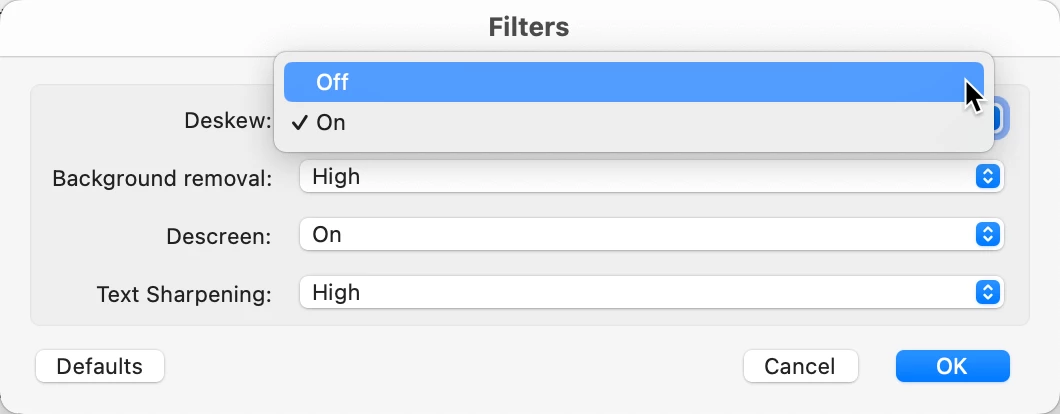
Then go to Deskew and turn that off. 

As a side, but related issue. I get a business-related journal that I scan for storage. On my flatbed scanner, I scan one side, flip 180°, scan the next page, wash, rince, repeat for all ≈ 60+ pages. With Deskew turned on, Acrobat's OCR recognizes that the text is 180° off and rotates the page back to 0° and I'm good to go. So, it definately has some advantages. So, when you're done with this, you might want to turn it back on.


Let me know if this solves your issue.

返信数 1

gary_sc
Community Expert
Community Expert
July 8, 2024

My guess is that it's focusing on these lines (in red) and not on the vertical line.

 Let me know if you're using the new or old User Interface and I'll tell you how to turn the auto-roate off.

feklee作成者
Inspiring
July 8, 2024

Thanks for the quick and detailed reply, Gary!

I am using the new interface, but can switch back to the old interface in case that helps. I faintly remember encountering the same issue years ago.

gary_sc
Community Expert
gary_scCommunity Expert解決!
Community Expert
July 8, 2024

OK, I also had the Old UI going, so I used that.

First, go into Scan & OCR

Next, along the top bar, select "Enhance" and then Scanned Document

Next, click on the Gear icon for Settings


And lastly, on the bottom of the window (seen above) click on the Edit of  Text Recognition Options

Then go to Deskew and turn that off. 

As a side, but related issue. I get a business-related journal that I scan for storage. On my flatbed scanner, I scan one side, flip 180°, scan the next page, wash, rince, repeat for all ≈ 60+ pages. With Deskew turned on, Acrobat's OCR recognizes that the text is 180° off and rotates the page back to 0° and I'm good to go. So, it definately has some advantages. So, when you're done with this, you might want to turn it back on.


Let me know if this solves your issue.