


Known Participant
March 13, 2019
解決済み

Parms for converting a pdf to jpg

  • March 13, 2019
  • 返信数 8.
  • 2113 ビュー

I need to understand what I have to do make it export to the

jpg as 600 pix wide and constrain proportions turned on and

with no length set, since I have constrain proportions turned on.

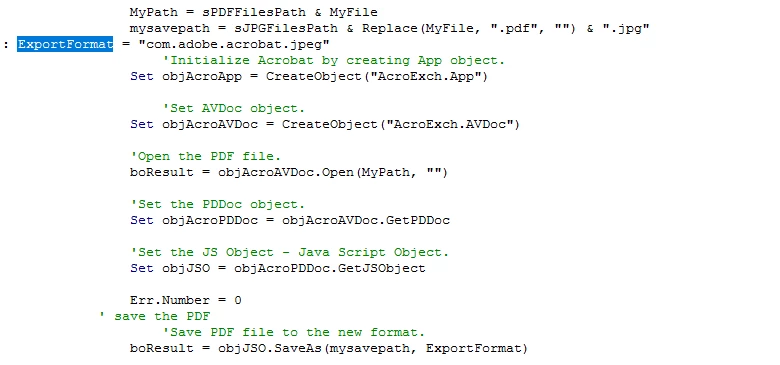
  The code I have is as follows and can someone let me know what

parms I need to add on the statement?  Thanx in advance.
このトピックへの返信は締め切られました。
解決に役立った回答 Bernd Alheit

VBA and Javascript can't access this settings.

返信数 8

Participant
April 27, 2019

This is what I got my photos were deleted on my mail and I need these back for a court case

try67
Community Expert
Community Expert
April 27, 2019

Not sure what that is, but it's not a PDF file.

Participant
April 27, 2019

{"stories": [{"caption": "", "taken_at": "2018-08-21T16:40:20", "path": "stories/201808/5aeaf44a376a094a13372d01d2bc7f1c.mp4"}], "photos": [{"caption": "  ", "taken_at": "2018-09-20T07:57:49", "path": "photos/201809/eecf7f86166792cc1bbc8ef2c4ddb385.jpg"}, {"caption": "", "taken_at": "2018-09-17T10:22:06", "path": "photos/201809/df17f69b3b118c7a0326d717e7b7c208.jpg"}, {"caption": "", "taken_at": "2018-09-17T10:21:49", "path": "photos/201809/7ccd42dbc08d1d1ea26ae2cfe9950a40.jpg"}, {"caption": "", "taken_at": "2018-09-17T10:21:38", "path": "photos/201809/31eb5db20ade7af2f7130fde95de8b70.jpg"}, {"caption": "", "taken_at": "2018-09-17T10:21:34", "path": "photos/201809/8fcdab998311b33bf5b82d8ed1ec27ab.jpg"}, {"caption": "", "taken_at": "2018-09-03T09:06:12", "path": "photos/201809/38b9ade9f8c046c7eb3688c44f961c5a.jpg"}, {"caption": "", "taken_at": "2018-09-03T09:06:11", "path": "photos/201809/210ac7fddc6b8533ca053d1131e2fa13.jpg"}, {"caption": "", "taken_at": "2018-09-03T09:06:12", "path": "photos/201809/33eabe14512f12025f345151bc868562.jpg"}, {"caption": "", "taken_at": "2018-09-03T09:06:08", "path": "photos/201809/3b426e4a2359d606dbb372f24817689e.jpg"}], "profile": [{"caption": "", "taken_at": "2016-06-27T17:36:34", "is_active_profile": true, "path": "profile/201606/1cf9f483c2d4dd7735bb79b4fccd8da3.jpg"}]}

Participant
April 27, 2019

I need help I have a PDF file that has pics on it but all I see is numbers and letters how to I get a pic out of these

Participant
April 27, 2019

Would it help if I showed you what I'm talking bout

try67
Community Expert
Community Expert
April 27, 2019

Yes, as what you describe is very vague.

Legend
March 14, 2019

We are telling you that you cannot do this with VB or any other kind of programming (except perhaps C++ plug-ins). You need to set these options in the user interface. If this does not work for your intended use, Acrobat is the wrong tool for you.

ballj_35作成者
Known Participant
March 14, 2019

okay thank you

Legend
March 14, 2019

See my reply.  The end user needs to set their settings, before running automation. This is not for hands off automation or server use.

ballj_35作成者
Known Participant
March 14, 2019

I just looked at it and do not get what you are saying.  If I can do this through automation, plz let me know where there is some documentation or an example of doing this.  I have a folder which contains many pdf files.  Within my MS Access application, after I have created the pdf files, then I want to convert them to jpg files, that are 600 px wide and constrain proportions turned on,  Height will not be defined.  I have yet to be able to find a a way to create some script using Abobe that will automate this and I can call from my program to get it done, when needed.  If you know that would be great, but I cannot find it.

Bernd Alheit
Community Expert
Bernd AlheitCommunity Expert解決!
Community Expert
March 14, 2019

VBA and Javascript can't access this settings.

Legend
March 14, 2019

This is a very simple tool for low volume personal automation. It just uses the defaults you selected last time.

try67
Community Expert
Community Expert
March 14, 2019

Look under: Edit (or the Acrobat menu if you're on a Mac) - Preferences - Convert from PDF - JPEG.

ballj_35作成者
Known Participant
March 14, 2019

I am running under Windows 10.  Also, If I was running Adobe Acrobat program, this would be fine.  I am trying to do this in vba code calling the Adobe API's or jscript to do this.

Bernd Alheit
Community Expert
Community Expert
March 14, 2019

In the preferences of Adobe Acrobat you can specify parameters for the conversion.

ballj_35作成者
Known Participant
March 14, 2019

If I was running Adobe Acrobat program, this would be fine.  I am trying to do this in vba code calling the Adobe API's or jscript to do this.