


Participating Frequently
September 12, 2023
解決済み

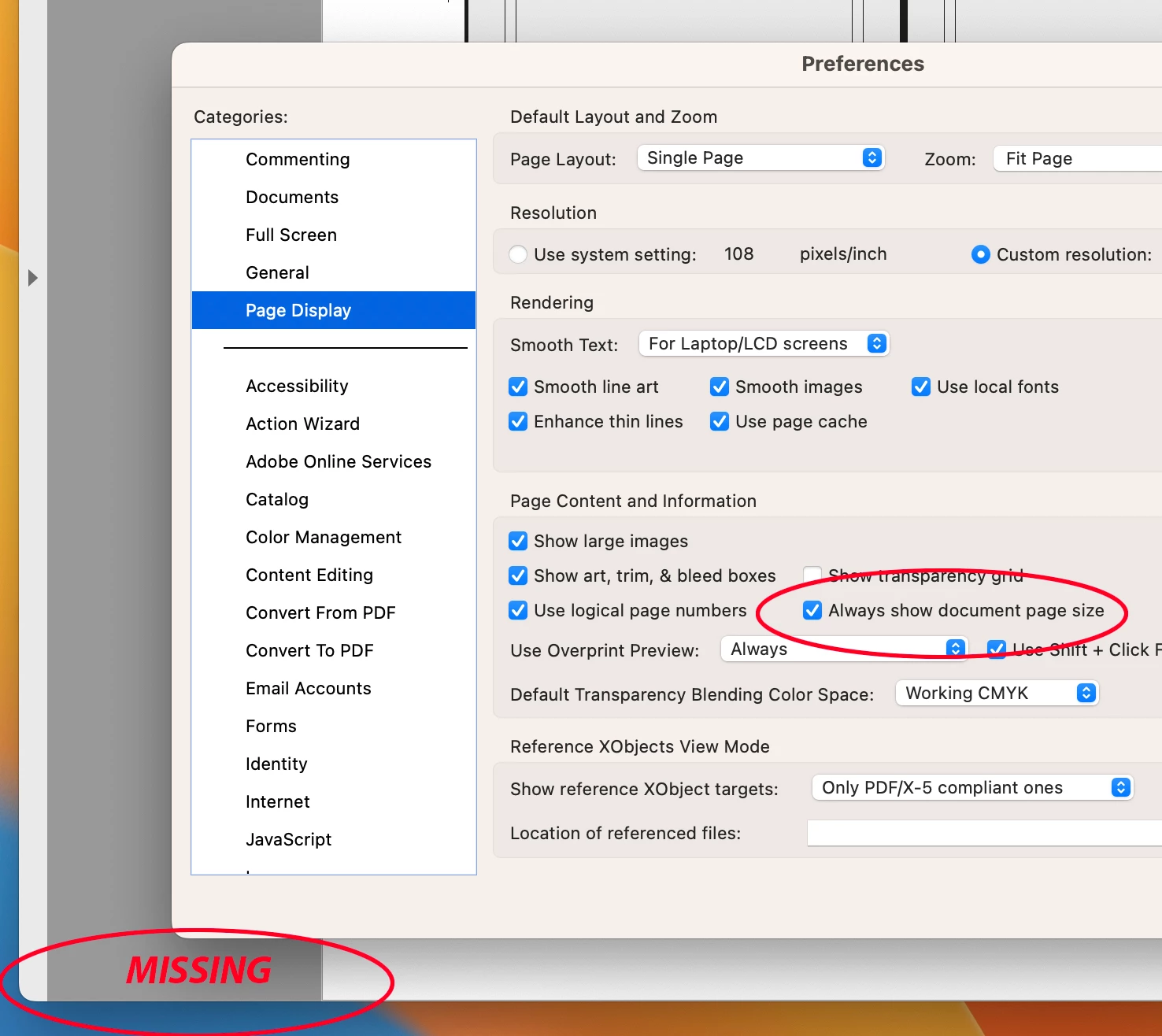
"Always Show Document Pages Size" in "Page Display" preference is suddenly not working !!!

  • September 12, 2023
  • 返信数 54.
  • 60325 ビュー

I always rely on the Document Page size in the lower left frame bar of any and all PDF windows.  For some reason, today it is gone.  I have restarted Acrobat, rebooted my machine.  I have even deleted the Acrobat preferences and let it create a new preference file.  No matter what, this check box clicked or not clicked, does not yield me what I have relied on for many years.


Thoughts please.


Acrobat DC for Mav. v 2023.006.20320


解決に役立った回答 AJaycup

The solution is to go to the menu tab, down to view, then select "Disable New Acrobat". This reverts to Adobe UI before it was made to be garbage and will display the page size all the time. As far as I can tell, all the features are still there as well.

返信数 54

Michael98092003
Participant
September 15, 2023

What subtle synonymous meaning of the word "always" is too hard to understand?
We – and many others – need a 24/7/365 (that’s always) visible display of the dimensions of the PDF on screen.

This feature is not "nice to have". It’s no workaround to see some figures when hovering around.

I. Need. To. See. It.

Participant
September 15, 2023

I must agree with the rest of the forum. Adobe needs to bring back page display as it was. It is not productive to hover your cursor in the corner for every page you need to check in a file. Fix your mistake Adobe.

Participant
September 14, 2023

I also wanted to voice my displeasure at Adobe removing the scroll bars regardless of what my System Settings are set at. I like to see my scroll bars, ALWAYS, and they just decided that they would ignore my desires! I am guessing this is related to the update that took away my page size display. This doesn't seem to be a modern scroll experience to me. 

JamT2000
Participating Frequently
September 15, 2023

Same here. We process hundreds of pdfs per day and check the dimensions of every single one. Acrobat DC update has broken this.

I presume from the reference to modern scrolling framework that the page display window is now hidden behind a scroll area? Because, even if we hover the dimensions box isn't appearing…unless it's white on white…


There isn't a roll back available in the CC app either, who at Adobe shall I apply to have a pdf gets through with the wrong dimensions as the publishers and printers are sure to come to us for compensation…?

Adobe Employee
September 13, 2023

Hi @Michael310632523pt2 ,


Thanks for reporting the issue, apologise for the inconvenience caused.
The reason for not seeing the page size persistently is that we have upgraded to a modern scroll framework. Page dimension would only be now visible on hovering on the bottom left corner of the page. This enhancement is applicable only for Mac. Please find more details on the page. https://helpx.adobe.com/acrobat/using/scroll-framework-upgrade-macos.html.

Please let us know if you don't see the Page dimensions on hovering.

Thanks,
Abhinav Sethi

Participating Frequently
September 13, 2023

Thank you for the answer and the info, but I am not happy about it.


At first I was going to reply that not matter how I hover over the bottom left corner it does not show page dimensions. Then I decided to turn OFF the preference to "Always display page size" and who knew, it now shows page dimension when you hover.  Quite a bit counter-intuitive !


I don't see the benefit of the change by Abobe, maybe some day I will.  I just know that somethubng simple and stupid make more of a PITA when I compare documents side by side!

Participant
September 14, 2023

I agree wholeheartedly! This was a setting I have been using for years, and I don't want to have to move the mouse to check something I used to be able to see just by opening the file. A quick look was all I needed; close the file and move on. Now I have to actually move the mouse over to get it to show up.


And yes, why is the preference not only still there and turned on, but also now blocking it from allowing the hover (the only way to look at it) from working properly?


This was a heavy-handed change to something that was working properly and was well-used, meaning it was an unnecessary change.

Participating Frequently
September 12, 2023

YES! I was literally just about to post this exact thing. I depend on this and I took screen shots showing mine had changed as well. What happened to it and how do I get it back? Looking up the document properties every single time is not the answer when before a quick glance gave me exactly what I needed.