



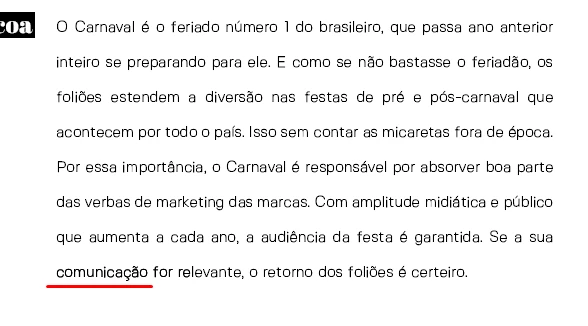
Some characters from my text are showing up a little bolder than others on a random basis.
Hey everyone, so I've been having this issue for a couple of weeks now, i've searched the web for it and havent found someone with this problem.
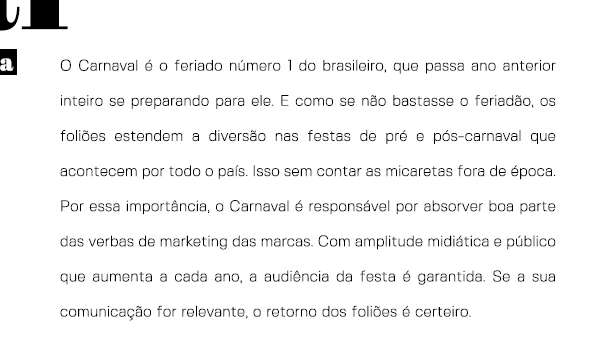
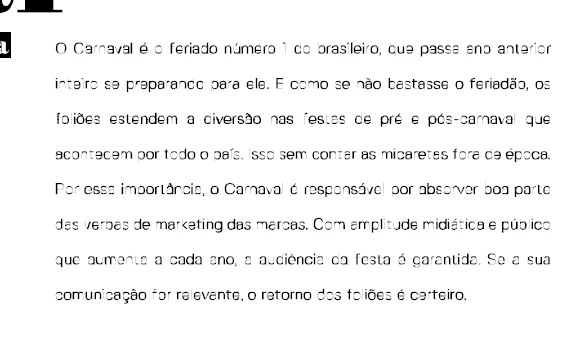
The thing is I have an eBook i made on photoshop (which i know isnt the best tool for this, but anyway) and I export my artboards to a PDF and then optimize this pdf on Acrobat for a smaller file size. All good until now. The problem is that, even in the first photoshop generated PDF, some of the characters show up a little bolder than others, not enough boldness that it increases a font weight, but just a little tiny bit. Not only "L" and "i", but any character. I have fixed this issue by converting all my text in photoshop to shapes, but then when I optimize the file in Acrobat the text just becomes unreadable. I've tried to use system fonts and display fonts such as verdana and this issue keeps on showing up, on the same area of the page.
Im attaching some screenshots for better understanding of the situation.
1. one example of the problem (the word underlined in red and a couple of characters from the words folowing.
2. its just perfect when i convert text to shapes, but a huge file.
3. After i optimize the perfect file above to reduce file size...
Thanks for your help and i hope someone else has been through this too
 AdChoices