


Participant
May 31, 2016
Question

PDFs printing as negative images & can't find Output panel in Advanced Print Setup dialog box

  • May 31, 2016
  • 1 reply
  • 2526 views

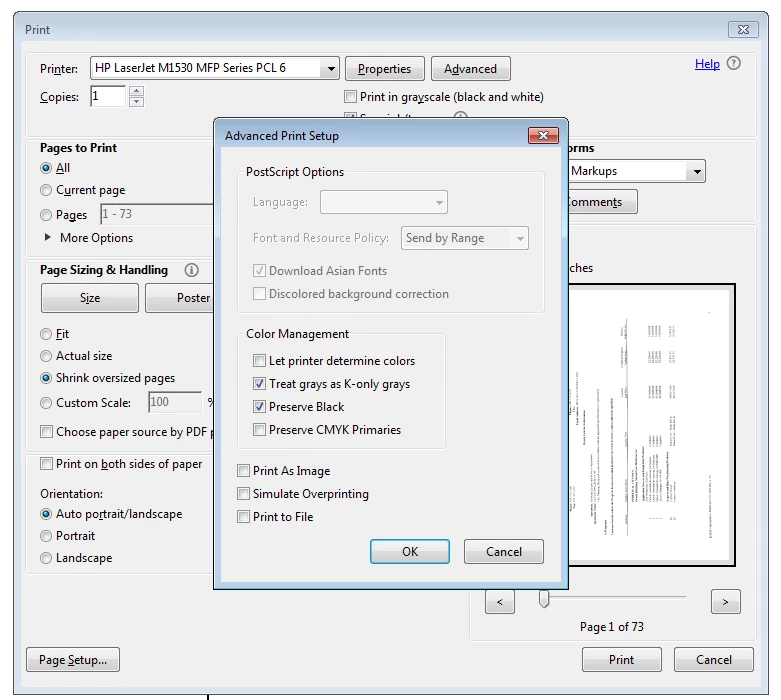
Pretty much all of the PDFs I print are coming out as negative. Some come out normally but I can't predict which ones. I enabled print in grayscale, which is now disabled, but this isn't working. Also uninstalled Reader and installed Reader DC, which hasn't fixed the problem. There should be an option to select/deselect Negative per here: Advanced PDF print settings, Adobe Acrobat  but I can't find it in the Advanced Print Setup dialog box. Do I need to look elsewhere?
This topic has been closed for replies.

1 reply

Karl Heinz  Kremer
Community Expert
Community Expert
May 31, 2016

This option is only available for Adobe Acrobat DC Pro - not in Standard and also not in the free Adobe Reader.

Are you printing scanned documents? If so, the CCITT G4 compression mechanism used has a bit that indicates if a logical 1 is interpreted as black or as white. It is possible that your printer driver has a problem with this interpretation.

Here is what I would do: My first step would be to make sure that I am using the latest version of printer drivers for my printer. If that is already the case, I would try a different driver. Your printer supports PCL5, PCL6 and PostScript. Based on the screenshot, you are using the PCL6 driver. Try either the PCL5 or the PostScript drive and see if you still get the same problems.

p51Author
Participant
May 31, 2016

Thanks. I'm using the free download. Hopefully I'm not stuck.

Karl Heinz  Kremer
Community Expert
Community Expert
May 31, 2016

You are using the free Adobe Reader, that's why the "negative" option is not available.

Try the things I suggested and report back if one of these fixes your problem.