Participant
April 12, 2022
質問

Failure to use "Merge PDFs" in Power Automate

  • April 12, 2022
  • 返信数 2.
  • 4166 ビュー

Dear Expertise/ Specialist,


I have encountered the flow error with message “For application/pdf mime-type The input file appears to be corrupted and cannot be processed.” On the Flow of “Adobe Merge PDFs”.   


It would be great if Adobe could have a User Guide to let users know how to put the parameters correctly esp. in some scenarios such as get attachments from multiple SharePoint Items in the List/ Table....


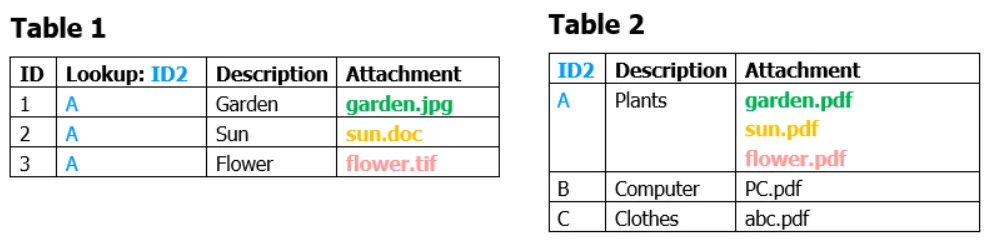
I have 2 Tables/ Lists and the flows below:

  1. From ‘Table 1’, I use Do-Loop to extract the Attachment from multiple records I needed. 
  2. After that, I use “Adobe Convert Doc to PDF” function to convert the (1) Attachment from multiple records to SAVE it ALL to a single raw record in ‘Table 2’. And the Loop function ended.
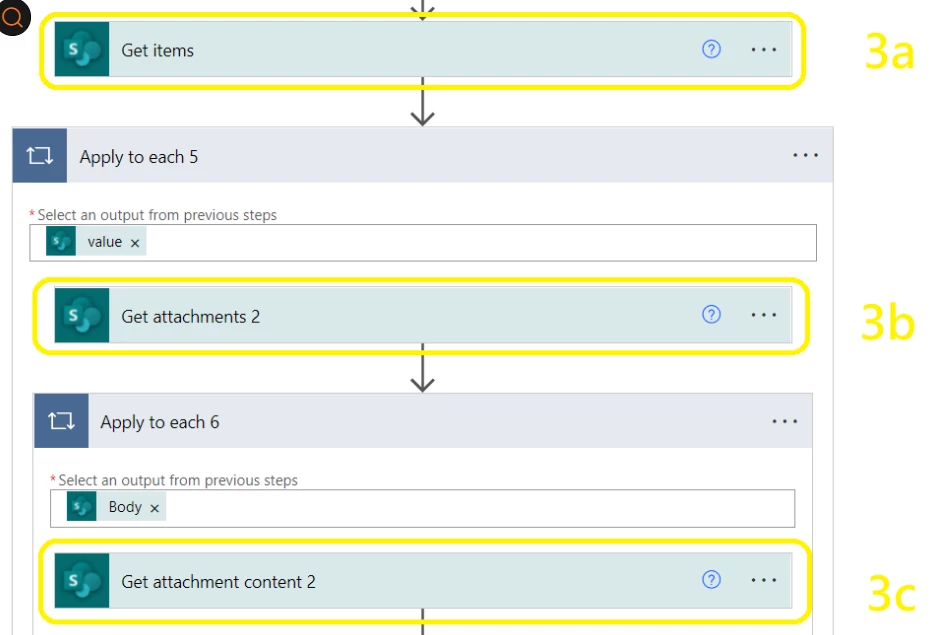
  3. Then,
    1. I get the Raw Record from ‘Table 2’
    2. Get Attachment
    3. Get Attachment Content
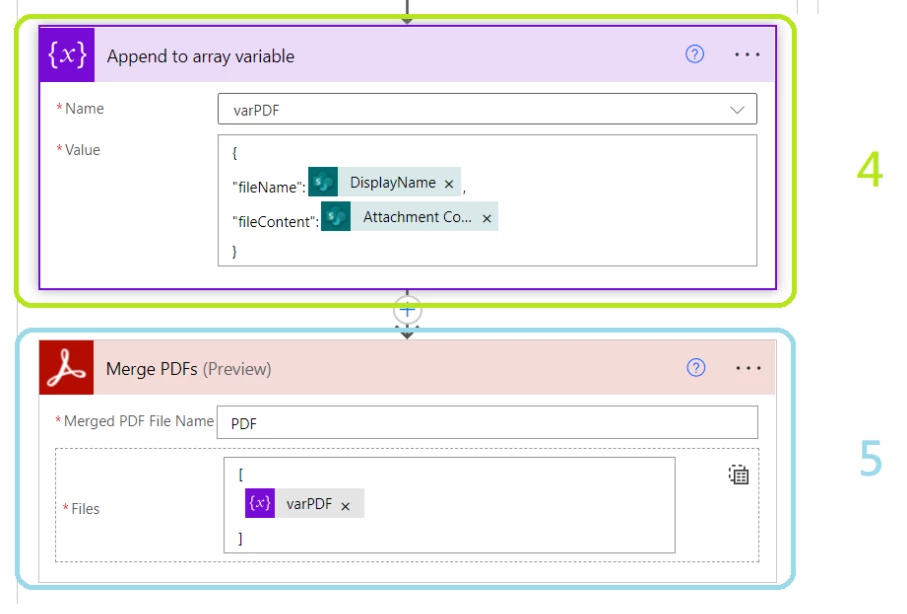
  4. Based on (3) result, I append it to the array Variable “varPDF”
  5. I called the “Adobe Merge PDFs” function and attach the “varPDF” to it for merging, then I could save it back to my Database.


Thank you so much.


このトピックへの返信は締め切られました。

返信数 2

Ben Vanderberg
Community Manager
Community Manager
July 20, 2022

Hi @Li23979650t7px ,


I was exploring your scenario and here is the flow that I created for your similar scenario. A couple additions I made were:

  • Added a condition to check if it had attachments
  • Cleared the variable with each cycle
  • Used the raw input to add the array into the Merge PDF view.

Hope this helps.


Ben Vanderberg
Community Manager
Community Manager
April 12, 2022

First thing I would try is set your "Merged PDF File Name" to have a .pdf extension at the end. 

The second thing is if one of the files that you are merging isn't a PDF already, you might need to convert that first to PDF and then merge it.

Participant
April 12, 2022

Dear Mr Vanderberg,


Thank you so much for your reply and effort on my issue.  I will be very appreciate it if you would give me some valuable advice on my scenario. 

Assuming that all environment conditions are met (all are .pdf files, and not null.....), the error is still arise, I have modified some flows such as compose the 'Attachment Content' as base64 format..., but it does not help.  

I would very appreciate it if you could give me some professional advice.

Best


Participant
April 13, 2022

I would very appreciate it if any could give me some advice.