


Amitej S
Community Manager
Community Manager
August 24, 2023

Updates for the new Adobe Express as of August'23

  • August 24, 2023
  • 29 답변들
  • 9728 조회


Latest Release: Fixes & Enhancements


Your feedback matters, and we've been listening. We understand the concerns highlighted in your reviews, and we will continue to work towards improving your experience. We're happy to announce recent updates to the new Adobe Express.


Latest Updates


Move ALL folders and files


You can now transition all folders & files to the new Adobe Express without moving files one by one or having to recreate folders. See the steps below.


  1. From Home, navigate to Your Stuff.
  2. Select "Access files" on the blue tile - this will take you to the folder organizer where your old files & folders live.
  3. Select the "Move all folders and files" option from the right corner.
  4. Select "Move for desktop" on notification.


To move an individual file, hover over the file and select "Move file" then select "Convert for desktop" on notification.
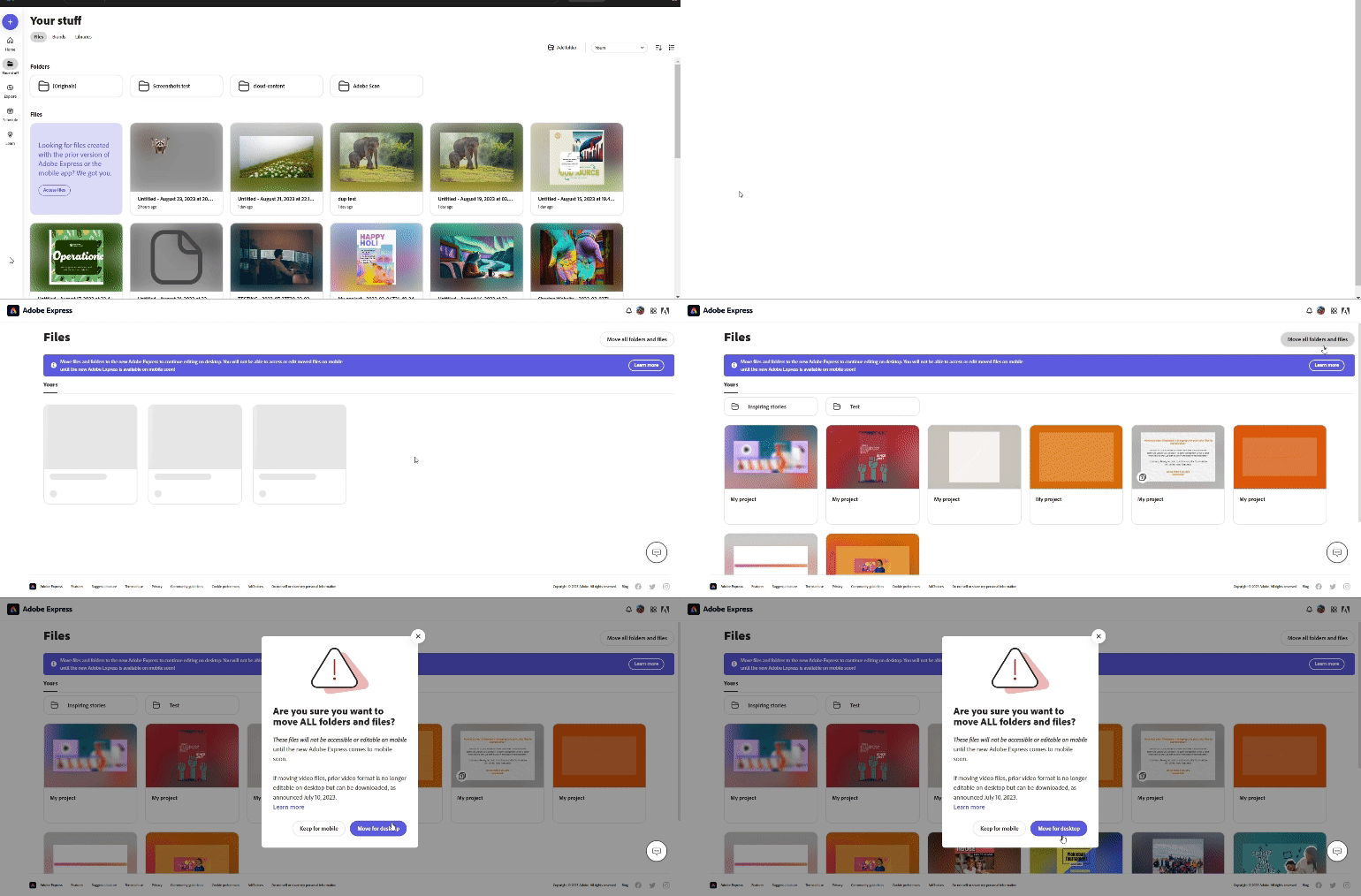
 

Note: The files & folders will be moved and no longer available to open or edit in the mobile app. Cross-platform editing will return when the all-new version of Adobe Express comes to mobile.


Webpage conversion


Did your webpage not convert properly to the new Adobe Express? Here are the steps to reconvert webpage files.


  1. Go to Your Stuff, then select & delete webpage files that didn't convert properly. Do not delete files in the [Originals] folder.
  2. Navigate to the [Originals] folder and select the original webpage file you want to reconvert.
  3. Select "Open converted file" from the "File already converted" message.


The reconverted files will be saved in the [Originals] folder.

Known Issues & Workarounds
s


Can't find files after migration.

Please contact Adobe Virtual Assistant so we can help you find your files.


Organized folders are missing.

To restore the old folder structure, visit https://new.express.adobe.com/restore-folders from a new browser. 


If files & folders have already been migrated, the 'Folders' hierarchy will remain as it was in the previous version.


Missing collage/layout, circular text, and lightroom integration.

Coming soon! We are actively working to restore these features.


There's a workaround you can try for the Circular Text feature. You can make the curved text on your mobile device & then bring it to the webapp project. Remember, once you switch to Adobe Express webapp, you will not be able to edit the curved text anymore as it will be an independent asset.


Unable to download a video created in an older version of Adobe Express.

Older videos, especially from Spark, are taking longer to download. To ensure your videos download completely, please do not refresh the webpage until the download is complete.

Useful links


  • FAQ: Get answers to common questions about Adobe Express.
  • Known Issues: Stay up-to-date with Adobe Express's known issues and workarounds.
  • Report abuse: Report offensive content or abuse within Adobe Express.
  • System requirements: Find the minimum technical specifications to use Adobe Express.
  • Discord: Join the Adobe Express Discord server to connect with others, get creative feedback, and share resources!
  • UserVoice: How can we improve Adobe Express? Share your thoughts and ideas in UserVoice.


Hey community! Upvote if this post was helpful, and leave a comment to join the conversation.


    이 주제는 답변이 닫혔습니다.

    29 답변

    Known Participant
    September 7, 2023

    I've just started to use Adobe Express over the last month or so. Like many I prefer to work via Desktop as it gives more workspace to operate within. But being an online desktop means it suffers delays that one isn't used to having used Adobe Apps for many years. So as a new user you are left waiting to discover if it's just taking it's time, or there's something wrong and it's stopped working. And that just wastes so much time... I am patient but eventually decide to refresh the web page only to find the expected feature then worked! But sadly beyond that the online desktop version just seems to be bug-ridden. On my first project with just 7 or so layers, it was previously successfully built and published, but upon updating I'm finding the content of some layers just doesn't appear anymore!?... you can still see the layers and the outline of the layers appear, but nothing is visible inside the content outline. I cannot move or delete layers anymore!? I move a layer and then do a web refresh to clear any glitch and the layer appears back where it was - and I can't delete it! Layers seem to have the lock icon on... but clicking the lock icon just means it whirls for a while and then just stops with no changes!? Clicking on a layer that has 'invisible' content results in side bar options whirling away with no end result! Can only find minimal advice online on Adobe Express - seems PhotoShop Express is still being referenced, which doesn't help... but ended up here. Starting using excited and now just frustrated and disappointed knowing the heritage of Adobe.

    Known Participant
    September 7, 2023

    ... and it continues! Just tried to edit a simple social media post that I created on my mobile, and when I try and edit the photos on the original template, it doesn't allow me to ungroup the two elements that for some reason the photos on that design have. The Ungroup icon just doesn't work! So I delete the whole thing to start again and choose Twitter and template option... but all the Templates are then greyed out in the side bar???? See attached.

    Participant
    September 7, 2023

    It would be best to stay informed about Adobe Express or any other Adobe software product by visiting Adobe's official website, checking the Adobe Creative Cloud application for updates, or reading Adobe's official announcements and release notes if you wish to get the most accurate and up-to-date information about Adobe Express or any other Adobe software product. By doing so, you will be able to get the latest information on new features, enhancements, and updates to their software products, which will be available in the coming months.

    Known Participant
    September 7, 2023

    That still does not address all the issues. And does not address why they released a buggy version and switched everyone over with all these missing features.

    Participant
    September 7, 2023

    I was reached out to by Adobe to go to my CC and click the version button next to Adobe Express to get the old version. This button doesn't exist. Please advise. Bring back the old version before you launch the new one completely. This makes no sense. Poor form Adobe. 

    Participating Frequently
    September 6, 2023

    We were building a website in the old version, and when Express migrated to the new version on 8/25 we have run into a few issues. Why would you make this change without communicating it to people using the platform? The biggest 2 we've encoutered so far are below. Can you provide any assistance?

    • URL: Biggest issue. The URL we were using for the site has now been updated to new.express.adobe and so anything we had pointing to it is now broken and points to the old page. When we make updates to the page itself, it is updating the version at new.express.adobe.
    • Mobile-friendly website: The new Express is not mobile friendly yet. Why would you release a platform that has less features than the previous platform?

    Any help you can provide is appreciated.

    Participant
    September 7, 2023
    Lo unico que interesa es que el programa funcione, hace mas de un mes que
    no lo puedo usar.

    --
    Participant
    September 5, 2023

    What is about the previous effects, which were available in the old version? I am missing it, all posts on social media is based on that. Missing the "lighten" one.

    Theresa J
    Community Expert
    Community Expert
    September 4, 2023

    Please, please, please bring back the Lightroom connection for Express Web. I love Express Web and I don't understand why it doesn't get more attention from Adobe. Currently, just to create a new web page, you have to scroll, and scroll, and scroll, to find Web at the bottom of the New content list. Express (Spark) page/web was a wonderfull tool that now feels broken.

    RV1970
    Participating Frequently
    September 4, 2023

    Thanks, this adobe express has a lot of things.  

    RV
    Participant
    September 4, 2023

    I was Finding About latest update of Adobe. Then i fiind this article which provide me very helpful information. Thanks For sharing this information.

    Participant
    September 4, 2023

    I'm apparently just adding to the multitude of complaints, but it seems as though someone at Adobe thought it would be good to remove the old version of Express Desktop before having the new version on mobile. Now I can no longer add client fonts to the mobile app. When speaking to customer service, they told me it was discontinued and just use the desktop app which is filled with issues. When I said I was thinking of just cancelling my subscription, they sent me straight to cancelations and compensations where they just asked me to confirm my cancelation. Terrible customer support, I gotta say. Ready to push me out so fast. You should look into that. I, like a lot of people, have used Adobe for years. I was even part of beta testing Rush. Things have changed with this company over the past year. Its pretty disappointing.

    jennyfilipetti
    Participant
    September 3, 2023

    Re: Features like collage, layout, and circular/curved text are missing:

    I moved several files without realizing that they would be affected by this issue, and indeed the designs are completely unusable in the current version of Express (I had used the grid text feature). What can be done if we have already moved affected files? Is the relevant metadata still attached so that when you have a fix, they will return to normal? If not, is there a way to revert them to the old version? I would have happily waited to move the files but I needed to at least view/download the content and that did not seem to be an option unless I moved them.

    jennyfilipetti
    Participant
    September 3, 2023

    Update for anyone else with the same issue: Just saw that Adobe automatically creates an "Originals" folder alongside the converted versions, available in "My Stuff." If you choose "Download only" for a given file, you can download PNGS of each page the way they were formatted in the old Express (transparent background not supported). It's a far cry from a workable solution but at least provides a visual record of your work.
