


Participant
March 23, 2017
解決済み

move location of "conformed files" folder

  • March 23, 2017
  • 返信数 2.
  • 2695 ビュー

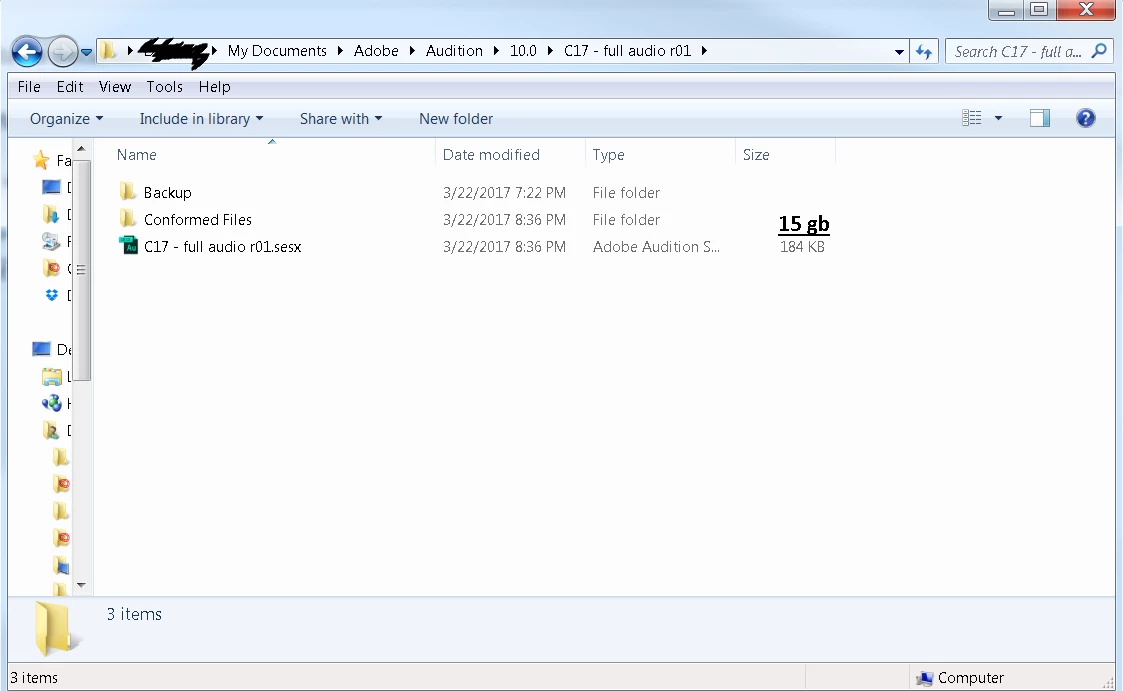
Having trouble with audition taking up huge amounts of space on my system drive.  Files are being stored in "my documents" alongside project files despite me setting all cache preferences to the storage drive.  I only have 128 gb of SSD to play with for my system, and the 15gb of wav files is causing my system to lag.

Read through all settings and searched high and low, no results yet. 

Hope this is a simple fix I am overlooking, please let me know
このトピックへの返信は締め切られました。
解決に役立った回答 ryclark

Unfortunately there seems to be no way to move the location for storing Conformed files from within Audition as far as I can see (unless the Developers know better). The Documents folder (among other Library folders) does take up a lot of space so this is a common problem for people with their OS on smaller SSD drives. Windows does however allow you to move the location of your Library folders onto another drive. So I would suggest that you could try moving your Documents folder onto your larger D: drive.

How to Move Windows 7 Personal Folders Like My Documents to Another Drive | Gizmo's Freeware

So perhaps a new feature request for the ability to assign the folder where Audition stores Conformed files is in order.

返信数 2

SuiteSpot
Inspiring
March 29, 2017

Unless I'm mistaken the "Conformed Files", "Bounced Files", "Backup" and "Rendered Files" were all in the folder containing the sesx file all of which (for the sake of good project management) should be in their own Artist/Session/Project folder.

So you have control of where conformed files go.

If you have a small C drive get a second or third SSD and put your data on that one

tbdemon作成者
Participant
March 29, 2017

I am pretty new to all of this so I can't say for sure.  All I know is that every time I import, it saves them to this location regardless of any preferences I have changed. 

I followed the advice of relocating my documents to the larger drive, and this seems to be a suitable hack for he moment. 

Thanks for the input and getting me through this hiccup. 

ryclark
Participating Frequently
March 23, 2017

Which version of Audition? So you have redirected all the Temp folders and Media Caches in Audition's Preferences/Media and Disk Caches. Can you post an image of that settings page?

tbdemon作成者
Participant
March 28, 2017

Audition CC 10.0.2.27 

Attached photos for reference.

Windows 7 64bit home

8gb ram

C:\ 128gb SSD system

D:\ 500gb HDD for media

ryclark
ryclark解決!
Participating Frequently
March 29, 2017

Unfortunately there seems to be no way to move the location for storing Conformed files from within Audition as far as I can see (unless the Developers know better). The Documents folder (among other Library folders) does take up a lot of space so this is a common problem for people with their OS on smaller SSD drives. Windows does however allow you to move the location of your Library folders onto another drive. So I would suggest that you could try moving your Documents folder onto your larger D: drive.

How to Move Windows 7 Personal Folders Like My Documents to Another Drive | Gizmo's Freeware

So perhaps a new feature request for the ability to assign the folder where Audition stores Conformed files is in order.