Participant
April 29, 2025

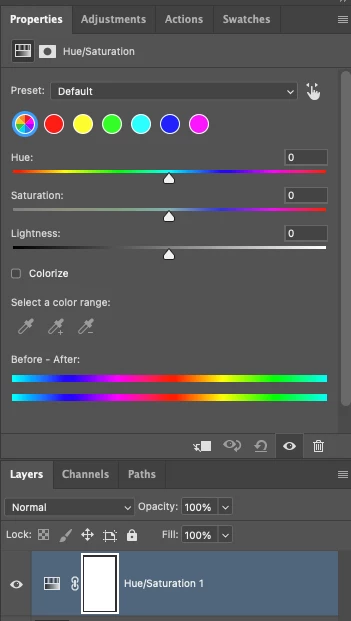
P: Adjusting layer properties doesn't work for Hue/Saturation/lum. HSL layers

  • April 29, 2025
  • 返信数 62.
  • 11440 ビュー

The tab to click on and change the properties for an adjustment layer randomly disappears. Quitting and re-opening the app solves the issue, but it will happen again within minutes, usually when switching between different projects or different app on the computer. 

On Photoshop v26.6 - Mac Mini M4 pro, 32gb ram, 1tb ssd.


Any help would be appreciated!
ss

返信数 62

Known Participant
May 30, 2025

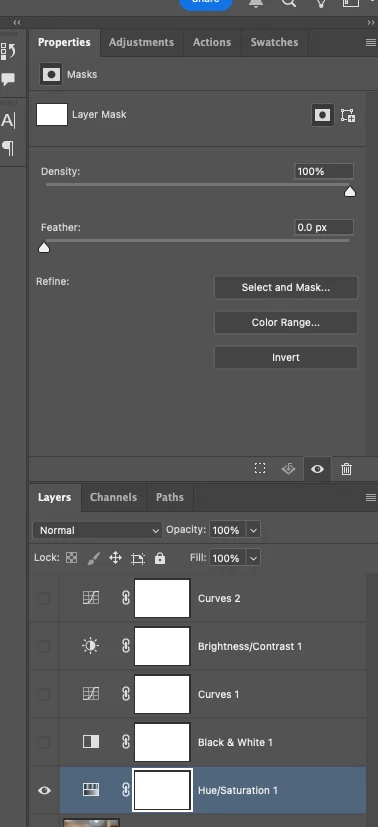
Attached a video example. Project A Loads both Hue/Sat and Mask properties no issue. Project B loads Hue/Saturation as a Mask only layer and won't display the layer propertiers to adjust, no matter what.

Inconsistently happens in 16bit and 32bit projects, couldn't trigger it in 8bit projects.

Anshul_Saini
Community Manager
Community Manager
May 30, 2025

Hi @Angel_Leyenda,


Thanks for reporting this issue.


To help us investigate further and escalate this properly to the product team, could you please share the following:
 1. A sample PSD file where this issue occurs (preferably “Project B” as mentioned).
 2. Your system information from Photoshop: Go to Help > System Info and copy the full output into a .txt file.
 3. Any specific steps (if known) that you take before the adjustment layer becomes non-functional.


Once we have this information, we can investigate further what’s causing this and share it with engineering for a closer look.


Appreciate your help in narrowing this down!

Best,

Anshul Saini

Participating Frequently
May 28, 2025

PS 26.7.0 running on Mac OSX Sequoia 15.4.1:


Creating a new Hue/Sat adjustment layer intermittently results in a layer whose Properties panel includes ONLY a mask, and no properties. 

PS must be re-launched in order to access the hue/sat controls. 


Additionally, the "direct selection" tool can on longer be selected by use of a keyboard shortcut. I.e. the key board shortcut is in place, but the key fails to select the tool. 

Srishti Bali
Community Manager
Community Manager
May 28, 2025

Hi @antonioi21376345


Sorry to hear you're experiencing this issue. Has this issue started occurring after the recent release? I recommend resetting Photoshop preferences to see if that resolves the problem.

Before doing so, please make sure to back up your preferences, as resetting will restore everything to default settings.


Steps are shared here.


Regards,

Srishti

Participating Frequently
May 27, 2025

Hi there

I don't know in which comunity I'm supposed to post this.

I'm having this bug with photoshop Hue And Saturation. It does not happen all the time so I don't know the pattern/reason. The change color is all white, and the properties box does not have any colors. I don't know how to explain the issue as English is not my first language. I attached a screenshot. 

CMass
Community Manager
Community Manager
May 27, 2025

Hey @Monroe23977549yy9g

Try clicking on the hue adjustment layer, not the mask, and select the preset to default. Does that help? 


^CM

Participating Frequently
May 27, 2025

Hi CMass

If you check the screenshot, you'll see that I'm clicking on it. This was the first thing I tried unfortuntely. It didn't work

Srishti Bali
Community Manager
Community Manager
May 26, 2025

Hi @Sam Singleton @LEMONardo 


Sorry to hear you're facing issues with the adjustment layer. We recently addressed similar problems in our latest release (version 26.7). I’d recommend updating to this version and letting us know if the issue persists. Looking forward to your response!


Regards,

Srishti

Participating Frequently
May 12, 2025

Before the most recent update I ran, when working with a Hue/Sat Adjustment Layer, any time you clicked on the layer you would see the Main/Defualt/Master/All colors view, you could then switch to and modify a channel, but when you came back to the layer it would take you to All Colors page again.


Now, when you navigate to a different channel, leave the layer, come back, it will just be on the last channel that was open (not the last channel that was modified) until you close the file.

This means that I can never assume I know which channel is active when I click on a Hue/Sat Layer, which sucks when you're trying to work quickly and in a flow state.  Yeah, clicking off the layer and back when you were in a specific channel is anoying, but not functioning in a realiable and consistant manner is much more anoying.


Please rethink this functionality.  It needs to work in a more predicatable way.


PS 26.6.0, MacOS 15.4.1


[Six topics that do not apply removed by moderator]


c.pfaffenbichler
Community Expert
Community Expert
May 14, 2025

Could you post screenshots just to make sure? 

Hue/Saturation does not operate on channels per se, so what do you mean by »which channel is active« exactly? 


If I understand correctly the old behaviour (displaying »Master« in the Properties Panel on reselecting the Hue/Saturation Layer) did not indicate the last edited range, either, so how would that be better than the current one? 

Participant
May 9, 2025

This is an intermitent problem for me running photoshop 26.6.0. When making a Hue/Sat adjustment layer the tool in the Properties panel will only show the mask adjustments and not the Hue/Sat tools. Restarting the program seems to fix this issue for a time and then when swtiching between adjustment layers it occurs again.


melissapiccone
Community Expert
Community Expert
May 9, 2025

Try resetting your preferences. 

Melissa Piccone | Adobe Trainer | Online Courses Author | Fine Artist
Participant
May 9, 2025

Latest PS 2025 intermittant bug issue with Hue Sat adjustment layer. 

Loading a new Hue Sat adjustment layer into a layer stack, intermittantly the H/S layer does not show the adjustable propeties as it should ie the properties area is blank. The ajustable Hue Sat propeties is only visible and accessible once you quit PS and restart. 

AxelMatt
Community Expert
Community Expert
May 9, 2025

In a first step try to reset the preferences of Photoshop using the steps described here:

https://helpx.adobe.com/photoshop/using/preferences.html#reset-preferences

It's recommended to backup your settings before resetting the preferences.

See here:  https://helpx.adobe.com/photoshop/using/preferences.html#backup-photoshop-preferences


If this doesn't help, try to disable the option to "Use Graphics Procesor" from Photoshop by going to Preferences, then Performance. Once done, quit & relaunch Photoshop to check if that helps.

If it helps, you can check out the steps suggested here:  https://helpx.adobe.com/photoshop/kb/troubleshoot-gpu-graphics-card.html


My System: Intel i7-8700K - 64GB RAM - NVidia Geforce RTX 3060 - Windows 11 Pro 25H2 -- LR-Classic 15 - Photoshop 27 - Nik Collection 8 - PureRAW 5 - Topaz Photo
nazameijide
Participant
May 8, 2025

Hola a todos,

Actualicé hace unos dáis a la última versión de Photoshop, la 26.6.0, y han cambiado la interfaz de funcionamiento de tono y saturación. 


El problema es que, después de un rato de estar trabajando con la aplicación, no se abre la opción de propiedades en dicho ajuste y no puede usarse.

A alguien más le pasa?


Además hubiera agradecido que en la nueva versión hubieran añadido la opción de transición a la herramienta quitar (la tirita con función generativa) o poder poner, por fin, un comando a la opción de enmascarar.


Mil gracias!


melissapiccone
Community Expert
Community Expert
May 8, 2025

Hue Saturation hasn't changed, are you using an Adjustment layer in the Adjustment panel or from the Image > Adjustments drop down?


If you are using the Adjustment panel maybe you are selecting the Mask icon instead of the adjustment icon? Screenshots would help me understand the problem. 


For the second comment - are you saying you want to be able to add a prompt to the remove tool? That isn't what it's for. If you want to make a selection and add a prompt, use the new selection brush tool to paint over the area and you can add a prompt. 

Melissa Piccone | Adobe Trainer | Online Courses Author | Fine Artist
Known Participant
May 30, 2025

The layer is bugged. I have a couple projects that it won't load the layer at all, but it will in others.

Even attempting to copy paste the layer from a working project to the other one breaks it. Between working projects, copies fine.

Known Participant
May 6, 2025

I have been running into the exact same problem. Yet to figure out how to reproduce it.


At first I blamed my outdated Intel iMac, because it does tend to happen during heavy workloads, as the whole system gets laggy. But now I see that it happens on the latest Apple Silicon as well.


I could add:

1. It returns to normal just after you close and re-open the PSD, without having to restart Photoshop.

2. If you try "Refresh prominent colors" from the contextual bar, you see an error says 'Could not complete the Refresh prominent colors command because of a program error."

Participating Frequently
May 3, 2025

BUG:


Maybe I'm doing something wrong but when I use the 'default' colors and adjust my yellows to change the hue (using the slider) I see a change to both the image and the circle thumbnail. BUT when I use the 'prominent' colors and adjust the yellow nothing happens to the thumbnail and the image ONLY gets partially adjusted: the photo's yellow tones shift with my adjustments but the solid block of yellow remains unmodified - the hue does not shift to pink. This is contrary to changes we see using the 'default' color choices.


Secondary example when I use the 'prominent' color and adjust the beige thumbnail you see a color adjustment to both the image and the circular thumbnail. So in this instance the beige gets adjusted and the thumbnail shows a split for before and after colors.


NOTE: the bear and yellow block are one layer - not stacked layers. something seems broken here.


please see the attached snaps for reference.

c.pfaffenbichler
Community Expert
Community Expert
May 5, 2025

Please provide the file with the Adjustment Layers.