Exit
  • Global community
    • Language:
      • Deutsch
      • English
      • Español
      • Français
      • Português
  • 日本語コミュニティ
  • 한국 커뮤니티
0

Captivate 2017 - Unable to retake quiz

Community Beginner ,
Aug 04, 2017 Aug 04, 2017

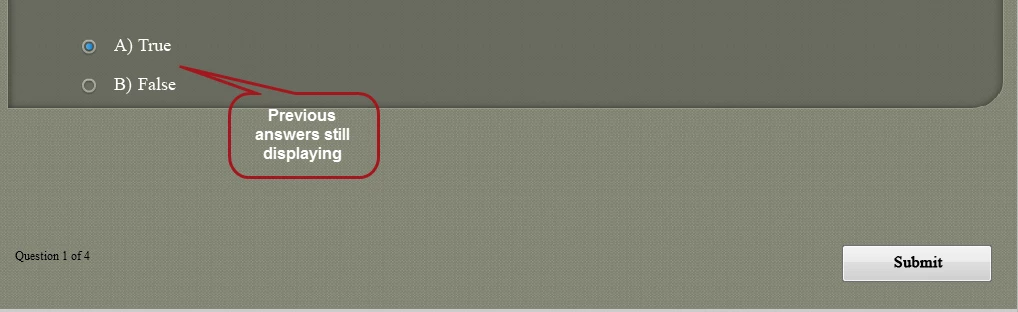
At the end of my quiz, I have added a Retake Quiz button  (if the user fails the test) and and added an action ON success - jump to slide. However,  during preview or publishing; when the quiz slide begins, I continue to see the previously selected answers and I am unable to select / submit any answers.

I am not sure where I am going wrong. Please help.

Below are the  settings:
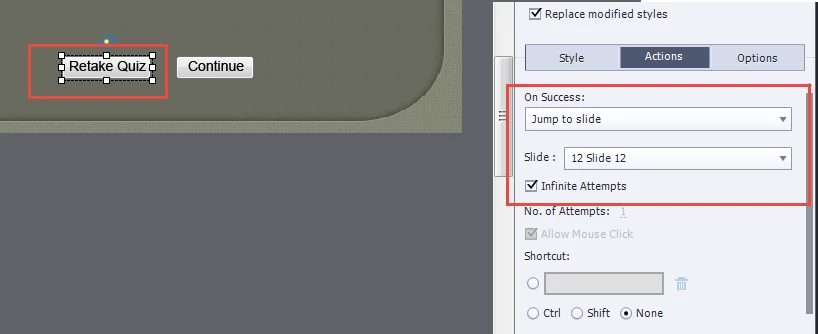
CP.png

CP1.png

CP2.png

1.1K
Translate
Report
Community guidelines
Be kind and respectful, give credit to the original source of content, and search for duplicates before posting. Learn more
community guidelines
LEGEND ,
Aug 04, 2017 Aug 04, 2017

t seems to me that you are confusing two levels in the quiz:

  1. Question level: you set the attempts to infinite. Normally this means that the learner cannot leave tle quiz unless the question has been answered correctly.
  2. Quiz level: it has no sense to retake this quiz, since all questions have to be answered correctly there will never be a failure.

Try to set the attempts on question level to 1. You can keep Continue both for Success and Last attempt. At the end of the quiz the learner will see the score slide with the Retake button since you have Infinite attempts on Quiz level. When clicking that button all questions are reset, the quizzing variables as well and learner can have another quiz attempt.

On quiz level you also have actions On Passing and On Failing Grade. Those actions will be done after clicking the Continue button when the playhead reaches the end of the score slide.

Some more details in this old post which I urgently have to upgrade for the most recent version:

Question Question Slides in Captivate - Captivate blog

It is the most visited post on my blog.

Translate
Report
Community guidelines
Be kind and respectful, give credit to the original source of content, and search for duplicates before posting. Learn more
community guidelines
Community Beginner ,
Oct 09, 2017 Oct 09, 2017

On retaking the quiz, the answers selected during the previous attempt are not cleared and Captivate is not allowing to click any answers on Retake.

Translate
Report
Community guidelines
Be kind and respectful, give credit to the original source of content, and search for duplicates before posting. Learn more
community guidelines
Community Beginner ,
Oct 09, 2017 Oct 09, 2017

Can I mail you the quiz slides so that you can help me understand the issue.

If yes, please share your email ID.

Thanks.

Translate
Report
Community guidelines
Be kind and respectful, give credit to the original source of content, and search for duplicates before posting. Learn more
community guidelines
LEGEND ,
Oct 09, 2017 Oct 09, 2017

You seem not to understand my answer. You have set each question to Infinite attempts, which means that they all have been answered correctly since they cannot go to the next question before having done that. Why should you want Retake the Quiz in that case? It has no sense, since they have already passed the quiz.

Sorry, I am just a user like you, don't accept files to debug.

Translate
Report
Community guidelines
Be kind and respectful, give credit to the original source of content, and search for duplicates before posting. Learn more
community guidelines
Community Beginner ,
Oct 10, 2017 Oct 10, 2017

Lilybri, Thank you for the response.

I am sorry, I failed to mention that I have followed the steps exactly as told by you in the ealier resolution dated Aug 4, 2017 3:45 AM. But I still continue to face the issue, on clicking Retake quiz button, it jumps to the designated slide but the previously selected answers are not cleared and the screen is not clickable.

Translate
Report
Community guidelines
Be kind and respectful, give credit to the original source of content, and search for duplicates before posting. Learn more
community guidelines
LEGEND ,
Oct 10, 2017 Oct 10, 2017

Was the quiz passed or not? Do you still have infinite attempts on each quiz slide and no Skip button?

Translate
Report
Community guidelines
Be kind and respectful, give credit to the original source of content, and search for duplicates before posting. Learn more
community guidelines
Community Beginner ,
Oct 10, 2017 Oct 10, 2017

The Retake quiz button appears if the user does not clear the quiz or does not score the specified points / marks.

I have unchecked the infinite attempts and there is not skip button on the project .

Translate
Report
Community guidelines
Be kind and respectful, give credit to the original source of content, and search for duplicates before posting. Learn more
community guidelines
LEGEND ,
Oct 10, 2017 Oct 10, 2017

Either all those changes have corrupted the project, or you have deleted embedded objects on quiz/score slides. I cannot think of any other reason at this moment. When you have multiple attempts on quiz level, but limited attempts on question level, and the user is not getting the passing grade the Retake buttons normally should take the learner to the first question slide and clear all answers. You don't have Branch aware checked, or Pretest slides in the project?

Translate
Report
Community guidelines
Be kind and respectful, give credit to the original source of content, and search for duplicates before posting. Learn more
community guidelines
Community Beginner ,
Oct 10, 2017 Oct 10, 2017

No I don't have Branch aware checked, or Pretest slides in the project.

Translate
Report
Community guidelines
Be kind and respectful, give credit to the original source of content, and search for duplicates before posting. Learn more
community guidelines
LEGEND ,
Oct 10, 2017 Oct 10, 2017
LATEST

In that case it is probably one of the two other reasons: corruption or messing up the quizzing slides by deleting embedded objects. I have never encountered your problem yet, not personally nor on these forums.

Translate
Report
Community guidelines
Be kind and respectful, give credit to the original source of content, and search for duplicates before posting. Learn more
community guidelines
Resources
Help resources