


Copy link to clipboard
Copied
Hi
Im trying to update a lab of Adobe 2018 CS installed PC's.
RUM 2.1.0.11 will return a list of needed updates but fails on most.
I updated a test target to RUM 2.2 . ( the latest I could get from the admin console) and it returns no updates needed.
Any advice?
Cheers,


 1 Correct answer

I worked with Adobe Support and we confirmed that updating the Core Components (or installing the Desktop App) would allow RUM to run correctly. The only remaining issue is that the Return Codes it gives are incorrect. Even though it shows that downloads and installs were successful, the Return Code given is for failure. This wouldn't be good if we are deploying the RUM command syntax via ConfigMgr or any other management tool.
He was reaching out to engineering to get further answers. Will u
...
 37
Replies
37
37
Replies
37


Copy link to clipboard
Copied
Hi,
Is there a code returned ?
The codes are explained in more detail here: Use Adobe Remote Update Manager
This could tell us if updates were not installed, for example because the applications were running at the time of use.
To look at more detail would require the logs.
The log file is named RemoteUpdateManager.log and is located as follows:
- In Windows, the log file is in the %temp% location.
- In Mac OS, the log file is in the folder ~/Library/Logs
Copy link to clipboard
Copied
Hi
I'll check the log and get back here this afternoon.
Thanks
Copy link to clipboard
Copied
How would you like me to attach the log(s)?
If I download the latest version (2.2) and run it I get an Return Code 1, and it doesn't even attempt to download anything.
If I run the one already on the machine (2.0) it goes through and then throws a Return Code 2, and fails to install several of the updates.
Copy link to clipboard
Copied
I have the same thing except for Adobe CC 2017. It fails on most with the default 'Unable to install update.'
A complete pain since this tool is supposed to make our lives easier but we can't depend on it.

Copy link to clipboard
Copied
I may be having a similar issue here. I've deployed CC 2018 Apps this past semester, but I just updated our RUM to the latest. My logs indicate that the updater is looking for DLL files (HDPMI, HDZIP, etc) in "C:\Program Files (x86)\Common Files\Adobe\Adobe Desktop Common\HDBox". This directory does not exist on any of our machines. The required DLL's exist in the following directory though...."C:\Program Files (x86)\Adobe\Adobe Creative Cloud\HDCore".
Am I missing something here? Do I simply have to copy these files over to a new HDBox directory for this to function properly?
Copy link to clipboard
Copied
Hi All,
There are a few responses in this thread now and we shouldn't assume they are all the same issue. For example you may not all be updating on the same platform or using the same methods (is an internal update server being used for example).
I ran a successful test on Windows and Mac for the current versions of RUM. This simply tells us that there is not a general issue with RUM.
Some things to look out for:
- Make sure RUM is run with elevated privileges
- Ensure that Adobe apps are all closed on the client machine - try a reboot.
- When updating RUM follow the advice here: Remote Update Manager update
- Issues such as 'Failed to initialize the HDPIM module' etc are often solved by installing the current version of the Creative Cloud Desktop App. RUM will not update the Desktop App and there have been mandatory updates to it which will affect the other CC applications.
Logs can be pasted in here. Alternatively you can open a support case with us and send the logs over to us.
To contact support please use one of the following options.
Creative Cloud for Enterprise - from the Admin Console go to the support tab to open a case. Phone and chat options are also available here.
Creative Cloud for Teams - from the CCT Admin Console go to the Help tab for chat and phone options.
Alternatively please go to https://helpx.adobe.com/contact.html
Copy link to clipboard
Copied
I've tried a newer version of RUM and it starts and then stops. Does it actually NEED to be installed on the machine, or the EXE just needs to be run on the machine? I've tried the latter. If it's the former, what is the silent syntax to install this on those machines?
Thanks.
Copy link to clipboard
Copied
It's the latter. If you download RUM then via terminal CD to the directory that you unzipped it to, then you can run the RemoteUpdateManager command from there. Of course with a wide distribution of the tool you want to have a consistent location and not to have older versions if possible.
Check that you are running in Admin mode. Check you have the desktop app up to date.
Copy link to clipboard
Copied
Yep, that's what I've been doing. If I run the one local on the machine it will go through and fail on some installs. If I run it using the newest version it starts up, loads the lines of asterisks, and then quits.
This is all with Admin Permissions.
Copy link to clipboard
Copied
Thanks, please check if the Desktop App is up to date (new update is just out).
Copy link to clipboard
Copied
I don't have that on machines. These are deployed installs using Device Licensing. These aren't user-based with the Desktop App available.
Copy link to clipboard
Copied
Yes, I as well do not distribute the Desktop App. We use Device Licensing, so having the desktop app invites Users to Sign In and break the license.
Thanks
Copy link to clipboard
Copied
Thanks all, it could be that the absence of the desktop app is the factor here (I understand why you don't deploy it). If you can share logs with me we can dig deeper and if needed check with our engineering team.
Copy link to clipboard
Copied
I would doubt that since some items update and some don't but anything is possible.
How would you like me to get you the logs?
Copy link to clipboard
Copied
If you can upload them to a cloud sharing solution and PM me a link that would be perfect. Thanks.
Copy link to clipboard
Copied
Copy link to clipboard
Copied
Thanks for those logs. I'll check with our engineering team and will let you know if I need additional information.
Copy link to clipboard
Copied
Thanks, our engineers have looked at the logs and reviewed this thread. The issue is caused by outdated 'core components'. When you build a package you will see 'Creative Cloud' as a mandatory item in the list. This is not the desktop app but rather the 'core components'.
The fix is to build and deploy a fresh package with the latest core components. The desktop app is not required, you don't necessarily need to include any other applications either.
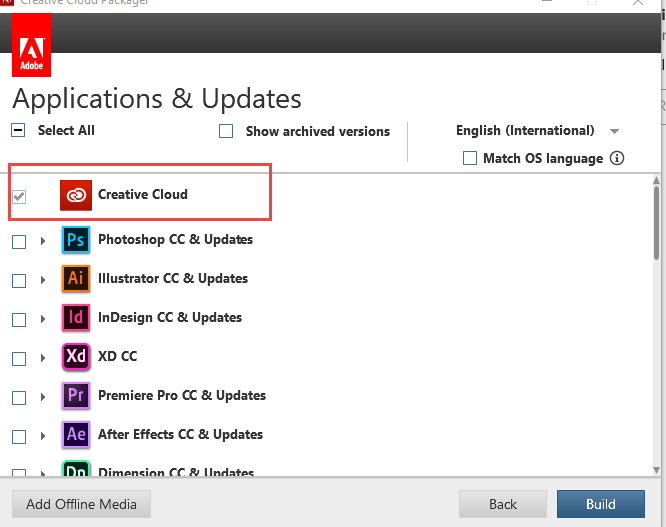
Let us know how that goes.
Copy link to clipboard
Copied
So, in order to use your convenient tool to update products automatically I need to package and deploy an update manually? It seems like the tool does not fulfill its purpose if I have to do this all the time.
Copy link to clipboard
Copied
Copy link to clipboard
Copied
Hi,
Either CCP or an admin console package will contain the updated core components. Be careful not to include the Desktop App if that is not desired.
Copy link to clipboard
Copied
That did not resolve the issue.
Please advise on next steps.
Copy link to clipboard
Copied
Hi acjuelich please provide new logs.
Copy link to clipboard
Copied
Sent to you via PM.

-
- 1
- 2

Get ready! An upgraded Adobe Community experience is coming in January.
Learn more
 AdChoices