


Known Participant
April 19, 2022
解決済み

Can someone share script that changes the color of random number of figures

  • April 19, 2022
  • 返信数 2.
  • 727 ビュー

I do have figures with propertyes:

Layer: RandomName

Number of figures: Random (sometimes 100+)
Corners: Random
Colour: Random
Stroke: Random

Endgoal:
Select all the figures, run the script and each figure to get an unique color (not slightly changed - that is not visible for the eye). Each figure to have only "fill" without "stroke" and opacity set to 50%.*
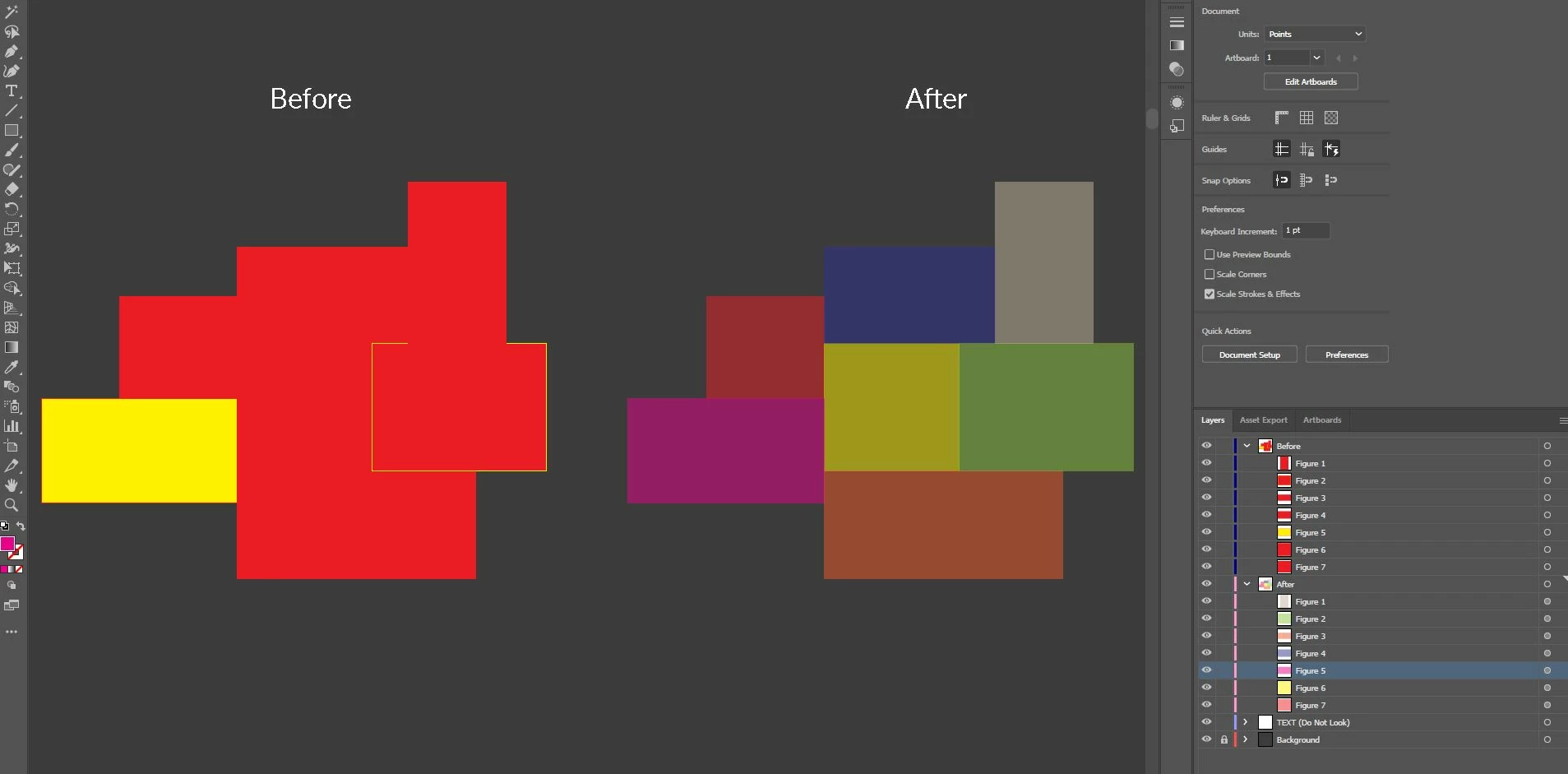
 *In the example picture they are two layers for representing purpouses only. It needs to change the settings in the current layers the figures are located.

このトピックへの返信は締め切られました。
解決に役立った回答 femkeblanco

This is my immediate simple thought.  There are 16 million RGB colors, so it's improbable that you'll get the same color twice.  But there are only 18 primary, secondary, and tertiary colors, so it's probable that you'll get colors close to each other. 


// select paths
for (var i = 0; i < app.selection.length; i++) {
    var colour1 = new RGBColor();
    colour1.red = randomise();
    colour1.green = randomise();
    colour1.blue = randomise();
    app.selection[i].stroked = false;
    app.selection[i].filled = true;
    app.selection[i].fillColor = colour1;
    app.selection[i].opacity = 50;
}
function randomise() {
    return Math.floor(Math.random() * 256);
}


返信数 2

femkeblanco
femkeblanco解決!
Legend
April 20, 2022

This is my immediate simple thought.  There are 16 million RGB colors, so it's improbable that you'll get the same color twice.  But there are only 18 primary, secondary, and tertiary colors, so it's probable that you'll get colors close to each other. 


// select paths
for (var i = 0; i < app.selection.length; i++) {
    var colour1 = new RGBColor();
    colour1.red = randomise();
    colour1.green = randomise();
    colour1.blue = randomise();
    app.selection[i].stroked = false;
    app.selection[i].filled = true;
    app.selection[i].fillColor = colour1;
    app.selection[i].opacity = 50;
}
function randomise() {
    return Math.floor(Math.random() * 256);
}


D.S..作成者
Known Participant
April 20, 2022

It does the job perfecrly! Thank you again. 🙂

m1b
Community Expert
Community Expert
April 20, 2022

Hi @D.S.., this is how I would approach this challenge. I'd collect the swatches in the document, shuffle them, and apply them to each item. So this way, you would set up your acceptable colors as swatches first. Maybe this doesn't suit your case? Anyway have a look at this script.

There are 2 example usages of the function to show you the possibilities.

- Mark


/*
    Apply Random Swatches to Items
    by m1b
    here: https://community.adobe.com/t5/illustrator-discussions/can-someone-share-script-that-changes-the-color-of-random-number-of-figures/m-p/12888650
*/

var doc = app.activeDocument;

// example usage 1: all page items, all swatches
applyRandomSwatchesToItems(doc.pageItems, getDocumentColors(doc));

// example usage 2: selected items only, swatches in 'Brights' swatch group only
// applyRandomSwatchesToItems(doc.selection, doc.swatchGroups.getByName('Brights').getAllSwatches());


function applyRandomSwatchesToItems(items, colors) {
    // make colors array at least as long as items array
    while (items.length > colors.length)
        colors.concat(colors.slice());

    // randomise order of colors
    colors = shuffleArray(colors);

    // set item colors
    for (var i = 0; i < items.length; i++)
        setItemColor(items[i], colors[i], 'fill');
}

function getDocumentColors(doc, includeGradients, includePatterns) {
    var swatches = doc.swatches;
    // make array of colors
    var colors = [];
    for (var i = 0; i < swatches.length; i++) {
        var sw = swatches[i];

        // skip unwanted swatches
        if (
            sw.color.typename == 'NoColor'
            || (
                sw.color.typename == 'SpotColor'
                && sw.color.spot.colorType == ColorModel.REGISTRATION
            )
            || (sw.color.typename == 'GradientColor' && includeGradients != true)
            || (sw.color.typename == 'PatternColor' && includePatterns != true)
        )
            continue;

        // add swatch color to array
        colors.push(sw.color);
    }
    return colors;
}

function shuffleArray(arr) {
    var i = arr.length,
        j = 0,
        temp;
    while (i--) {
        j = Math.floor(Math.random() * (i + 1));
        temp = arr[i];
        arr[i] = arr[j];
        arr[j] = temp;
    }
    return arr.slice();
};

function setItemColor(item, swatch, fillOrStroke) {
    if (item == undefined) throw 'setItemColor: No item supplied.';
    var _color,
        fillOrStroke = fillOrStroke || 'fill',
        fillOrStrokeColor = fillOrStroke == 'stroke' ? 'strokeColor' : 'fillColor',
        filledOrStroked = fillOrStroke == 'stroke' ? 'stroked' : 'filled';

    if (swatch.typename == 'Swatch')
        _color = swatch.color;
    else
        _color = swatch;

    try {

        switch (item.typename) {
            case "PathItem":
                item[filledOrStroked] = true;
                item[fillOrStrokeColor] = _color;
                break;
            case "CompoundPathItem":
                if (item.pathItems)
                    item.pathItems[0][filledOrStroked] = true;
                item.pathItems[0][fillOrStrokeColor] = _color;
                break;
            case "TextFrame":
                var trs = item.textRanges;
                for (var i = 0; i < trs.length; i++)
                    trs[i][fillOrStrokeColor] = _color;
                break;
            default:
                // a different type of item
                break;
        }
 
    } catch (error) { }
}