


Exit
  • Global community
    • Language:
      • Deutsch
      • English
      • Español
      • Français
      • Português
  • 日本語コミュニティ
  • 한국 커뮤니티
0

Corrupted text - outlined text - pdf

New Here ,
Jun 07, 2019 Jun 07, 2019

After creating outlines for the text in file and saving it as pdf, some of text characters becomes bold [ish]...

It happend to me once beffore, then it was just for few charracters and i solved it by manually replacing those.

But now i have quite a lot of them, what could be the issue, and how to resolve it?

Thanks!
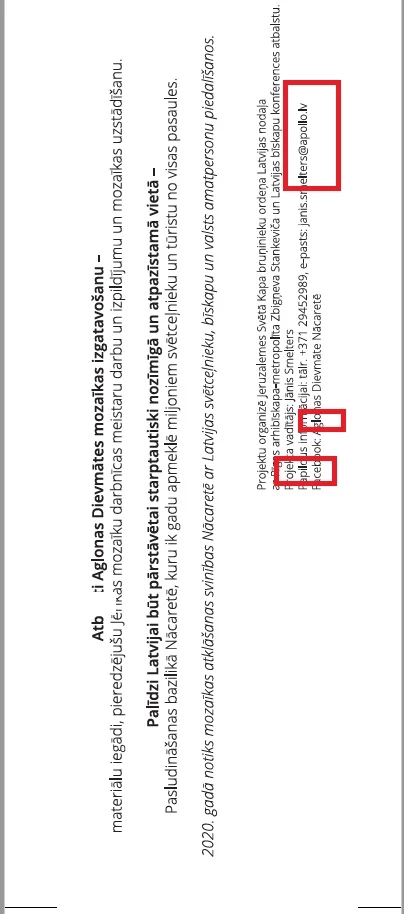
Untitled.jpg

409
Translate
Report
Community guidelines
Be kind and respectful, give credit to the original source of content, and search for duplicates before posting. Learn more
community guidelines
Adobe
Community Expert ,
Jun 07, 2019 Jun 07, 2019

nbdesign,

It may sound too silly, but what if you have CPU on instead of GPU (Ctrl/Cmd+E toggles between them) when you Save (a Copy) as PDF?

Translate
Report
Community guidelines
Be kind and respectful, give credit to the original source of content, and search for duplicates before posting. Learn more
community guidelines
Enthusiast ,
Jun 07, 2019 Jun 07, 2019

And why outline TXT anyway?

Translate
Report
Community guidelines
Be kind and respectful, give credit to the original source of content, and search for duplicates before posting. Learn more
community guidelines
Community Expert ,
Jun 07, 2019 Jun 07, 2019

You're viewing this in Acrobat?

Acrobat has some "enhancement" features that interfere with your outlined text.

And what CMHprepress said.

Translate
Report
Community guidelines
Be kind and respectful, give credit to the original source of content, and search for duplicates before posting. Learn more
community guidelines
LEGEND ,
Jun 07, 2019 Jun 07, 2019
LATEST

This is normal because Acrobat no longer knows that this was supposed to be text. So, outline text if you need to for some unusual print process. But don't outline it if you're planning to view it on screen, because this WILL happen.

Translate
Report
Community guidelines
Be kind and respectful, give credit to the original source of content, and search for duplicates before posting. Learn more
community guidelines
New Here ,
Jun 07, 2019 Jun 07, 2019

Solved!

The error accoured not only ON acrobat, even when open pdf with Chrome was the same.

Found A video where it was explained that this happens with object (outlined text) where is only four points (small L, big i, - and so ON) it didnt explain why but when i added 5th point it was Solved.

Translate
Report
Community guidelines
Be kind and respectful, give credit to the original source of content, and search for duplicates before posting. Learn more
community guidelines