Copy link to clipboard
Copied
Hi
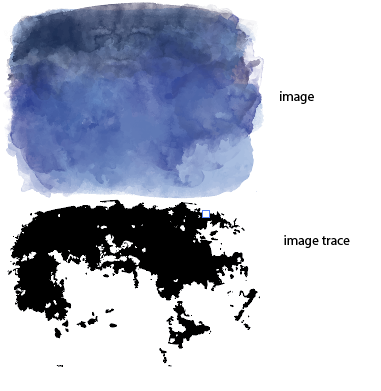
I'd like to an create image that looks like watercolour but the image is made up of small vector shapes.
Is there a function in illustrator that does this - or is it done by the artist?
I can't upload an Ai file to this forum, so I've put a sample Ai file of what I'm talking about in Dropbox.
https://www.dropbox.com/s/1z4kvgh27mqvwy0/watercolor.ai?dl=0
Thanks
Debra


 1 Correct answer


You will want to open the Image Trace Panel and change the settings to get the result you want


Explore related tutorials & articles
 9
Replies
9
9
Replies
9


Copy link to clipboard
Copied
In the Brushes panel you can find some watercolor brushes in the Artistic library.
Copy link to clipboard
Copied
Copy link to clipboard
Copied
Oop's.. not an experienced user
Copy link to clipboard
Copied
That is correct, you need to create multiple lines with multiple brushes to simulate watercolor.
Maybe Photoshop is the better tool for you. Watercolor brushes in Illustrator create heavy files.
Copy link to clipboard
Copied
Ton - thanks .. I will try photoshop and see how I go
Copy link to clipboard
Copied
That file looks like it was created using Image Trace settings on a photo or scan.
Copy link to clipboard
Copied
Copy link to clipboard
Copied
You will want to open the Image Trace Panel and change the settings to get the result you want
Copy link to clipboard
Copied
SJRiegel - that's great!
Thank you.
Debra


Find more inspiration, events, and resources on the new Adobe Community
Explore Now
 AdChoices