hmm.
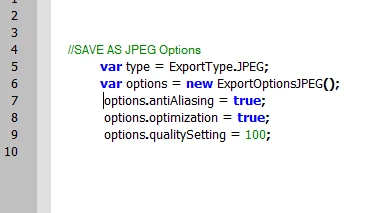
When i run it i get a jpeg.
if you change the extension in line 2 to .png then you certainly get a png.
However I just tryed to open the jpg i made in photoshop and got an error that " an unknown or invalid jpeg marker was found".
Does anybody know what could be causing this?
Hi Dane,
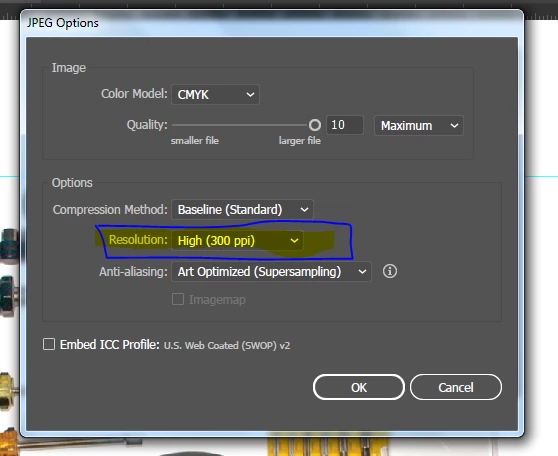
I am using below action code and received the correct output.
////////////////////////////
var dest = Folder.selectDialog("Pick a folder and save the JPEG there.");
if(myFolder == null){exit(0);}
function test(){
String.prototype.hexEncode = function(){
//http://stackoverflow.com/questions/21647928/javascript-unicode-string-to-hex
var hex = '';
for(var i=0;i<this.length;i++) {
hex += ''+this.charCodeAt(i).toString(16);
}
return hex;
};
function writeFile(fileDestStr, contents){
var newFile = File(fileDestStr);
newFile.open('w');
newFile.write(contents);
newFile.close();
};
var actionStr = [
"/version 3",
"/name [ 4",
"54657374",
"]",
"/isOpen 1",
"/actionCount 1",
"/action-1 {",
"/name [ 12",
"53617665204d79204a504547",
"]",
"/keyIndex 0",
"/colorIndex 0",
"/isOpen 1",
"/eventCount 1",
"/event-1 {",
"/useRulersIn1stQuadrant 0",
"/internalName (adobe_exportDocument)",
"/localizedName [ 9",
"4578706f7274204173",
"]",
"/isOpen 1",
"/isOn 1",
"/hasDialog 1",
"/showDialog 0",
"/parameterCount 7",
"/parameter-1 {",
"/key 1885434477",
"/showInPalette 0",
"/type (raw)",
"/value < 104",
"0a00000001000000030000000200000000002c0101000000000000000100000069006d006100670065006d00610070000000310000000000000000000000000000000000000000000000000000000000000000000000000000000000000000000000000000000000",
">",
"/size 104",
"}",
"/parameter-2 {",
"/key 1851878757",
"/showInPalette -1",
"/type (ustring)",
"/value [ PUT_FOLDERPATH_CHAR_LENGTH_HERE",
"PUT_HEX_FOLDERPATH_HERE",
"]",
"}",
"/parameter-3 {",
"/key 1718775156",
"/showInPalette -1",
"/type (ustring)",
"/value [ 16",
"4a5045472066696c6520666f726d6174",
"]",
"}",
"/parameter-4 {",
"/key 1702392942",
"/showInPalette -1",
"/type (ustring)",
"/value [ 12",
"6a70672c6a70652c6a706567",
"]",
"}",
"/parameter-5 {",
"/key 1936548194",
"/showInPalette -1",
"/type (boolean)",
"/value 0",
"}",
"/parameter-6 {",
"/key 1935764588",
"/showInPalette -1",
"/type (boolean)",
"/value 1",
"}",
"/parameter-7 {",
"/key 1936875886",
"/showInPalette -1",
"/type (ustring)",
"/value [ 1",
"31",
"]",
"}",
"}",
"}"
].join("\n");
if(app.documents.length == 0){
return;
}
var destStr = decodeURI(dest.fsName);
var actionFileDestStr = Folder.desktop + "/MyAction.aia";
writeFile(actionFileDestStr, actionStr.replace("PUT_FOLDERPATH_CHAR_LENGTH_HERE", destStr.length).replace("PUT_HEX_FOLDERPATH_HERE", destStr.hexEncode()));
var actionFile = File(actionFileDestStr);
app.loadAction(actionFile);
app.doScript("Save My JPEG", "Test");
//clean up
actionFile.remove();
app.unloadAction("Test", '');
};
test();
////////////////////////////



 AdChoices