
ad_ind38716857
Known Participant
December 18, 2020
解決済み

Got an error using palette in Illustrator script

  • December 18, 2020
  • 返信数 3.
  • 1477 ビュー

Hi All,


I got an error while running the palette dialog in Illustrator.

The below is my code.

var windowResource = "palette {  \
orientation: 'column', \
alignChildren: ['fill', 'top'],  \
preferredSize:[300, 130], \
text: 'Test',  \
margins:15, \
\
sliderPanel: Panel { \
  orientation: 'row', \
  alignChildren: 'right', \
  margins:15, \
  text: ' Test ', \
}, \
\
customPanel: Panel { \
  orientation: 'row', \
  alignChildren: 'right', \
  margins:15, \
 applyButton: Button { text: 'OK', properties:{name:'ok'}, size: [50,24], alignment:['left', 'center'] }, \
} \
}";

var win = new Window(windowResource);


win.customPanel.applyButton.onClick = function() {
    var cusTextCont = app.documents.length;
    if(cusTextCont > 0) {
           alert(app.documents[0].name);
    }
    else {
        alert("no documents");
        return;
    }
};

win.center();
win.show();

I just prompt the active document name in alert dialog.


I got the below error.
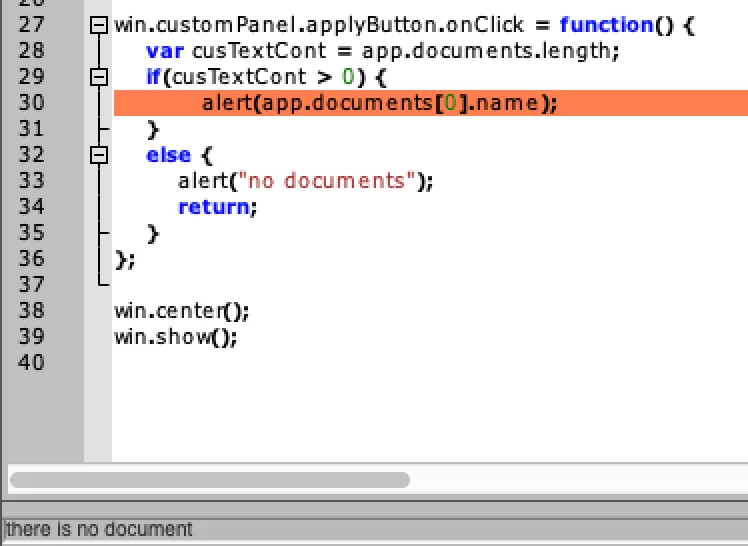
 

Anyone help me, how to resolve this.


Thanks.

解決に役立った回答 CarlosCanto

I didn't get any errors running your code, but it didn't run. 


Palette UI windows do not communicate with Illustrator, unless we use BridgeTalk.

Here's a basic sample, but read this thread for a lot more information about BridgeTalk

https://community.adobe.com/t5/illustrator/calling-functions-from-ui-palette/m-p/4578355?page=1#M14582


//#target Illustrator
#targetengine main

var win = new Window('palette', 'Select Top Object');
var btnSelect = win.add('button', undefined, 'Select');

btnSelect.onClick = function(){
    var bt = new BridgeTalk;
    bt.target = "illustrator";		
        var script = "\n" +
        "app.activeDocument.pageItems[0].selected = true;\n" +
        "app.refresh();\n" 

    bt.body = script;
    bt.send();	
}

win.center();
win.show();

返信数 3

CarlosCanto
Community Expert
Community Expert
December 18, 2020

the palette should remain on screen and you should be able to click elements in the Illustrator Ui. I'm not sure why you're not seeing it. I'm on windows 10, and the sample I posted works as it should.

CarlosCanto
Community Expert
CarlosCantoCommunity Expert解決!
Community Expert
December 18, 2020

I didn't get any errors running your code, but it didn't run. 


Palette UI windows do not communicate with Illustrator, unless we use BridgeTalk.

Here's a basic sample, but read this thread for a lot more information about BridgeTalk

https://community.adobe.com/t5/illustrator/calling-functions-from-ui-palette/m-p/4578355?page=1#M14582


//#target Illustrator
#targetengine main

var win = new Window('palette', 'Select Top Object');
var btnSelect = win.add('button', undefined, 'Select');

btnSelect.onClick = function(){
    var bt = new BridgeTalk;
    bt.target = "illustrator";		
        var script = "\n" +
        "app.activeDocument.pageItems[0].selected = true;\n" +
        "app.refresh();\n" 

    bt.body = script;
    bt.send();	
}

win.center();
win.show();
Silly-V
Legend
December 18, 2020

Yes! Also, I'll add that "targetengine main" is important, otherwise the palette will immediately disappear when it is shown.

Silly-V
Legend
December 18, 2020

The palettes in Illustrator unfortunately act as an 'external' application and to communicate to its host application (Illustrator) one must use the BridgeTalk object. The script you wish to execute in Illustrator must be sent as a string, and it gets complicated when such a string contains various characters that can make it difficult to run without custom functions to help the process. For instance, newlines will break this string so I use encodeURI to send it and one of the first statements is to decode it.
Here is my example of my first palette script which contains a lot of functions to send customized scripts to Illustrator and retrieve some data. This palette isn't using a JSON object because it's very simple and is able to use the .toSource() function to quickly render a key-value object as a string.
https://github.com/Silly-V/Experiments/blob/master/SpecWriter.jsx


Unfortunately some of the really old and not-so-old threads on this obscure and frustrating topic are still lost as evidenced by going to this thread and attempting to reach the thread specified in @CarlosCanto 's answer: https://community.adobe.com/t5/illustrator/palette-don-t-work-on-illustrator/m-p/10166919?page=1