


Inspiring
June 27, 2024
質問

Have line jitters in "accurate"-mode in pencil tool gotten worse with new Update?
  • June 27, 2024
  • 返信数 1.
  • 2044 ビュー

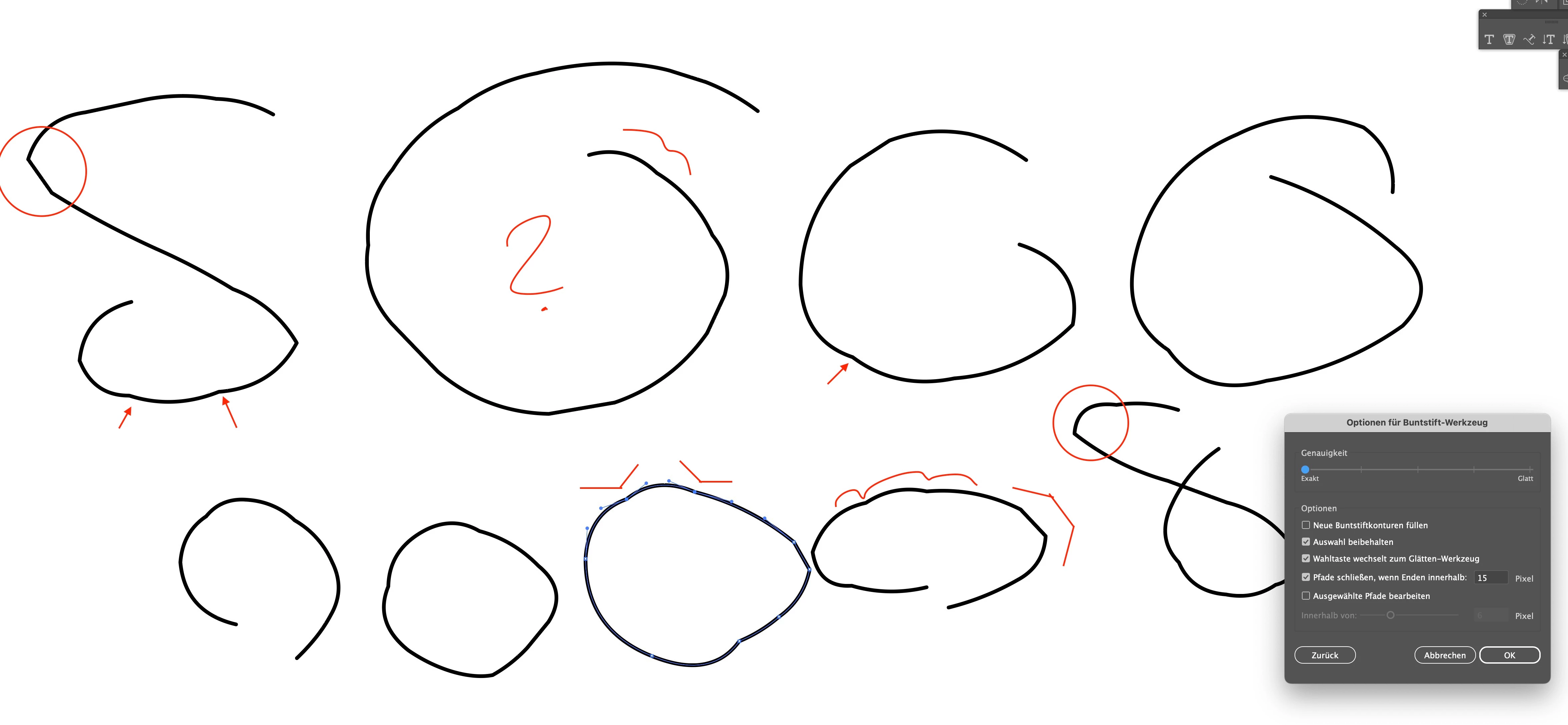
I'm using the pencil tool quite a lot in "Accurate"-mode, but it seems like this mode somehow got worse wi9th the last Updates? Did they change anything with the pencil tool?


Does anyone suffer the same results while drawing with some speed?

There are these wired bumps in a lot of sections, which are absolutely NOT accurate.


I know I can smooth the lines, but that smoothes everything. For some drawings I really like the accurate mode - but not this way ...


このトピックへの返信は締め切られました。

返信数 1

Srishti Bali
Community Manager
Community Manager
June 27, 2024

Hi @Someone75


Thank you for sharing your experience. I'm sorry to hear that you're having issues with the Pencil tool in "Accurate" mode after the recent updates. It must be frustrating to encounter those unexpected bumps, especially when you're aiming for precision in your drawings.


Would you mind sharing which version of Illustrator you are using? Also, a small video demonstrating your workflow. We're here to help, just need more info. 


Regards,

Srishti

Someone75作成者
Inspiring
July 5, 2024

@Srishti Bali  So thanks for no follow up ...

Someone75作成者
Inspiring
August 9, 2024

That is how fast I draw with a mouse. Ich bin auf der Arbeit und nicht auf der Flucht.


But I see that it gets more jittery when I set the mouse speed higher in the system. I have not set it up that way, because I do not like that kind of nervous mouse movement (and that is not about Illustrator but about moving around in my system).


@Monika Gause   The issue is realted to drawing actions performed with a pen. It does not deal with "escape", it deals with the "momentum" of real drawing! A mouse is no drawing tool by definition ... It's good for design, but not for drawing.


So this bug does not deal with nervousness either ...